



What Is the Consolidated Payment Feature?
Often, B2B clients have many open invoices and Sales Orders. Part of the reason they're slow to pay, is that they let them accumulate. The Make a Consolidated Payment feature in Clarity Payment Hub lets your customers view their open invoices, select multiple invoices they want to pay, and process all of them in a single payment transaction. Instead of initiating five separate payments for five invoices, a customer can check a few boxes, review the total, and pay everything at once. The portal then routes that single transaction back to your ERP where it is intelligently parsed and posted against each invoice individually, maintaining perfect data accuracy and eliminating confusion about which payment applies to which invoice.
Why not make it easy for your customers to pay when they either want or can? This feature addresses a fundamental inefficiency in B2B payments: the mismatch between how customers want to pay and how traditional systems force them to pay. A customer managing cash flow knows they have five invoices due this week and wants to consolidate that payment into one transaction for simplicity, cost savings, and cleaner bank records. Yet most payment systems require them to process each invoice individually, generating multiple transactions, multiple fees, and multiple confirmations. Consolidated payments bridge that gap.
So how do all the invoices get paid, if there's only a single "bulk" payment? Built on Clarity's enterprise-grade eCommerce platform and tightly integrated with Clarity Connect, the consolidated payment feature scales to handle any number of invoices. Some customers routinely consolidate 20, 50, or even 100+ invoices in a single transaction without any performance degradation. The feature works smoothly across your entire customer base, regardless of their industry, invoice volume, or ERP system.
The Problem: Why Single-Invoice Payments Cost Too Much and Frustrate Customers
Traditional payment systems were designed with a one-payment-per-invoice mentality. Customers log in, find invoice #12345, pay it, log out. If they need to pay ten invoices, they repeat that process ten times. The result is operational friction for both sides: multiple transactions, multiple authorization fees, multiple receipts, and multiple reconciliation headaches. For companies processing thousands of invoices monthly, this inefficiency adds up to measurable costs and lost productivity.
Consider a manufacturing company that receives weekly shipments and invoices. By mid-week, they might have four open invoices ranging from $5,000 to $25,000. From a cash flow perspective, they want to pay all of them on Friday with one check or wire. But today's fragmented payment systems force them into a choice: either call the vendor's AR team and have someone process multiple credit card payments over the phone, or initiate separate digital transactions for each invoice. Both paths are inefficient, expensive, and error-prone.
If your payment gateway charges per-transaction fees, paying ten invoices individually means ten authorization fees instead of one. For a customer processing hundreds of invoices annually, those redundant fees can cost thousands of dollars, money that could be reinvested in the relationship or their own operations.
Making five separate payments is five times as much work as making one consolidated payment. Customers must navigate the portal repeatedly, enter payment details multiple times, and reconcile multiple confirmations. For high-volume payers, this becomes a significant administrative burden that erodes customer satisfaction.
When customers must manually select each invoice they want to pay, it is easy to accidentally skip one. An invoice gets overlooked, posted as unpaid in the ERP, and triggers a collection reminder days later, creating friction and damaging relationships that should be frictionless.
Multiple payments from the same customer on the same day create matching and reconciliation headaches for both parties. The customer's bank statement shows five separate debits, and the vendor's AR team must manually match each one to the corresponding invoice payment in the ERP.
Many ERP-native payment add-ons do not allow consolidation at all. Customers are locked into a "one invoice, one payment" workflow, removing their ability to optimize their own cash flow and payment processes. This inflexibility often pushes customers toward alternative payment methods like checks or wires, which are slower and more manual than online payments.
How Clarity Payment Hub Solves the Consolidated Payment Problem
Clarity Payment Hub's consolidated payment feature gives customers the flexibility they need while maintaining the accuracy and automation your AR and accounting teams require. Here is how it works: customers log in to the portal, see their list of open invoices, check the boxes for the invoices they want to pay, and review the consolidated total. They then select a payment method and submit a single transaction. That transaction passes through Clarity Connect, which intelligently distributes the payment across the selected invoices in your ERP, posting each portion against the correct invoice with perfect accuracy.
The beauty of this design is that it serves both constituencies simultaneously. From the customer's perspective, they made one payment, authorized once, and received one confirmation. From your accounting perspective, each invoice was paid correctly and recorded accurately in your ledger. No manual intervention, no reconciliation guesswork, no disputes about which payment applies where.
Customers can check the boxes for as many invoices as they want. There is no limit. Some customers consolidate 50+ invoices regularly. The portal calculates the total in real time as they select.
A consolidated payment requires only one transaction authorization and incurs only one per-transaction fee, compared to multiple fees if each invoice were paid separately. Savings compound across hundreds or thousands of consolidated payments annually.
Through Clarity Connect, each invoice in the consolidated payment is recorded separately in your ERP with its own payment posting. The system handles the distribution automatically. Your AR records stay clean, disputes are eliminated, and reconciliation becomes trivial.
Customers receive a single complete receipt showing all invoices paid, the total amount, the transaction ID, and the payment date. For their records and for audit purposes, one receipt is cleaner than five.
Customers can consolidate some invoices and leave others for later. They can make multiple consolidated payments over time without any issues. The flexibility is entirely theirs.
Gateway-agnostic and highly configurable. Clarity Payment Hub consolidation works with virtually any payment gateway or processor. You are not locked into a vendor that offers consolidation as a premium feature or charges extra for it. Clarity's flexible architecture means consolidated payments are built in, standard, and work the same way regardless of which processor you choose. Want to switch gateways later? The consolidation feature moves with you.
The Missing LinkBetween Paymentsand Your ERP
Clarity Payment Hub closes that gap, connecting your orders, invoices, and payment channels into one flow.
Speak to a Platform ArchitectSee It in Action: Consolidated Payment Demo
Watch the Demo
Portal Screenshot
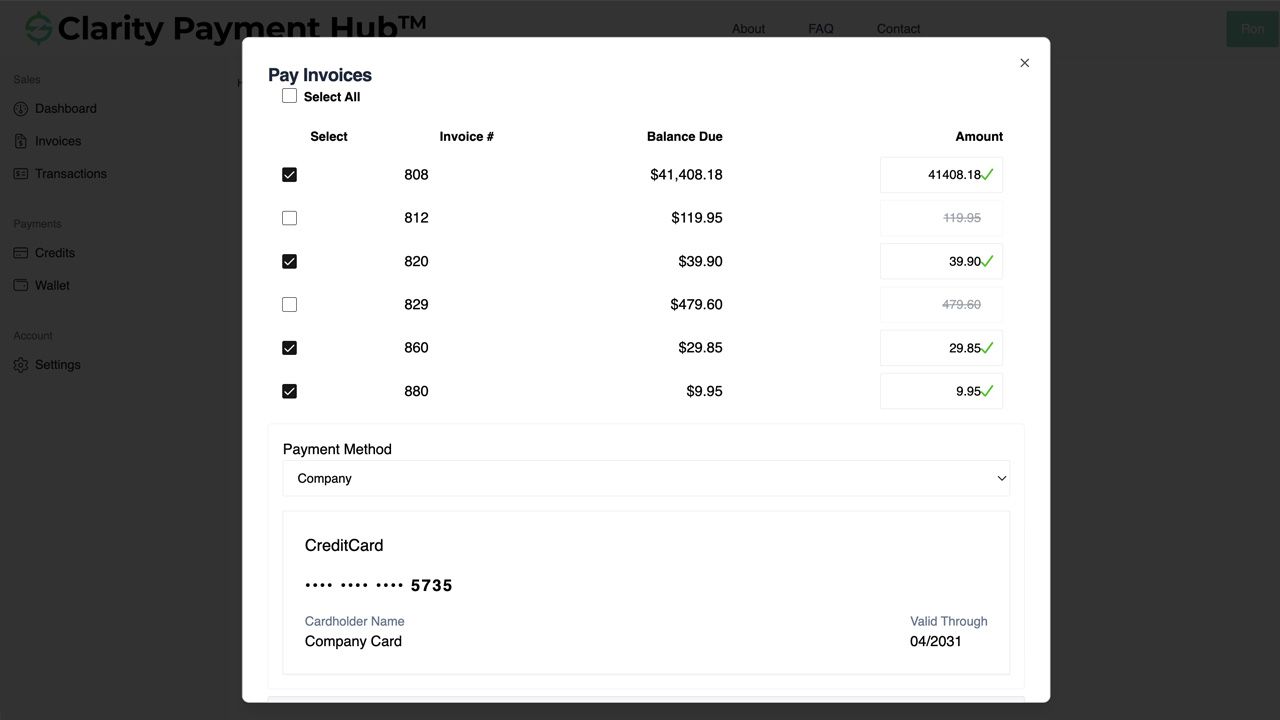
Step-by-Step Walkthrough
Navigate to your company's Clarity Payment Portal and sign in with your customer credentials. You will land on the dashboard showing your account summary and quick-access links.
Click the Invoices tab or sidebar link. The portal displays all open invoices in a sortable, searchable table with invoice number, date, total amount, and balance due for each.
Check the checkboxes next to each invoice you want to consolidate. As you select, the portal displays a running total of the consolidated amount at the top or bottom of the list. You can select as many as you want.
Before proceeding, review the invoices you have selected and the total amount you are about to pay. The portal shows a clear summary so you can confirm everything is correct. You can uncheck any invoices you change your mind about.
Choose a credit card or ACH method from your saved payment methods, or enter a new one. You can opt to save the new method for future use. Your payment data is stored in a PCI DSS-compliant, encrypted wallet.
Click the Pay button. The portal processes the entire consolidated transaction in one authorization. You receive an on-screen confirmation and an email receipt listing all paid invoices. The payment automatically posts to your vendor's ERP against each invoice.
Benefits and Business Impact
Consolidated payment functionality creates value across your entire organization. It is not just a convenience feature, it is a strategic tool that lowers costs, improves customer satisfaction, and simplifies accounting operations. Here is what you gain:
By reducing the number of payment transactions, you reduce per-transaction fees. A customer consolidating five invoices into one payment saves four transaction fees, multiplied across your customer base, that compounds to thousands of dollars in annual savings.
When customers find your payment system easy and efficient, they use it more often. Consolidation removes friction, making it attractive for customers to pay multiple invoices at once rather than selectively or by check. The result is faster collections and higher online payment adoption.
Your customers appreciate consolidated payments because they clean up their bank statements and internal records. One debit instead of five means simpler reconciliation on their end, which builds goodwill and reduces their questions and complaints to your team.
Clarity Connect automatically distributes the consolidated payment to the correct invoices in your ERP. There are no manual allocation steps, no guesswork, and no disputes about which payment applied to which invoice. Accounting accuracy is built in.
Customers using ERP-native payment systems that do not support consolidation often feel frustrated and constrained. Offering them the flexibility to consolidate signals that you understand their business needs and respect their operational preferences. This intangible benefit strengthens relationships.
Fewer payment transactions means fewer line items to post, fewer confirmation codes to file, and fewer reconciliation exceptions to investigate. Your AR team spends less time on payment administration and more on strategic collections and credit analysis.
Consolidated payments represent a fundamental shift in how B2B payment systems should work. Rather than forcing customers into a rigid one-invoice-per-transaction model, Clarity Payment Hub adapts to how they actually want to manage cash flow and payments. That flexibility is not just a nice-to-have, it is a competitive advantage that attracts and retains high-value customers while reducing your operational costs simultaneously.
Frequently Asked Questions
How do I pay multiple invoices in a single transaction?
Log in to the Clarity Payment Portal, navigate to Invoices, and check the boxes next to each invoice you want to pay. The portal calculates the consolidated total automatically. Choose a payment method and click Pay. All invoices are paid in one authorization, and you receive one consolidated receipt. Each invoice is recorded separately in your vendor's ERP.
Will I receive a separate receipt for each invoice?
No. When you make a consolidated payment, you receive one payment confirmation and one receipt covering all selected invoices. The receipt lists each invoice and the amount paid against it, so you have a complete record. However, in your vendor's ERP, each invoice is recorded with its own payment posting for accounting accuracy.
Are there limits on how many invoices I can consolidate?
There is no practical limit. Clarity Payment Hub supports consolidating as many invoices as you want in a single payment. Some customers routinely consolidate 10, 20, 50, or even 100+ invoices at once without any performance issues or additional fees.
Does consolidation reduce my payment fees?
Yes, typically. If your payment gateway charges per-transaction fees, consolidation significantly reduces fees. Instead of paying authorization fees for each invoice separately, you pay just one fee for the consolidated transaction. Most customers report 5-10% cost savings by consolidating strategically.
How are consolidated payments recorded in the ERP?
Through Clarity Connect, each invoice in a consolidated payment is recorded separately with its own payment posting. Even though you authorized one transaction, the ledger reflects multiple payments against multiple invoices. This maintains perfect accounting accuracy and simplifies reconciliation for both parties.
Can I pay some invoices now and others later?
Absolutely. Simply check only the invoices you want to pay now. Leave others unchecked, and they remain available in your invoice list for payment whenever you choose. You can make multiple consolidated payments over time without any issues or restrictions.
What if I need to modify my selection after submitting the payment?
You can modify your selection at any point before clicking Pay. If you have already submitted a consolidated payment and need to adjust it, you would need to contact your vendor's AR team. However, the portal allows you to review your selections thoroughly before submission to prevent mistakes.
Related Features
Faster AR. Fewer headaches.
See Clarity Payment Hub running inside your ERP, or spin up a free trial environment and click around on your own. Either way, you’ll see exactly how it handles your invoice mix, your gateway, and your Level II/III savings &mdash. Before you commit to anything.
Supported
Go-Live
Savings