



What Is the Partial Payment Feature?
COVID changed a lot for many businesses. For us, this was one of the side affects that became necessary when businesses couldn't afford to pay their invoices during the COVID slow down. The Make a Partial Payment feature in Clarity Payment Hub allows your customers to pay any amount up to the full invoice balance instead of being locked into a "pay the full amount or do not pay at all" requirement. When a customer selects an invoice, instead of seeing only a button labeled "Pay Full Amount," they see a text field where they can enter any amount. The portal immediately calculates the remaining balance and shows them exactly what will remain open after their payment posts.
Why it helps. This simple but powerful capability addresses a core challenge in B2B relationships: the mismatch between when invoices are due and when customers have cash available. In the real world, a customer often receives multiple invoices on different schedules and may have legitimate reasons to pay in installments. They might be waiting for project milestone payments from their own customers, managing cash flow across multiple operations, or simply prioritizing which invoices to pay first. The old system forced them into an impossible choice: either call the vendor and make an awkward payment arrangement, or wait until they could pay the full amount.
Updated payment statuses, partial payments auto-updated in ERPs and more are just part of this feature. Partial payments, powered by Clarity Connect's automated ERP integration, let customers resolve this in seconds. They enter the amount they can pay right now, the portal processes the transaction, and Clarity Connect updates the ERP to reflect the partial payment and the new remaining balance. No phone calls, no special arrangements, no awkward negotiations, just transparent, self-service flexibility.
The Problem: Why Rigid Payment Systems Damage Customer Relationships
Most traditional payment systems operate on a binary model: you must pay the full invoice amount, or you cannot use the self-service payment channel. If a customer can only pay part of an invoice, they are forced to call the AR department, explain their situation, and rely on a human to process a partial payment manually, if the vendor even allows it. The result is friction, delays, and strain on relationships that should be routine and efficient.
This rigidity fails because it does not reflect how real businesses operate. Cash flow is not synchronized. A customer might be sitting on the funds to pay 70% of an invoice today and the remaining 30% next week. They want to send what they can immediately rather than sitting on cash unnecessarily. Yet without a partial payment option, they have no good path forward. They either hold their payment until they have the full amount, keeping the vendor's DSO improved, or they call in, creating administrative burden for both sides.
Without a partial payment option, customers who want to send payment incrementally have no clean way to do so through self-service channels. They become dependent on manual AR processes or delay payment entirely, both of which hurt your DSO and the customer relationship.
When customers need partial payment options, the default is a phone call to your AR team. This is inefficient for both sides and puts your team in the position of having to manually process a transaction that should be automated.
When partial payments are handled manually or through non-integrated systems, confusion often arises about what remains due. Does the customer owe the original amount minus their payment? Or is there a dispute over what was paid? Without transparent tracking, these ambiguities breed customer frustration.
Every manual partial payment entry in the ERP is a chance for error. The AR clerk might mistype the amount, misallocate the payment, or forget to update the remaining balance. These errors trigger phone calls, corrections, and frustration that could have been prevented with automation.
When customers cannot pay partially through self-service, they often delay payment indefinitely rather than go through the hassle of calling. By removing the barrier, you increase the likelihood that they will send something today instead of waiting for perfect cash alignment to send it all.
How Clarity Payment Hub Enables Partial Payments with Perfect Accuracy
Clarity Payment Hub solves the partial payment problem by putting flexibility directly in the hands of your customers while ensuring perfect accuracy on the accounting side. When a customer selects an invoice to pay, they are not locked into a "pay full amount" button. Instead, they see a text field where they can enter any amount from $0.01 to the full balance due. The portal instantly calculates the remaining balance, shows it to them for confirmation, and allows them to proceed with their chosen amount.
When the payment is submitted, Clarity Connect automatically posts it to your ERP as a partial payment against that invoice. The system calculates the new remaining balance and updates the invoice record. If the customer makes another partial payment against the same invoice days or weeks later, that transaction is recorded separately, the remaining balance is recalculated, and the ledger stays accurate. From your AR perspective, you see the original invoice, each partial payment, and the real-time remaining balance, all without lifting a finger.
Customers enter the amount they want to pay. No arbitrary minimums, no rigid full-amount-only requirements. They have complete control over their payment amount, supporting their cash flow management.
After a partial payment, the ERP automatically calculates and tracks the remaining balance. Customers see what they owe, your team sees what they owe, no manual reconciliation, no disputes.
Customers can make as many partial payments as they want against the same invoice. Each transaction is recorded separately, the remaining balance is updated each time, and full audit trails are maintained automatically.
The portal always shows customers the remaining balance after their payment. Before they submit, they know exactly what they will owe. After submission, the updated invoice in the portal reflects the new status.
Partial payment posting happens entirely through Clarity Connect. Your AR team does not need to manually update the ERP, adjust remaining balances, or reconcile anything. It is all automatic.
Works with any ERP and payment gateway. Unlike ERP-native payment solutions that limit you to full-amount-only payments, Clarity Payment Hub's partial payment feature is built into the platform and works consistently across any ERP and any payment gateway. You are never locked into a vendor that treats partial payments as a premium feature or charges extra for the flexibility.
The Missing LinkBetween Paymentsand Your ERP
Clarity Payment Hub closes that gap, connecting your orders, invoices, and payment channels into one flow.
Speak to a Platform ArchitectSee It in Action: Partial Payment Demo
Watch the Demo
Portal Screenshot
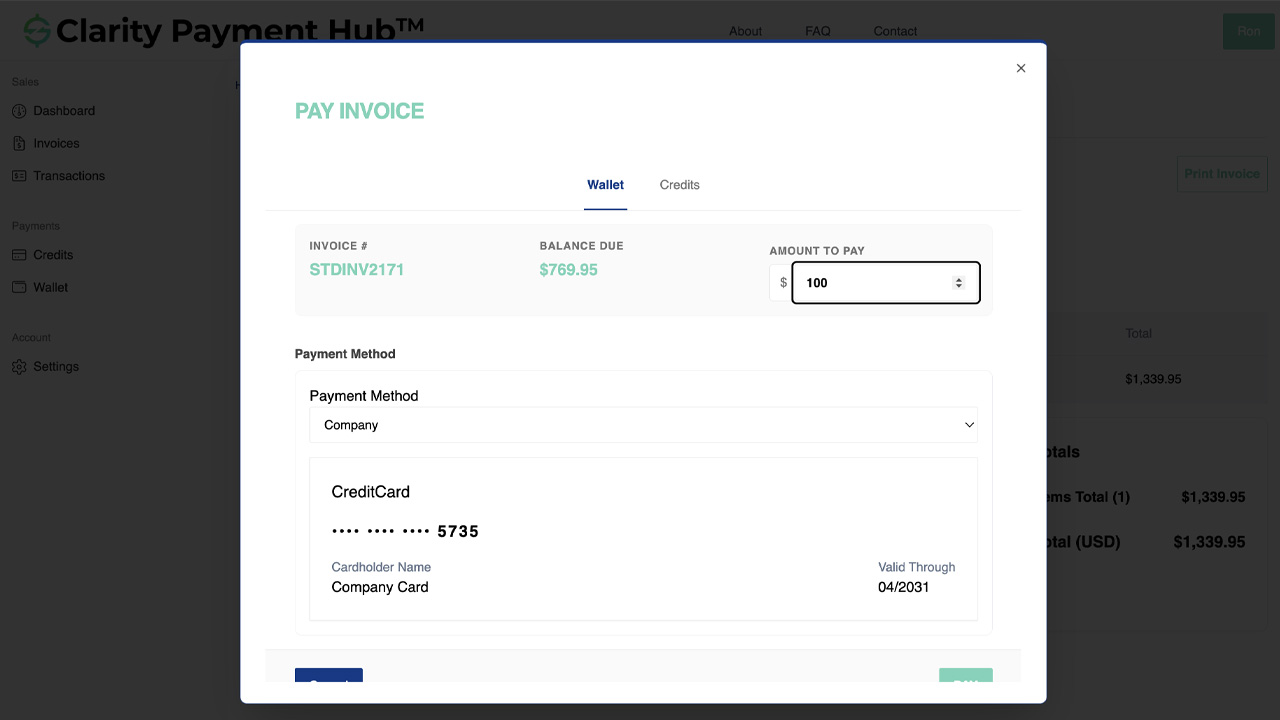
Step-by-Step Walkthrough
Navigate to your Clarity Payment Portal and go to the Invoices section. You see all open invoices with their amounts and due dates. Click on the invoice you want to make a partial payment toward.
The invoice detail view shows the full amount, current remaining balance, due date, and payment history if applicable. You can see the complete picture before deciding how much to pay.
Instead of clicking "Pay Full Amount," you enter the specific amount you want to pay in the payment field. You can enter anything from a few dollars up to the full balance. The portal validates your entry and shows the remaining balance in real time.
Before submitting, you see a clear display of the amount you are paying, the original balance, and exactly what will remain due on the invoice. This transparency prevents any confusion or disputes.
Choose a saved credit card or ACH method, or enter a new one. Click Pay to submit your partial payment. The transaction processes immediately, and you receive a confirmation showing the amount paid and the remaining balance.
Through Clarity Connect, your partial payment posts to the invoice in your vendor's ERP, and the remaining balance is automatically calculated and tracked. You can make another partial payment against the same invoice anytime by repeating this process.
Benefits and Business Impact
Partial payment capabilities fundamentally change how customers interact with your payment system and how your AR team operates. Instead of a binary choice of "call to make special arrangements" or "wait until you have full cash," customers have a self-service path that respects their cash flow reality. This creates measurable benefits across both organizations.
When customers can send partial payments easily, they often do so immediately instead of waiting. By removing the barrier of the full-amount requirement, you collect more frequently and reduce DSO even if individual payments are smaller.
Customers value flexibility and transparency. A payment system that accommodates their real-world cash flow management builds loyalty and differentiates you from competitors with rigid payment systems.
When partial payments are self-service and automatically posted to your ERP, your AR team spends zero time processing partial payment requests or manually updating invoices. That time shifts to higher-value work.
Because the portal and ERP both show real-time remaining balance after each partial payment, there is no ambiguity or confusion. Disputes that traditionally plague partial payment scenarios are eliminated entirely.
Customers who make partial payments are showing intent to pay and are staying engaged with resolution. This is less risky than accounts where customers ignore invoices entirely. Partial payments actually increase your likelihood of collecting the full amount eventually.
More frequent partial payments mean more frequent deposits in your bank account, improving your working capital position and cash forecasting accuracy.
Partial payment flexibility is especially valuable for customers in capital-intensive industries, those with seasonal cash flow, or those managing payments across multiple suppliers. By offering this capability, you position yourself as a customer-centric partner rather than a vendor with a rigid process they must conform to.
Frequently Asked Questions
Can I pay part of an invoice instead of the full amount?
Yes. The Clarity Payment Hub partial payment feature lets you enter any amount up to the invoice balance. Simply enter the amount you want to pay, and the portal shows you the remaining balance. Your vendor's ERP automatically tracks the remaining amount due, and you can pay the rest later without any disputes or special arrangements needed.
How does the remaining balance appear in the vendor's ERP?
Through Clarity Connect, after your partial payment posts, the invoice in your vendor's ERP shows the original amount, the partial payment applied, and the new remaining balance. All calculations are automatic. Your vendor sees exactly what was paid and what is still due, no manual reconciliation needed.
Can I make multiple partial payments against the same invoice?
Absolutely. You can make as many partial payments as you want against a single invoice over any timeframe. Pay $1,000 today, $500 next week, and $750 the week after if that works for your cash flow. Each payment is recorded separately, and the remaining balance is updated after each transaction.
Will partial payments cause disputes with my vendor?
No. Partial payments are a standard business practice, and Clarity Payment Hub handles them with complete transparency. Both you and your vendor see the same information: the original invoice amount, each partial payment, and the remaining balance. The system eliminates the ambiguity that traditionally causes disputes.
What happens if I cannot pay the remaining balance?
The remaining balance stays open on the invoice in your vendor's ERP. You can pay it whenever you are able, or contact your vendor to arrange a resolution. Partial payments do not trigger disputes, they are handled like any open invoice balance. Your vendor can see your intent to pay (you already sent a partial payment) and can work with you accordingly.
Is there a minimum partial payment amount?
Most payment gateways support payments as small as $1, though your vendor's configuration might set a slightly higher minimum. Check with your vendor if you want to know their specific policy on minimum partial payment amounts. In most cases, there are no practical restrictions.
Does making a partial payment cost more than paying the full amount?
From a processing fee perspective, no. One payment is one transaction, regardless of amount. However, some vendors may configure minimum payment amounts for business reasons. Ask your vendor if you are concerned about fees for very small partial payments.
Related Features
Faster AR. Fewer headaches.
See Clarity Payment Hub running inside your ERP, or spin up a free trial environment and click around on your own. Either way, you’ll see exactly how it handles your invoice mix, your gateway, and your Level II/III savings &mdash. Before you commit to anything.
Supported
Go-Live
Savings