



What Is the "Pay an Invoice" Feature?
Stop being the bank, and get paid faster. The Pay an Invoice feature in Clarity Payment Hub is a self-service capability that lets your customers log in to a secure web portal, locate any open invoice by number, date, or amount, and submit a payment using a saved or new payment method. The transaction is processed in real time and automatically posted as a payment against the invoice in your ERP system through Clarity Connect, the integration platform that bridges your accounting software and payment gateway.
Clarity Payment Hub helps you automate your accounts receivables. In a traditional B2B environment, paying an invoice is anything but simple. Your customer receives a paper or emailed invoice, then has to call your AR department, mail a check, or log in to a separate banking platform to initiate a wire. Meanwhile, your team is manually keying payments into the ERP, reconciling mismatches, and chasing down late payers. The Pay an Invoice feature eliminates that entire cycle by putting payment control directly in your customers' hands, 24 hours a day, seven days a week.
Full, partial, consolidated invoices payments? It's all off the shelf. This feature is a core component of the Clarity Payment Hub Customer Portal, which is built on Clarity's enterprise-class eCommerce platform. Whether the portal runs as a standalone site or is embedded into your existing website, it gives your customers a familiar, bank-like experience for managing their invoices and payments.
The Problem: Why Paying Invoices Is Still Broken for Most B2B Companies
If your customers have to call in to pay, mail a check, or wait for an accounts receivable rep to process their credit card over the phone, you already know the pain. The traditional invoice payment process was built for a world of paper ledgers and fax machines, and in many organizations, it has barely evolved since then. The result is slow collections, frustrated customers, and AR teams drowning in manual work they should not have to do.
Across industries, the consequences are measurable. Research shows that roughly half of all B2B invoiced sales in the United States become overdue, and companies using manual processes consistently report days sales outstanding (DSO) figures that run significantly longer than their automated counterparts. Each manual payment costs an estimated $12–$15 to process when you factor in staff time, error correction, and reconciliation, compared to $2–$4 for a digital, automated transaction.
When the only way to pay is by check, phone, or bank wire, payments take days or weeks to arrive, process, and clear. Your cash sits in limbo instead of in your account.
Keying payments into the ERP by hand is error-prone. Misapplied payments trigger disputes, erode customer trust, and create reconciliation headaches that eat up hours of staff time.
Without a convenient payment channel, your AR team spends a disproportionate amount of time on collection calls, reminder emails, and follow-ups rather than strategic work. Studies indicate companies may spend 14 or more hours per week on these collection activities.
Your customers manage their personal banking, subscriptions, and shopping online, yet paying your invoice still requires a phone call during business hours. That friction delays payments and damages the customer experience.
Without a centralized payment platform, it is difficult to know which invoices are paid, pending, or overdue in real time. Reporting becomes a patchwork of spreadsheets and bank statements.
How Clarity Payment Hub Solves the Invoice Payment Problem
Clarity Payment Hub takes the pain out of invoice payments by providing a turnkey, self-service customer portal connected directly to your ERP through Clarity Connect, Clarity's integration platform that has been in active development for more than 15 years. Rather than building a custom payment solution from scratch, you get a pre-built, packaged platform that is customized with your branding, configured to your payment preferences, and connected to your ERP and payment gateway of choice. Most installations are fully operational within 48 hours of receiving sandbox credentials.
Here is how the Pay an Invoice feature specifically addresses each of the challenges above:
Payments are authorized and captured the moment the customer clicks "Pay." No waiting for checks to arrive, no batch processing delays. Funds move faster, and your DSO drops.
Every payment is automatically written back to your ERP as a posted payment against the invoice. Clarity Connect handles the mapping, so there is no manual data entry, no misapplied payments, and no reconciliation burden.
Customers store credit card and ACH details in a tokenized, PCI DSS-compliant wallet. Card data never touches your servers. Saved methods make repeat payments fast and frictionless.
The portal is available around the clock. Customers can log in, find their invoice, and pay on their own schedule, no phone call required, no business-hours restriction.
Customers can search invoices by number, date range, or amount. They see the full invoice detail, line items, taxes, balance due, before paying. No ambiguity, no disputes.
No gateway lock-in. Unlike ERP-native payment add-ons that restrict you to a single processor, Clarity Payment Hub integrates with virtually any payment gateway or processor. This means you can negotiate competitive rates, including Interchange Level II and Level III pricing for B2B transactions, and switch processors without rebuilding your payment infrastructure. As Clarity's white paper notes, many ERP companies have exclusive arrangements with processors that result in rates well over 3 percent. Payment Hub gives you the freedom to do better.
The Missing LinkBetween Paymentsand Your ERP
Clarity Payment Hub closes that gap, connecting your orders, invoices, and payment channels into one flow.
Speak to a Platform ArchitectSee It in Action: Pay an Invoice in the Customer Portal
Watch the Demo
Portal Screenshot
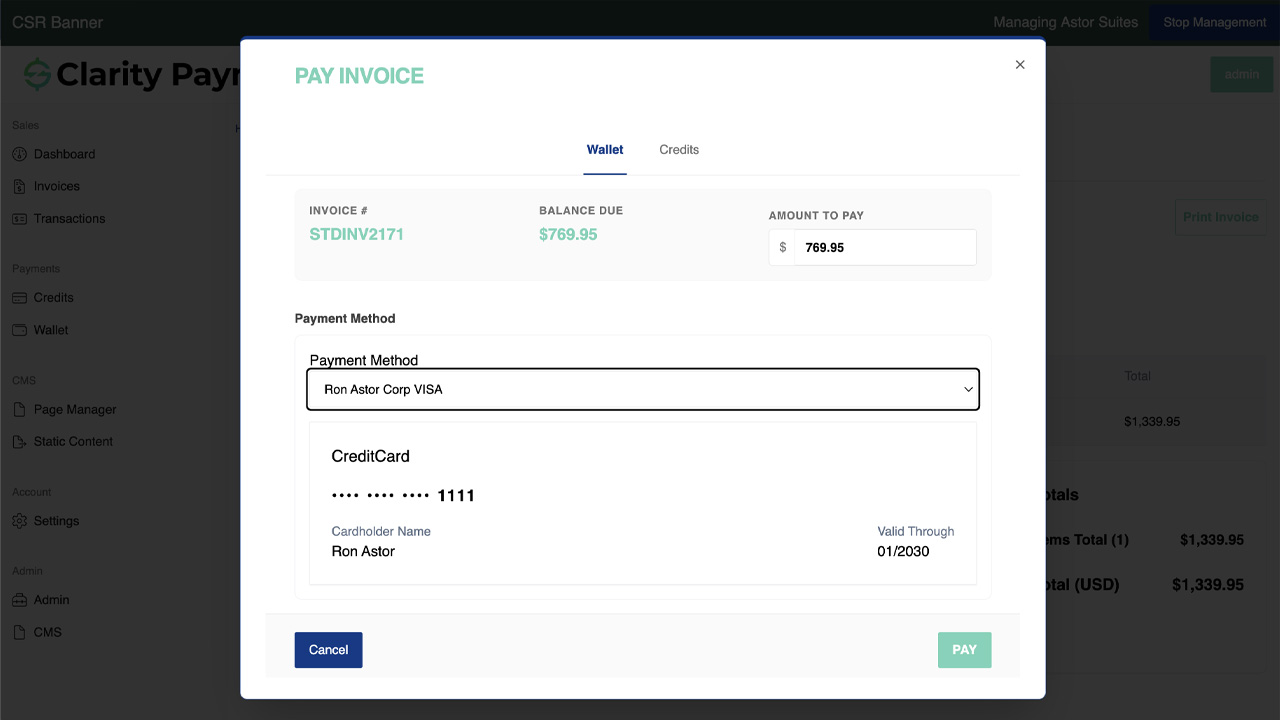
Step-by-Step Walkthrough
Navigate to your company's Clarity Payment Portal, either as a standalone site or embedded in your website, and sign in with your customer credentials. First-time users register with an email and a password.
Click "Invoices" in the sidebar navigation. All open invoices pulled from your vendor's ERP are listed with invoice number, date, total amount, and balance due. Use the search bar or date filters to find a specific invoice quickly.
Click on any invoice row to see the full breakdown: line items, quantities, unit prices, taxes, and the remaining balance. This is the same data that lives in your vendor's ERP, synchronized through Clarity Connect.
Choose a credit card or ACH method already saved in your PCI-compliant wallet, or enter a new one. You can save the new method for future use so the next payment is even faster.
Confirm the payment amount, review the details, and click "Pay." The transaction processes immediately. You receive an on-screen confirmation and an email receipt, and the payment posts to the vendor's ERP in real time, no manual intervention required on either side.
Benefits and Business Impact
Implementing the Pay an Invoice feature does more than add a button to a webpage. It fundamentally changes the dynamics of your accounts receivable operation, your customer relationships, and your cash flow. Here is what you gain:
When customers can pay the moment they receive an invoice, or any time after, payments arrive faster. Companies that automate their invoicing processes consistently report measurable DSO reductions, often between 1 and 13 days. Faster collections mean more working capital available for operations and growth.
Automated, self-service payments cost a fraction of what manual processing demands. By eliminating phone calls, manual keying, and error correction, you shift from a $12–$15 per-transaction cost to just $2–$4, and those savings scale with every invoice you process.
Your customers expect the same digital convenience they get from consumer apps. A self-service portal with saved payment methods, invoice search, and instant confirmation gives them control and eliminates the frustration of phone-tag with your AR team.
Because payments post automatically from the portal to your ERP through Clarity Connect, there is no manual entry to mistype, no payment to misapply, and no reconciliation discrepancy to hunt down. Data integrity stays intact from portal to ledger.
When customers self-serve, your AR team stops spending hours on collection calls and payment processing. That time shifts to dispute resolution, credit analysis, and cash-flow forecasting, work that actually moves the business forward.
PCI DSS-compliant tokenization means cardholder data is never stored on your infrastructure. Every transaction is encrypted with TLS/SSL. Your customers pay with confidence, and your compliance burden stays manageable.
The people who benefit span your entire organization. AR teams gain efficiency and accuracy. CFOs and controllers gain real-time visibility into collections and cash position. Customer service reps no longer need to act as payment intermediaries. And your customers gain the self-service convenience they have come to expect in every other area of their business and personal lives.
Frequently Asked Questions
How do I pay an invoice online with Clarity Payment Hub?
Log in to your Clarity Payment Portal, navigate to the Invoices section, and select the invoice you want to pay. Choose a payment method from your secure wallet, or enter a new credit card or ACH account, and click "Pay." The transaction processes in real time, and you will receive an immediate confirmation. The payment automatically posts to the vendor's ERP system through Clarity Connect.
Is paying through the portal secure?
Yes. Clarity Payment Hub uses PCI DSS-compliant tokenization, which means your credit card or bank information is encrypted and stored by the payment processor, never on the vendor's servers. All communication between your browser and the portal is protected by TLS/SSL encryption, the same standard used by banks and major eCommerce platforms.
What ERP systems does Clarity Payment Hub work with?
Clarity Payment Hub integrates with virtually any ERP or accounting system, including Microsoft Dynamics 365 Business Central, Dynamics 365 Finance and Operations, Oracle NetSuite, SAP Business One, SAP S/4HANA, Epicor Kinetic, Epicor Prophet 21, Sage 100, Sage 300, Acumatica, QuickBooks Enterprise, and more. The Clarity Connect integration platform handles the data mapping between your ERP and the payment portal.
Can customers pay with both credit cards and ACH?
Yes. The portal supports credit cards (Visa, Mastercard, American Express, Discover), ACH bank transfers, and other methods depending on your gateway configuration. Customers can save multiple payment methods in their wallet for convenience, and you control which methods are available.
Does the payment post to our ERP automatically?
It does. Every payment captured through the portal is sent back to your ERP via Clarity Connect and recorded as a payment against the corresponding invoice. This eliminates manual posting, reduces errors, and keeps your accounts receivable records accurate without any intervention from your team.
Am I locked into a specific payment gateway or processor?
No. Clarity Payment Hub is gateway-agnostic. Unlike ERP-native payment add-ons that force you into a single processor, Payment Hub connects to virtually any gateway or processor. This gives you the flexibility to negotiate better rates, take advantage of Level II and Level III interchange pricing, and switch processors in the future without rebuilding your portal.
How quickly can we go live with this feature?
Most Clarity Payment Hub installations, including the customer portal with invoice payment, are fully functional within 48 hours of Clarity receiving credentials to your ERP sandbox. The platform is pre-built and packaged-priced, so you are deploying a proven solution, not waiting on a custom development project.
Related Features
Faster AR. Fewer headaches.
See Clarity Payment Hub running inside your ERP, or spin up a free trial environment and click around on your own. Either way, you’ll see exactly how it handles your invoice mix, your gateway, and your Level II/III savings &mdash. Before you commit to anything.
Supported
Go-Live
Savings