


Reduction
Inquiry Calls
Portal
Integrated
Timeline
What AR collections automation actually replaces
Stop wasting time chasing "your" money. The manual collections cycle consumes most of an AR team's week. Printing and emailing invoices, answering "where is my invoice?" and "what's my balance?" calls, running aging reports, working exception queues by hand, sending dunning reminders on a staff-maintained schedule, taking card and ACH payments over the phone, rekeying receipts into the ERP, reconciling cash at month-end. Almost every step of that cycle is mechanical — and almost every step of that cycle is something Clarity Payment Hub automates.
Manual collections cycle
- AR emails or prints invoices one at a time
- Customers call to ask "what do I owe?" and "can you resend invoice 12345?"
- AR runs aging reports in the ERP to figure out who to chase
- Dunning reminders sent manually on a staff-maintained spreadsheet
- Phone-in card payments keyed into a virtual terminal and then into the ERP
- Net 30 means 30 days of waiting plus the chase calls on day 31, 35, 45
- Month-end cash reconciliation takes 2–3 days of AR time
- Disputes and short-pays tracked in spreadsheets or email
Automated collections cycle
- Invoices sync to the branded portal the moment they post to the ERP
- Customers self-serve invoice lookup, aging, balance, receipts — 24/7
- Payment Hub runs aging and surfaces only exceptions to AR
- Automated dunning on your schedule with branded emails + pay-by-link
- Tokenized one-click payment by card, ACH, or wallet — no rekeying
- Net 30 converts to authorized ACH auto-debit on the due date
- Cash receipts post in real time — month-end reconciliation is hours, not days
- Disputes and short-pays captured in the portal with audit trail to the ERP
The purpose of both AI and software is to help you work more accurately and efficiently. The shift isn't "AR people work harder" or "replace AR with software." It's stop your AR team from doing the mechanical work that software should be doing, and free their time for the exception-handling, relationship, and analysis work that actually moves the business.
How Payment Hub automates the AR cycle
So what's included that helps our processes? Eight capabilities are doing the heavy lifting. Each one replaces a manual step your AR team is running today.
Branded self-service portal
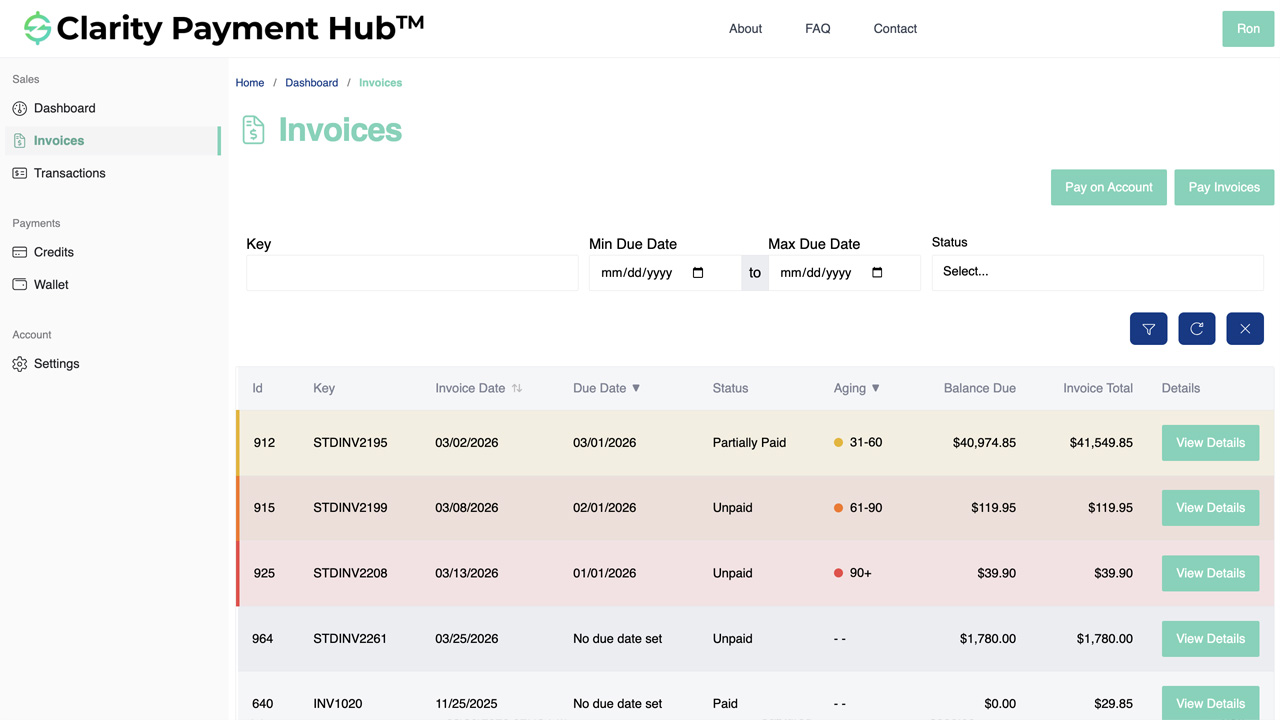
Customers log in to your URL under your brand to see open invoices, aging, credits, payment history, and receipts. 24/7 mobile-first. Replaces inbound balance-inquiry and invoice-copy calls almost entirely.
Automated dunning (email + SMS)
Scheduled reminder cadence you configure per segment — pre-due, due, past-due at 3 / 10 / 30 / 60 days. Branded templates, open / click tracking, and escalation routing when a customer doesn't respond.
Single-use signed pay-by-link
Every dunning email carries a deep-link that opens the portal pre-authenticated at the specific invoice. Customer clicks, authorizes with saved card / ACH, payment posts. Ninety-second path from email open to paid.
Tokenized one-click payment
Saved cards and bank accounts live in the gateway's PCI vault, not on your infrastructure. Repeat customers re-pay in one click. Raw PAN never touches Payment Hub or your servers — SAQ A PCI scope.
ACH auto-debit for Net terms
Replace Net 30 with authorized tokenized ACH auto-debit on the due date. Customer keeps the 30-day timing; you eliminate the chase cycle, DSO drops, write-offs fall. NACHA authorization capture handled automatically.
Configurable payment plans
Publish plan offers (3-month, 6-month, 12-month) with rules you define. Customers self-select plans from the portal, authorize recurring, and the ERP reflects the plan balance with scheduled dates. AR only sees requests outside policy.
Collections worklist & aging dashboard
AR sees only the accounts that actually need attention — dunning-unresponsive, disputed, past payment-plan lapse, high-exposure. Aging buckets by 30/60/90/120+, sortable by amount, with one-click drill to customer detail and action buttons.
Real-time ERP posting
Every cash receipt, credit application, dispute status, and payment-plan schedule writes back to your ERP the moment the customer acts. No overnight batch, no CSV import, no manual cash application at month-end.
Watch the Demo
Portal Screenshot
The automated collections workflow — invoice to receipt
A concrete walkthrough of what happens from the moment an invoice posts in your ERP to the moment the customer's payment clears and closes the invoice. No AR staff involvement except at the exception stage.
Invoice posts in the ERP
Your ERP generates an invoice as it always has — same line items, tax, PO reference, and terms. Clarity Connect picks up the new invoice in real time and mirrors it to the branded portal plus the customer's notification inbox.
ERP unchanged Real-time syncInvoice-posted email to the customer
Customer receives a branded email with the invoice number, amount, due date, and a single-use signed pay-by-link. One click opens the portal pre-authenticated at that invoice. Tokenized saved payment methods appear automatically for repeat customers.
Branded Pay-by-linkDunning cadence runs silently until payment
Reminder schedule runs per your rules (e.g., 7 days before due, on due date, at 3 / 10 / 30 / 60 days past). Every reminder carries a fresh pay-by-link. Open and click tracking feed back to the worklist so AR can see who's engaged vs. unresponsive.
Automated Segment-awareCustomer pays (any method, any time)
Portal, pay-by-link email, mobile, MOTO via AR staff, or scheduled auto-debit. Card, ACH, Apple Pay, Google Pay, PayPal / Venmo / Amazon Pay where configured. Tokenization happens at the gateway vault; raw PAN never touches Payment Hub or your servers.
Any method Tokenized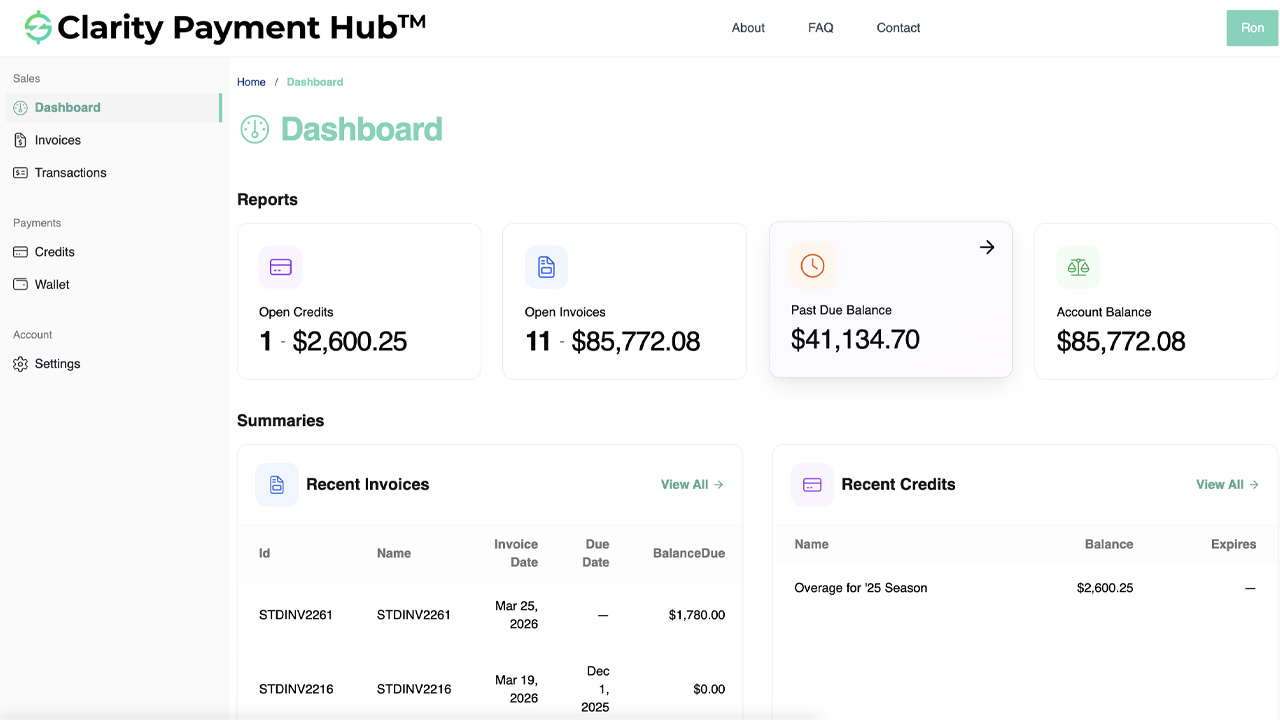
Cash receipt posts to the ERP in real time
The moment the gateway authorizes the transaction, Payment Hub writes the cash receipt to your ERP through Clarity Connect — applied to the correct invoice, against the correct customer, in the correct GL account. Aging, balance, and invoice status update immediately.
Real-time Auto-appliedExceptions bubble up to the worklist
If the customer disputes, short-pays, lets the invoice age past 60+ days, or misses a payment-plan installment, the account surfaces in the AR worklist with context (history, exposure, authorization artifacts, last engagement). AR works the ~5–10% of accounts that actually need judgment.
Exception-only Context-richMonth-end reconciliation is already done
Because every receipt posted in real time throughout the month, the reconciliation work that used to eat 2–3 AR days at month-end is already complete. Your controller sees a clean cash / AR tie-out and the GL is current.
No batch reconciliation GL currentIndustries where AR automation wins hardest
Every vertical benefits from collections automation, but the magnitude of DSO reduction and cost savings varies with invoice size, customer volume, and the manual-chase baseline. Payment Hub applies the right AR pattern per industry automatically.
B2B Distribution & Wholesale
The single biggest AR-automation win in the Clarity book. Net 30 / 45 / 60 terms, commercial-card programs, and call-in payments all convert to tokenized portal self-service plus ACH auto-debit.
- Net 30 → ACH auto-debit on due date
- Level 2/3 auto-enrichment on commercial cards
- Portal replaces balance / aging phone calls
- Real-time cash application into the ERP
Manufacturing
Progress billing, milestone invoices, balance-on-delivery, and dealer-network commercial-card flows — every pattern where the back-and-forth between AR and the customer eats calendar days.
- Milestone invoices paid in one click from the portal
- Deposits on sales orders automated
- Dealer commercial cards with Level 3 savings
- Real-time posting so production doesn't wait on AR
Healthcare & Life Sciences
Patient self-pay is the largest uncollected segment for many practices. Automated dunning + payment plans + mobile-first portal + HSA/FSA acceptance converts aged receivables into monthly-plan revenue.
- Branded patient portal — balance, plans, receipts
- Self-serve payment plans (3-, 6-, 12-month)
- HSA/FSA + commercial card + ACH
- Practice-management system stays book of record
Nonprofit & Fundraising
Pledge receivables, event-invoice collection, and foundation-grant disbursements all benefit from automation — plus recurring ACH on sustaining giving has meaningfully lower churn than card.
- Pledge reminders with pay-by-link
- Recurring ACH for sustaining donors
- Event / sponsorship invoice automation
- Fund-accounting posting with designation tracking
Education
Tuition, fees, activity charges, continuing-ed registration — all volume-heavy AR that benefits from self-service plus payment-plan automation. Multi-year plans on ACH avoid card-expiry churn.
- Tuition payment plans on ACH auto-debit
- Branded parent / student portal
- Activity fee and late-enrollment automation
- Posting to SIS / ERP for real-time balance
Government & Public Sector
Permit, license, utility, and commercial-supplier AR. Automated dunning within fee-pass-through rules, CEDP Level 3 on commercial cards, and portal self-service for citizens and vendors.
- Branded citizen payment portal
- Fee-pass-through and convenience-fee support
- CEDP Level 3 on commercial-card transactions
- Posting to Tyler, Oracle, SAP, or Dynamics financials
Professional Services & Agencies
Retainer collection and project-invoice follow-up are where professional services lose the most AR time. Auto-debit on retainers and pay-by-link on project invoices collapse the cycle.
- Retainer auto-debit on monthly schedule
- Pay-by-link on project and hourly invoices
- Trust / IOLTA segregation for legal workflows
- Real-time posting to PSA / ERP
Subscription, SaaS & Membership
Dunning, retry, and involuntary churn on recurring billing is a solved problem when the dunning cadence, retry logic, and card-updater flows are automated. Payment Hub handles all three.
- Smart retry schedules on failed recurring
- Automated card-updater calls on expiry
- Annual / enterprise plans on ACH for low churn
- Real-time posting to the billing / ERP system
We can pull a rough before/after economics model during a 30-minute discovery call — DSO, collections-time savings, bad-debt impact — against the ERP you actually run. Skip the reading and book a walkthrough.
DSO, cash flow, and the working-capital math
AR automation isn't a brand play — it's a working-capital play. Here's where the compression comes from, with honest math.
Where DSO reduction comes from
Three mechanisms compound. First, customers pay earlier when the portal makes it one-click to do so — especially on mobile, and especially when the reminder email carries a deep-link into the invoice. Second, Net 30 converts to authorized ACH auto-debit on the due date for customers who opt in, which eliminates the grace period between "due" and "paid." Third, real-time ERP posting means the invoice closes the moment the bank confirms — no overnight batch, no CSV-import delay, no manual cash application. These three layers typically combine to drop DSO by 30–50% inside the first 60–90 days.
Working-capital impact (worked example)
A B2B distributor with $50M annual revenue and a 50-day DSO is carrying about $6.85M of AR at any moment ($50M × 50 / 365). Drop DSO to 30 days — a 40% compression — and AR carries about $4.11M. That's roughly $2.74M of working capital released. At a 7% cost of capital, that's about $192,000 per year in saved financing cost — on top of the direct cost savings on AR labor and the reduction in bad debt.
Other hard savings
- Card processing optimization. Commercial cards with Level 2/3 data enrichment typically save 0.5–1.0% per transaction — automatic on every eligible transaction through Payment Hub.
- ACH substitution. Moving high-dollar invoices from cards to ACH auto-debit can save 2.0–2.5% per transaction on the shifted volume (roughly $200K–$500K per $10M of B2B card volume reassigned).
- Bad-debt reduction. Authorized ACH auto-debit and automated dunning typically reduce write-offs by 30–60% on segments converted.
- AR staff productivity. Balance-inquiry volume falls ~70%, manual cash-application time falls ~80%, freeing AR headcount for exception handling and relationship work.
The point isn't that every number above applies to every customer — it's that the mechanics are known and the math is repeatable. In a 30-minute discovery call we'll pull a rough before/after model against your own AR book.
ERP integration — your AR system stays the book of record
Payment Hub does not replace your ERP. Clarity Connect — the integration engine under Payment Hub, with 15+ years of active development and 25+ ERP connectors — syncs bidirectionally with your existing AR system in real time. You keep your chart of accounts, your customer records, your aging logic, your GL structure. Payment Hub is the customer-facing and collections-automation layer on top.
Inbound from ERP
Customers, contacts, open invoices with line items, account balances, credits, payment history, aging, statements — all in real time via each ERP's supported API layer.
Outbound to ERP
Applied cash receipts, tokenized payment-method references, payment-plan schedules, dispute reason codes, short-pay deltas, credit-memo applications, and address updates — written back the moment the customer acts.
25+ ERP connectors
NetSuite, Acumatica, Dynamics 365 BC / F&O, Dynamics GP / NAV, SAP S/4HANA Cloud and ECC, Sage 100 / 300 / Intacct, Oracle EBS, Epicor P21 / Kinetic / Eclipse / Eagle, Infor SX.e / CloudSuite, SYSPRO, Workday, Tyler, and more.
No ERP modifications
Clarity Connect uses only documented, supported integration points. No schema changes, no ERP-side custom code, no plugins to maintain across upgrades. ERP-vendor-compliant.
For cloud ERPs (NetSuite, Acumatica, Dynamics 365 BC, SAP S/4HANA Cloud) Clarity Connect talks directly to the ERP's cloud APIs. For on-premise ERPs (Dynamics GP / NAV, Sage 100 / 300, SAP ECC, Oracle EBS, SYSPRO, Epicor P21 / Eclipse / Eagle) we use a lightweight outbound-only secure agent that calls from inside your network — no inbound firewall ports to open, no VPN tunnel, no public ERP exposure.
Security, PCI scope, and NACHA compliance
AR automation touches payment credentials, customer data, and authorized debits. Clarity Payment Hub is built to push your deployment to the lightest compliance scope available across all three.
- Tokenization at the gateway vault. Cards and ACH accounts are tokenized directly at your gateway's PCI-scoped vault. Raw PAN and raw bank credentials never touch Payment Hub's infrastructure and never touch your servers.
- SAQ A PCI scope. Because cardholder data is captured and stored entirely inside the gateway's environment via hosted fields or tokenization SDK, your PCI self-assessment drops to SAQ A — the lightest self-assessment available, with no cardholder-data environment to audit.
- NACHA-compliant ACH authorization. Every recurring or one-time debit captures NACHA-required authorization (electronic signature or audit-trailed click-to-authorize) and stores the artifact for the NACHA-required 2-year retention window. SEC code selection (WEB / PPD / TEL / CCD / CTX) happens automatically based on transaction context.
- Portal authentication controls. Invoice-bound authentication, customer-matched billing addresses, single-use signed Quick Pay links, and session controls tuned for B2B / industry-specific fraud patterns.
- SOC 2 Type II. Clarity Ventures operates to SOC 2 Type II standards. Security, availability, confidentiality, and data-handling controls are independently audited on an ongoing basis.
- Outbound-only agent for on-premise ERPs. No inbound firewall ports. No VPN tunnel. No public ERP exposure.
AR Collections Automation FAQ
The questions B2B AR, IT, and finance teams ask before rolling out collections automation in Clarity Payment Hub.
What does AR collections automation actually replace?
It replaces the manual collections cycle that consumes most of an AR team's week: printing and emailing invoices, answering "where is my invoice?" and "what's my balance?" calls, running aging reports in the ERP and working exception queues by hand, sending dunning reminders on a staff-maintained schedule, taking card or ACH payments by phone, rekeying receipts into the ERP, and reconciling cash at month-end.
Clarity Payment Hub replaces each of those steps with a branded self-service portal, automated reminders, pay-by-link emails, tokenized one-click payment, real-time ERP posting, and a collections worklist that only surfaces true exceptions for AR to work.
How much does DSO actually drop?
A typical Payment Hub rollout drops Days Sales Outstanding by 30–50% within the first 60–90 days, depending on vertical and starting point. The compression comes from three places: customers pay earlier because the portal makes it one-click to do so (especially on mobile); Net 30 converts to authorized ACH auto-debit on the due date for customers who opt in; and real-time ERP posting eliminates the reconciliation delay between receiving a payment and closing the invoice.
The effect compounds — as DSO drops, working-capital needs drop with it. For a $50M-revenue business with a 50-day starting DSO, a drop to 30 days releases roughly $2.74M of working capital.
Does Payment Hub send the reminder emails, or do we still use our AR system?
Payment Hub sends the reminder emails (and SMS where configured) on a schedule you define per customer segment — for example: 7 days before due, day of due, 3 days past due, 10 days past due, 30 days past due. Each reminder is branded, includes the invoice detail, and carries a single-use signed pay-by-link that opens the portal pre-authenticated at that invoice.
You control the cadence and the copy; Payment Hub handles the send, the open / click tracking, and the escalation routing when a customer doesn't respond. If you already use a dunning tool you love, Payment Hub can be the payment page the reminders link to while the other tool handles messaging.
How does Payment Hub handle disputes and short-pays?
When a customer disputes an invoice from the portal (or pays a partial amount with a reason code), Payment Hub captures the dispute reason, holds further dunning on that specific invoice, posts the dispute status to the ERP, and routes the case to an AR queue with the customer's contact details, invoice history, and authorization-to-pay artifacts attached.
Partial payments are accepted and posted as short-pays against the invoice with the balance staying open — both customer and AR see the remaining balance clearly. Dunning resumes automatically on the remaining balance only; the fully-paid portion stops generating reminders.
Can customers set up their own payment plans?
Yes, within rules you define. Payment Hub lets you publish payment-plan offers (e.g., "invoices over $X are eligible for a 3-month auto-debit plan at 0% or 5%") that customers self-select from the portal. The customer authorizes the plan, Payment Hub schedules the installments against a tokenized card or ACH, and the ERP reflects the plan balance with scheduled dates.
No AR approval required for standard plans; AR only gets alerted on plan requests that exceed the rules — unusual dollar amounts, high-risk customers, out-of-policy extensions — so your team works the judgment cases, not the standard ones.
How does this integrate with our ERP?
Payment Hub syncs bidirectionally with your ERP through Clarity Connect, the integration engine with 25+ ERP connectors including NetSuite, Acumatica, Dynamics 365 BC / F&O, Dynamics GP / NAV, SAP S/4HANA Cloud and ECC, Sage 100 / 300 / Intacct, Oracle EBS, Epicor P21 / Kinetic, Infor SX.e / CloudSuite, SYSPRO, Workday, and others.
Customer data, open invoices, credits, payment history, and aging flow from the ERP into the portal in real time; cash receipts, payment-plan schedules, dispute status, and credit applications flow back the moment the customer acts. Your AR system remains the book of record; Payment Hub is the automation layer on top.
What happens to AR headcount? Do we cut staff?
Most Clarity customers don't cut AR staff — they redeploy them from reactive collections chase into higher-value work: reviewing the small set of exceptions Payment Hub surfaces, managing disputes, negotiating terms with slow-pay customers, analyzing aging trends, and supporting customer success.
The automation eliminates the volume work (invoice lookups, status questions, manual payment entry, dunning queue), not the judgment work. In high-growth businesses, AR typically holds flat in headcount while invoice volume grows 2–3x — which is the real win.
Does the customer-facing portal carry your brand or ours?
Yours. The portal runs under your domain (pay.yourcompany.com or similar), carries your logo, your colors, your fonts, and your copy where relevant. Customers do not see Clarity Ventures branding in the customer-facing flow. The admin interface — the collections worklist, the aging dashboard, the configuration panels your AR team uses — is a Clarity product, but it lives behind your authentication and is not customer-facing.
How long does implementation take?
A typical Payment Hub + ERP go-live takes 48 hours once Clarity receives ERP sandbox credentials and gateway API credentials. No new servers, no middleware, no custom code on your ERP side.
You keep your existing gateway(s) — Payment Hub is gateway-agnostic and works with Worldpay, Adyen, Cybersource, Stripe, Braintree, Authorize.Net, PayPal, NMI, USAePay, Fortis, PayTrace, Nuvei, and more. Implementation is a flat subscription with the ERP integration included.
What if some customers refuse to use the portal?
They don't have to. Payment Hub supports phone-in MOTO entry through Virtual Terminal for AR staff to key in payments received by call, email, or fax — with the same tokenization, Level 2/3 data enrichment, and real-time ERP posting as portal transactions. The holdouts keep their preferred workflow; everyone else moves to self-service. You keep one reconciliation path regardless of which channel the payment came through.
Can we run a pilot on one business unit first?
Yes. Most enterprise customers start with a single division, geography, or customer segment — often the largest commercial-card / Net-terms portion of AR where the economics move fastest. Payment Hub's multi-tenant architecture supports configuration per business unit, so you can prove out DSO impact on one cohort before expanding.
How does Payment Hub handle international customers and currencies?
Through the gateway underneath. Payment Hub is gateway-agnostic, so international card acquiring and local payment methods (SEPA, iDEAL, Bancontact, BACS, BECS, PIX, etc.) flow through Adyen, Stripe, or whichever global-capable gateway you run. Payment Hub surfaces the correct local method per country automatically and posts all receipts to the same ERP, including currency translation where configured.