


ERP Posting
AR Work
Reconciliation
Integrated
Timeline
Ending the CSV era of cash application
The biggest complaint of our clients, is the monthly reconciliation. For a decade, the standard AR reconciliation workflow has looked the same: download yesterday's settlement report from the gateway, open it in a spreadsheet, match each transaction to an invoice in the ERP, key the cash receipt into the AR module, pray the totals agree with the bank deposit when it lands, and repeat. It's a two-to-three-day-a-month tax on the AR team and the controller. It doesn't scale with invoice volume. And it produces a predictable crop of reconciliation mysteries at month-end when one transaction got double-entered, one was missed, or a chargeback landed and nobody caught it.
CSV-based cash application
- Download gateway settlement reports (CSV, SFTP, or email)
- Open in Excel, cross-reference against invoice list
- Manually key cash receipts into the ERP
- Reconcile batch totals against the ERP GL cash
- Match batch against bank deposit when it lands (1–3 days later)
- Chase NSF returns and chargebacks via gateway portal, email
- Month-end: 2–3 days catching up missed entries and mismatches
- Audit trail lives in spreadsheets and gateway-download folders
Real-time automated reconciliation
- Per-transaction cash receipts post to ERP at gateway authorization
- Settlement-batch ID travels with each transaction
- Bank-deposit reconciliation matches against already-applied receipts
- NSF and chargeback return codes auto-reverse in ERP with reason codes
- Credit-memo applications and refunds post as separate audit-traceable records
- Surcharges and processing fees separated cleanly in GL
- Month-end: review exceptions on the morning of close
- Audit trail: every transaction tied to gateway, bank, and ERP records
AR / AI-powered reconciliation isn't only faster. The change isn't just speed — it's correctness. Because every transaction posts in real time with the gateway's settlement ID, chargeback reference, and return-code information already attached, the ERP record for each payment is complete from the moment it's written. There's no "reconcile this later" queue, because there's nothing sitting unposted waiting for reconciliation.
How Payment Hub reconciles every transaction
Eight mechanics run the reconciliation layer. Each one replaces a step the AR team is doing manually today — or worse, a step that's skipped and surfaces as a reconciliation mystery at month-end.
Per-transaction real-time ERP posting
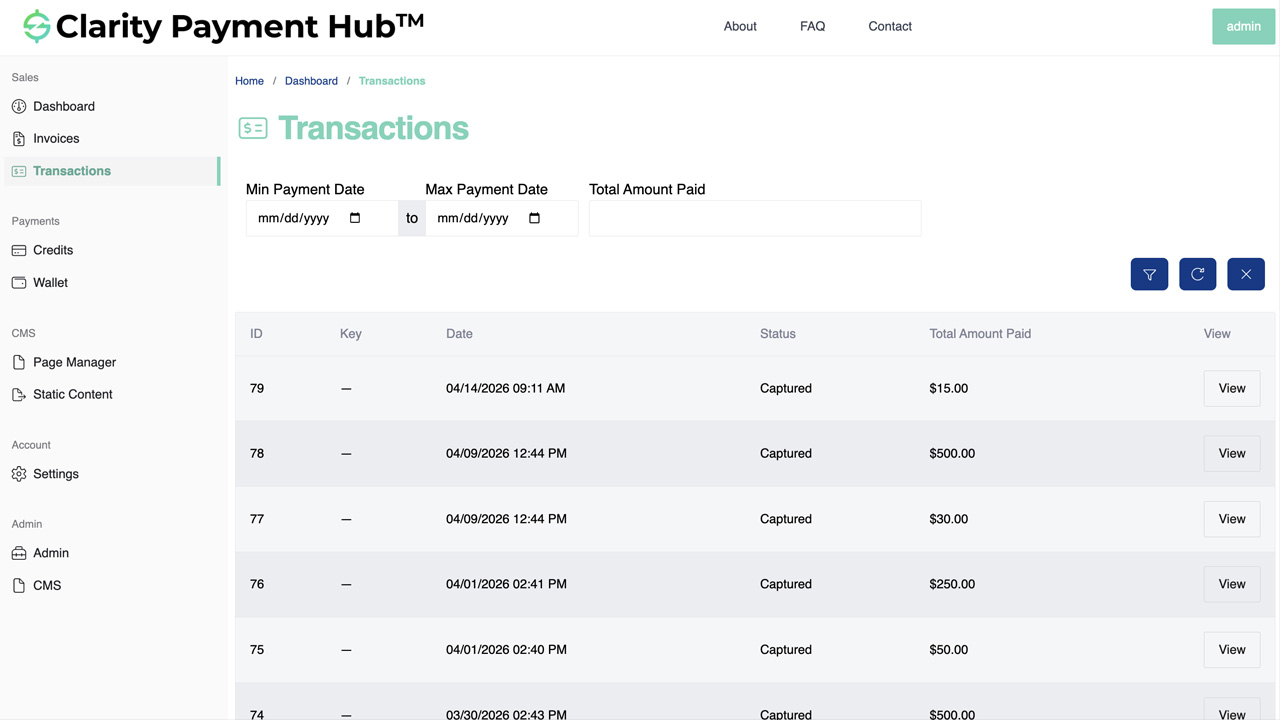
Every customer payment — portal, MOTO, POS, ecommerce, ACH auto-debit — writes a cash-receipt record to your ERP through Clarity Connect the instant the gateway authorizes. Correct invoice, correct customer, correct GL account.
Settlement-batch tracking
Every transaction carries the gateway's settlement batch ID into the ERP. When the batch settles and funds into your bank, Payment Hub matches the deposit to the already-posted receipts — no spreadsheet cross-referencing.
NSF and chargeback auto-reversal
ACH returns (NSF R01, account closed R02, authorization revoked R07, and others) and card chargebacks ingest from the gateway in real time. Payment Hub writes a reversal to the ERP, re-opens the original invoice with the reason code, and routes the exception to AR.
Surcharge and fee separation
Surcharges (customer pass-through) post as separate ERP lines from the invoice amount. Processing fees (merchant cost) deduct from deposits and post to a fee-expense GL account. Your revenue, surcharge income, and processing-cost lines stay distinct.
Multi-gateway, one reconciliation
If you run multiple gateways (Worldpay for card, Adyen for international, USAePay for branch, bank ACH), every transaction from every gateway flows through the same ERP posting path — one cash-GL view, one exception queue, one audit trail.
Credit memos and refunds as discrete entries
Credit memo applications close against specific invoices; refunds reference the original payment token and cash receipt; short-pays leave unpaid balances open with reason codes. Every adjustment is a separate, audit-traceable record — not a blended line.
Exception-only AR worklist
The 5–10% of transactions that need judgment — disputes, mismatched deposits, high-exposure returns, out-of-policy short-pays — surface in an AR worklist with full context (customer, invoice, gateway reference, bank deposit, history). The other 90–95% reconcile themselves.
Full audit trail & exportable reports
Every transaction links gateway reference ID, settlement batch ID, bank deposit reference, ERP cash-receipt ID, invoice ID, customer, authorizing contact, method, and timestamp. Exportable reports for controllers, auditors, and month-end review.
Watch the Demo
Portal Screenshot
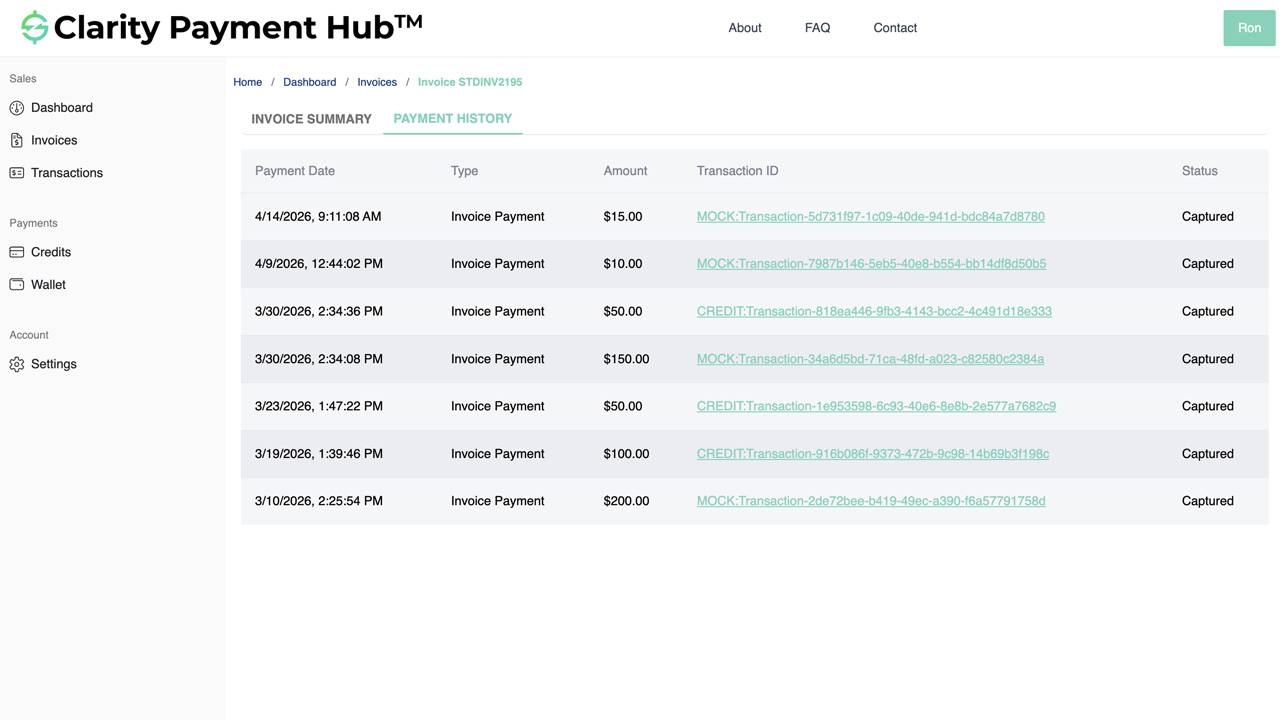
How transactions map to ERP postings
Every transaction type writes a specific set of records to your ERP. Here's the mapping Payment Hub runs automatically — no manual GL-code lookup, no miskeyed entries, no "where should this go" support tickets.
| Transaction type | ERP records written | GL accounts affected |
|---|---|---|
Customer invoice paymentWEB / TEL / CCD / card |
Cash receipt applied to invoice · Invoice closed (or partial balance) | Debit Cash / GL Clearing · Credit AR |
| New ecommerce sales order cart-based checkout |
Sales order · Cash receipt (pay-now) OR open invoice (charge-to-account) | Debit Cash / AR · Credit Revenue · (Tax, Shipping, etc.) |
| Credit memo application | Credit-memo closure · Invoice balance reduction | Debit Credit Memo Liability · Credit AR |
| Refund to original method | Refund transaction · Original-cash-receipt reversal | Debit Revenue (reversal) / AR · Credit Cash |
| Compliant surcharge (enabled by state / network) |
Surcharge line separated from invoice amount | Credit Surcharge Income (separate from revenue) |
| Processing fees (merchant cost on settlement) |
Fee deduction from deposit, expense entry | Debit Processing-Fee Expense · Credit Cash (net deposit) |
| ACH NSF return (R01, R02, R07, etc.) |
Cash-receipt reversal · Invoice re-opens with reason code | Debit AR · Credit Cash (reversing the original posting) |
| Card chargeback | Chargeback-reserve entry · Invoice re-opens with dispute flag | Debit Chargeback Reserve / AR · Credit Cash |
| Pay-on-account deposit | Unapplied-cash entry · Auto-apply to open invoices per rules | Debit Cash · Credit Customer-Credit Liability (initial) / AR (applied) |
| Gift card / store credit | Liability decrement · Invoice settled | Debit Gift-Card Liability · Credit AR |
The reconciliation workflow — from customer pay to closed books
A concrete walk-through of what happens from the moment a customer pays an invoice through to the entry showing up reconciled on the bank statement — and what your AR team does (or doesn't) do at each step.
Customer pays — any channel, any method
Portal, email pay-by-link, MOTO, POS, ecommerce, scheduled auto-debit. The customer doesn't see any difference from today; the automation is downstream of them.
Any channel Any methodGateway authorizes and returns a transaction reference
Whichever gateway is routing the transaction (Worldpay, Adyen, Stripe, Authorize.Net, USAePay, etc.) approves the payment. Payment Hub captures the authorization reference and settlement batch ID from the gateway response.
Auth + batch ID Real-timePayment Hub writes the cash receipt to the ERP
Within seconds, Payment Hub writes the cash-receipt record to your ERP through Clarity Connect — correct invoice, correct customer, correct GL account, correct amount, with the gateway settlement batch ID attached for future reconciliation.
Clarity Connect Per-invoice postingCustomer receives receipt; AR aging updates
Customer gets a branded receipt (email / SMS / portal). The invoice closes (or partial-closes) in the ERP immediately. AR aging report reflects the updated balance within the same reporting cycle.
Immediate close Aging currentGateway settles and funds to the bank
1–3 business days later, the gateway settles the batch and ACH-transfers funds to your bank. The deposit appears on your bank statement net of processing fees. Payment Hub tracks the settlement funding date against the batch ID.
1–3 day settlement Net of feesBank deposit matches against already-posted receipts
In the ERP's bank-reconciliation module, the deposit appears as a single bank line. Payment Hub has already tied the batch to the contributing cash-receipt records, so the reconciliation is a one-click match — not a spreadsheet exercise. Processing-fee deduction lines post automatically to fee-expense GL.
Auto-match Fees broken outExceptions surface in the AR worklist
If something didn't go clean — ACH NSF return, card chargeback, deposit short by an unexpected amount — the exception appears in the AR worklist with full context. Reversal is already posted to the ERP; the worklist routes the human judgment work (collections call, chargeback response, investigation).
Exception-only Auto-reversedMonth-end: a morning review, not a three-day project
Because every transaction posted in real time on the day it happened, there's no month-end catch-up. Controller reviews the exception queue, signs off on the AR aging and cash-GL balances, and closes the month. What used to take 2–3 days takes a morning meeting.
Clean close Audit-readyIndustries where reconciliation pain compounds hardest
Every vertical benefits from real-time reconciliation, but the magnitude of AR-labor savings and close-acceleration scales with transaction volume, method mix, and the number of gateways or channels in play.
B2B Distribution & Wholesale
High-volume commercial-card and ACH AR, branch counters, phone-in MOTO, pay-by-link from reminder emails — multiple channels per day, multiple gateways if there are branch acquirers. Per-invoice posting + settlement matching saves the controller the month-end catch-up entirely.
- High card & ACH volume
- Multi-branch acquirer relationships
- Per-invoice L2/3 data tracked
- Short-pays & credit-memos preserved
Manufacturing
Milestone invoicing and deposit payments create reconciliation complexity when each invoice on a project posts on a different day. Payment Hub ties cash receipts to the correct project codes and job numbers for correct cost-accounting allocation.
- Milestone & deposit tracking
- Project-code preservation
- Service-contract recurring
- Dealer commercial-card reconciliation
Healthcare & Life Sciences
Patient pay, HSA/FSA, insurance-reimbursement mix, and multi-payer complexity make reconciliation the hardest piece of healthcare revenue-cycle management. Per-transaction posting plus practice-management integration keeps the PM and ERP / accounting systems in sync.
- Patient-pay + insurance mix
- HSA/FSA card acceptance
- Practice-management integration
- Multi-payer reconciliation
Nonprofit & Fundraising
Recurring-giving reconciliation, designated-gift tracking across campaigns and funds, and pledge receivable closure all benefit from per-transaction posting. Fund-accounting GL structure preserved for audit and grant reporting.
- Recurring-gift reconciliation
- Designation / fund tracking
- Pledge receivable closure
- Audit-ready fund accounting
Education
Tuition payment plans, activity fees, bookstore sales, and continuing-ed registration all reconcile to different GL buckets. Per-transaction posting keeps SIS / ERP balances correct across the semester cycle.
- Tuition plan reconciliation
- Activity / fee separation
- Bookstore POS reconciliation
- SIS / ERP balance sync
Government & Public Sector
Permits, citations, utilities, and vendor AR each have different fund / department / GL destinations. Audit trail is paramount. Per-transaction posting with settlement-batch reconciliation produces audit-ready records for public-finance review.
- Permit / citation / utility separation
- Fund-accounting GL preservation
- Vendor AR reconciliation
- Audit-ready transaction trail
Professional Services & Agencies
Retainer payments, project invoices, hourly bills, trust / IOLTA segregation — each has different GL / compliance rules. Per-transaction posting with project-code tracking keeps PSA and ERP in sync across engagements.
- Retainer reconciliation
- Project-code cost tracking
- Trust / IOLTA segregation
- PSA / ERP posting sync
Subscription, SaaS & Membership
High-volume recurring billing with failed-payment reversals, dunning retries, refunds, and proration creates reconciliation noise. Per-transaction posting with retry-attempt tracking keeps MRR, churn, and revenue-recognition data accurate.
- Recurring billing reconciliation
- Retry-attempt tracking
- Refund & proration handling
- MRR / revenue-rec accuracy
Book a 30-minute walkthrough and see the reconciliation workflow run against a sandbox of your own ERP — per-transaction posting, deposit matching, exception handling, the whole loop. Live in 48 hours; gateway stays yours; AR team stops doing manual cash application.
ERP integration — where the reconciliation actually happens
Payment Hub's reconciliation isn't a separate reconciliation system — it's per-transaction writes to your existing ERP through Clarity Connect. Your ERP stays the book of record; Payment Hub makes sure the records are correct from the moment they're written.
Inbound from ERP
Customers, invoices, GL chart of accounts, payment terms, credit memos, chargeback reserves, bank-account references — all available for transaction routing and reconciliation logic in real time.
Outbound to ERP
Per-transaction cash receipts, credit-memo applications, short-pay records with reason codes, refund transactions, chargeback reserves, surcharge lines, processing-fee expense entries, NSF reversals — each as a discrete correct record.
25+ ERP connectors
NetSuite, Acumatica, Dynamics 365 BC / F&O, Dynamics GP / NAV, SAP S/4HANA Cloud and ECC, Sage 100 / 300 / Intacct, Oracle EBS, Epicor P21 / Kinetic / Eclipse / Eagle, Infor SX.e / CloudSuite, SYSPRO, Workday, Tyler, and more.
No ERP modifications
Clarity Connect uses only documented, supported integration points. No schema changes, no ERP-side custom code, no plugins to maintain. Your GL structure, customer records, and bank-reconciliation module stay the way your controller set them up.
For cloud ERPs (NetSuite, Acumatica, Dynamics 365 BC, SAP S/4HANA Cloud), Clarity Connect talks directly to the ERP's cloud APIs. For on-premise ERPs, a lightweight outbound-only secure agent calls from inside your network — no inbound firewall ports, no VPN tunnel, no public ERP exposure.
Security, audit trail, and reconciliation-grade controls
Reconciliation accuracy and audit-trail completeness go together. Payment Hub writes every transaction with full gateway, bank, and ERP reference IDs, so an auditor can trace any dollar from the customer's payment through the gateway authorization, through the settlement batch, through the bank deposit, to the ERP cash-receipt record — in one query.
- Tokenization at the gateway vault. Cards and ACH accounts stay tokenized at the gateway's PCI-scoped vault. Raw PAN never touches Payment Hub, your ERP, or your reconciliation reports.
- SAQ A PCI scope. Because cardholder data is captured and stored inside the gateway's environment, your PCI self-assessment qualifies for SAQ A — the lightest available.
- Complete transaction linkage. Every record connects the gateway authorization ID, settlement batch ID, bank deposit reference, ERP cash-receipt ID, invoice ID, customer ID, authorizing contact, method, timestamp, and amount. An auditor can trace any dollar end-to-end without cross-system reconciliation.
- Immutable audit log. Transactions and reconciliation adjustments can't be silently modified. Corrections post as separate correcting entries (with reference to the original), preserving the audit trail for external review.
- NACHA-compliant ACH authorization retention. Authorization artifacts retained for the NACHA-required 2-year window after the last transaction, accessible from each transaction's detail view.
- Role-based access on reconciliation views. AR associates see the transaction ledger and exception queue; controllers see deposit-matching and GL-posting detail; auditors get read-only exportable views.
- SOC 2 Type II. Clarity Ventures operates to SOC 2 Type II standards. Security, availability, confidentiality, and data-handling controls are independently audited on an ongoing basis.
- Outbound-only ERP agent. For on-premise ERPs, no inbound firewall ports, no VPN tunnel, no public ERP exposure.
ERP Payment Reconciliation FAQ
The questions controllers, AR leads, and IT teams ask before rolling out Payment Hub's reconciliation layer.
What does Payment Hub replace in our current reconciliation workflow?
It replaces the CSV-based cash-application workflow most AR teams run today: download a settlement report from the gateway or bank, match each line to an invoice in the ERP, key the cash receipt into the ERP, then reconcile the deposit total at month-end against bank statements and gateway funding.
Payment Hub writes per-transaction cash receipts to the ERP in real time at the moment the customer pays, so cash application is already done by the time the batch lands at the bank. Settlement reports from the gateway match automatically against the already-posted receipts. What remains is a morning review of exceptions rather than three days of data entry.
Does it actually reconcile against our bank deposits?
Yes. Payment Hub tracks each transaction from customer-payment through gateway-settlement through bank-deposit, with the settlement batch ID on both sides so the gateway's funded batches match the bank's ACH / card deposits automatically.
When the bank deposit lands in the ERP's bank-reconciliation module, the underlying gateway-settled transactions are already applied to invoices — the deposit reconciles as a single bank line tied to a group of already-applied receipts. No matching spreadsheets; no "why doesn't Friday's batch total the same as Monday's deposit?" investigation.
How does it handle NSF returns, chargebacks, and reversals?
When a transaction returns — ACH NSF (R01), account closed (R02), authorization revoked (R07), or a card chargeback — Payment Hub ingests the return code from the gateway in real time, writes a reversing entry to the ERP that re-opens the original invoice with the return reason attached, and routes the exception to your AR worklist.
The deposit reconciliation adjusts automatically; your GL cash account stays correct. Re-presentment of NSF returns (up to 2 retries within 180 days per NACHA rules) is scheduled automatically. Your team sees the exception, not the ledger surgery.
What happens with surcharges, processing fees, and gateway costs?
Payment Hub separates cash receipts from surcharges and processing fees in the ERP posting — so your GL sees the true revenue (invoice amount), the surcharge income (pass-through, if enabled), and the processing-fee expense (merchant cost) as three distinct lines.
Bank deposits typically arrive net of processing fees; Payment Hub reconciles the deposit against the gross receipts plus the known fee amount, so your controller never wonders why the deposit was $24 short of the receipt total. Fee expense posts to the correct GL expense account as configured during implementation.
How does it work across multiple gateways?
Payment Hub is gateway-agnostic — if you run Worldpay for card, Adyen for international, USAePay for branch counters, and ACH through the bank, every transaction from every gateway flows through the same Payment Hub reconciliation layer to your ERP.
Settlement batches from each gateway match against the corresponding deposits from each funding source. The AR team sees one exception queue, one cash-application view, one set of reconciliation reports — regardless of which gateway processed the transaction.
What happens to our month-end close?
Month-end cash application compresses from a multi-day project to a review. Because every customer payment posted to the ERP in real time on the day it happened, the cash-GL, AR aging, and bank-reconciliation balances are current as of the closing date without catch-up work.
What's left is reviewing the small set of exceptions (NSF returns, chargeback reserves, partial payments flagged for AR review). Most Clarity customers report month-end AR work dropping by 60–80%, freeing the controller and AR team for analysis rather than data entry.
Does it handle credit memos, refunds, and adjustments?
Yes. Credit memo applications, refund transactions (to the original payment method), and short-pay adjustments all post as separate records in the ERP — not blended into cash receipts.
Credit memos close against the specific invoices they were applied to; refunds reference the original payment token and the original cash receipt; short-pays leave the unpaid balance open with a reason code. The ERP reconciliation stays exact because each adjustment has its own audit-traceable record.
Can auditors trace a transaction end-to-end?
Yes — this is one of the main benefits of real-time reconciliation. Every Payment Hub transaction record links: the customer's authorization (timestamp, IP, method), the gateway reference ID, the settlement batch ID, the bank deposit reference, the ERP cash-receipt ID, the invoice ID, and the GL account posted to.
For external audits (financial, tax, grant, SOX, etc.), the audit trail is a single query or export from Payment Hub rather than a cross-system reconciliation project.
What if the gateway sends a batch that's inconsistent with what we expect?
Rare but it happens — a transaction fails to fund, a batch splits unexpectedly, a chargeback reserve gets withheld. Payment Hub monitors every settlement batch for mismatches against the per-transaction receipts it's already posted. When a mismatch is detected, the batch surfaces in the reconciliation exception queue with a diff showing exactly which transactions are unaccounted-for, so your controller can resolve it the same morning rather than discovering it three weeks later.
How does it handle refunds that happen in a different period than the original charge?
Refund records post in the period they occur, with a reference to the original payment and the original cash-receipt entry. Your ERP's revenue-recognition and period-close rules handle the accounting treatment based on the refund-date posting — Payment Hub supplies the correct data; the ERP handles the accounting logic.
Does this work with our existing bank-reconciliation process?
Yes. Your ERP's bank-reconciliation module is still where bank statements are matched to GL entries. Payment Hub makes that step easier by ensuring the contributing cash-receipt entries are already posted with the correct settlement batch reference by the time the bank deposit appears. Your bank-reconciliation clerk still does the final sign-off; the per-deposit matching is a one-click confirmation rather than a spreadsheet exercise.
How long does implementation take?
A typical Payment Hub + ERP go-live takes 48 hours once Clarity receives ERP sandbox credentials and gateway API credentials. GL account mapping (cash, AR, credit-memo liability, chargeback reserve, surcharge income, processing-fee expense) is configured during implementation based on your existing chart of accounts.
No ERP schema changes; no custom GL accounts required (unless you want to add them); no disruption to month-end close cycles already in flight. Your existing gateway(s) stay intact.