


per Batch
Authorization
L2/3 Enrichment
Integrated
Timeline
Why controllers keep asking for "pay everything I owe you"
B2B merchants typically send many invoices to their customers every month. Some as many as hundreds a month. B2B payment workflows aren't one-invoice-at-a-time. When a controller sits down at month-end to clear the AP queue against one of their vendors, they want to see everything open, select what they're paying this cycle, see a running total, and authorize once. Paying 30 invoices one-by-one — 30 separate card entries, 30 separate receipts, 30 separate confirmations — isn't a workflow; it's a tax on the AP team's calendar.
So how does a Controller handle all that volume? The math on the click-count is what makes this not-optional for real B2B payment software. Consumer checkout treats every transaction as a new cart, so paying 30 invoices means 30 carts, 30 authorizations, 30 receipts, and 30 per-invoice follow-ups to AR when something doesn't reconcile. Consolidated payment flips all of those to one.
30 invoices, one-by-one
- Customer selections 30 separate
- Card / ACH authorizations 30
- Gateway transactions 30
- Confirmation emails to customer 30
- Receipts to file 30
- ERP cash-receipt records 30
- Elapsed customer time ~25 min
- Interchange / processing friction High
30 invoices, one authorization
- Customer selections 1 multi-select
- Card / ACH authorizations 1 (or 2 on mixed)
- Gateway transactions 1 (or 2 on mixed)
- Confirmation emails to customer 1 consolidated
- Receipts to file 1 consolidated
- ERP cash-receipt records 30 (correct!)
- Elapsed customer time ~90 sec
- Interchange / processing friction Low
The mastery of the consolidated payment is key to efficiency and helping to lower your outstanding payment days (DSO) by half. A naïve "batch pay" feature posts a single lump sum to the AR ledger, which makes reconciliation a manual allocation job ("the customer paid $87,450 — which invoices did they mean?"). Payment Hub runs one customer-facing authorization but posts 30 correct per-invoice cash receipts to your ERP so aging and cash application stay clean at invoice-level detail, not at batch-level detail.
How Payment Hub handles consolidated invoice payment
Eight concrete mechanics run the consolidated-payment flow. Each one is Payment Hub doing work that would otherwise fall on your AR or AP teams — or worse, on a manual spreadsheet that no one owns.
Multi-select from the open invoices list
Customers select invoices individually, pick Select-All on a filtered view, or use filters (past-due only, specific PO, specific project / job, amount range). Running total updates as the selection changes.
Search & filter by PO, project, aging
Customers narrow the list before selecting — by PO reference, project / job number, aging bucket, amount range, or date range. Matches your customer's own AP logic rather than forcing them into a default sort.
Credit memo application across the batch
Available credit memos appear alongside the selection. Customer applies credits to any selected invoices — full or partial — before authorizing. Payment Hub posts credit applications and cash receipts as separate, correct line-level entries to the ERP.
Running total with credit & short-pay adjustments
Customer sees a live total reflecting selected invoices, applied credits, any short-pay reductions, and applicable surcharges. No mental math; no "I thought I paid $X" mismatches after the fact.
Method routing per sub-batch
Your routing rules run inside the consolidated workflow: invoices above threshold default to ACH; commercial cards stay on card with Level 2/3 enrichment; customer can override per sub-batch. Two authorizations on mixed method; still one customer click.
Single customer-facing authorization
Customer authorizes once — card entry, saved-method confirm, or ACH authorization click. Gateway runs a single auth against the method; Payment Hub handles the per-invoice cash-receipt fan-out afterward. No "authorize 30 times."
Per-invoice cash application to ERP
Payment Hub writes individual cash-receipt records for each invoice in the batch back to your ERP through Clarity Connect — correct invoice, correct amount, correct GL posting. Level 2/3 data flows per invoice for interchange qualification.
Consolidated receipt & per-invoice detail
Customer receives a single email receipt showing the batch total plus the per-invoice breakdown (invoice number, amount, method, credit applied). Individual per-invoice receipts available from the portal on demand.
Watch the Demo
Portal Screenshot
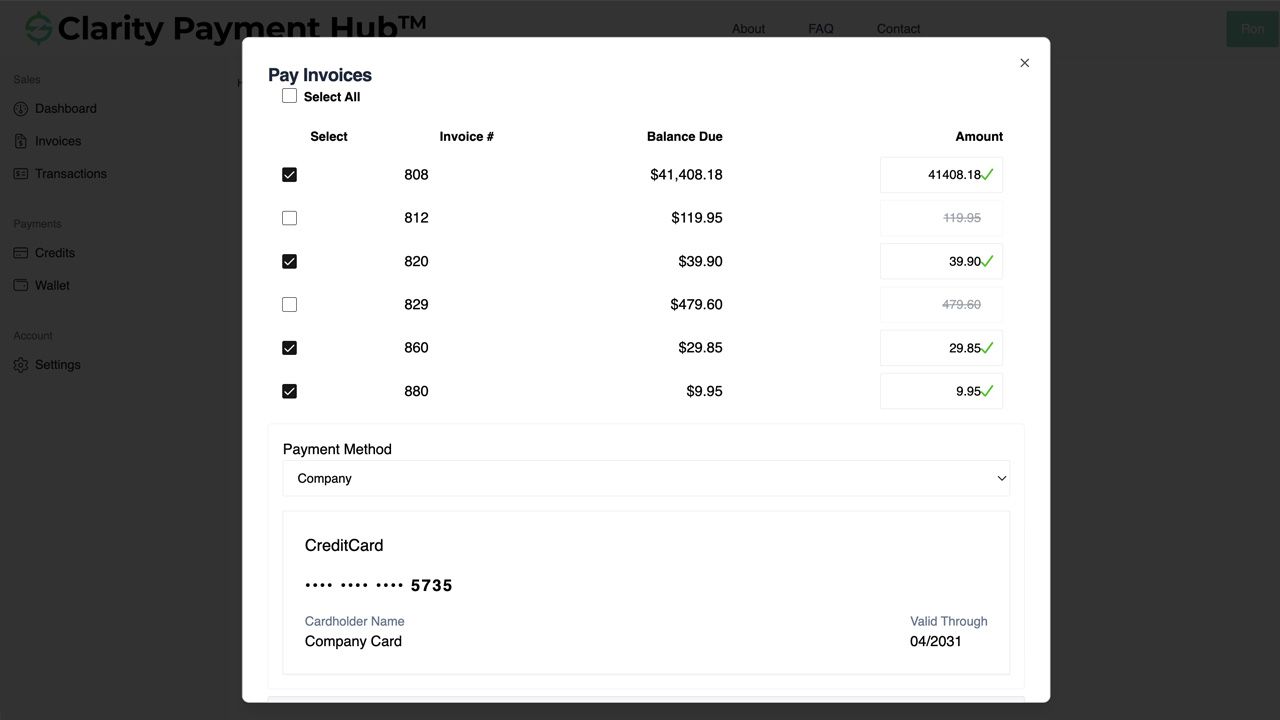
The step-by-step workflow — 30 invoices, 90 seconds
A concrete walk-through of what a controller at a B2B customer does to pay 30 open invoices with a consolidated payment. Every step is Payment Hub doing work that would otherwise fall on the customer, on your AR team, or on a month-end reconciliation meeting.
Controller logs in to the branded portal
Customer opens pay.yourcompany.com (or the link from the month-end statement email), authenticates as the controller (role-based, per-contact). The open invoices list appears — pulled from your ERP in real time so it's accurate to the minute.
Branded Role-based authFilter to this cycle's selection
Controller filters the list — e.g. "due this month," or "PO begins with 2025-Q1," or "aging 0–30." The selection shows only the invoices that matter for this pay cycle, reducing cognitive load on which invoices to mark.
Filter by PO / aging / projectMulti-select invoices (or Select-All)
Controller checks the individual invoices to pay, or uses Select-All on the filtered view. The running total in the header updates as the selection changes — 30 invoices, $87,450.
Running total Select-All-filteredApply available credit memos
If the customer has $4,200 in credit memos, Payment Hub surfaces them alongside the selection. Controller applies the credit to specific invoices (or "apply to oldest first"). Running total drops to $83,250.
Credit application Per-invoice allocationPayment method routing runs the rules
Your configured routing runs: invoices over $2,500 default to ACH, the rest stay on the saved commercial card. Controller can override per sub-batch if they want — e.g. "move everything under $5,000 to card for the rewards." Running total adjusts for any surcharges if applicable.
Method routing Customer overrideReview & authorize once
Controller sees the full batch summary — selected invoices, applied credits, running total, payment method(s) — and clicks Authorize. Single customer-facing click; Payment Hub handles the gateway-side authorization behind it.
Single click Full review before authGateway authorization runs (1 or 2 transactions)
Payment Hub submits a single card authorization for the card portion (with per-invoice Level 2/3 data enrichment) and a single ACH debit for the ACH portion. Tokenization at the gateway vault; no raw PAN ever touches Payment Hub or your servers.
L2/3 per line TokenizedPer-invoice cash receipts post to the ERP
Payment Hub writes 30 individual cash-receipt records to your ERP through Clarity Connect — correct invoice number, correct amount, correct credit-applied flag, correct GL account. Each invoice closes individually. Month-end reconciliation is already done.
Per-invoice posting Real-timeConsolidated receipt to the customer
Customer receives one email receipt showing the batch total plus a per-invoice breakdown. Individual per-invoice receipts available for download from the portal if the customer's AP process needs them. Confirmation numbers for each invoice and for the overall authorization.
Consolidated email Per-invoice PDF on demandAdvanced scenarios Payment Hub handles without an AR phone call
Real B2B consolidated payments don't always look like 30 clean invoices paid at full. The edge cases are where naïve batch-pay features break — and where Payment Hub's per-invoice logic earns its keep.
Mixed methods — ACH + card in one batch
Customer wants big invoices on ACH (for the economics) and small invoices on their commercial card (for the cash-back rewards and Level 2/3 savings). Payment Hub splits the batch: one ACH debit for the large invoices, one card authorization for the small invoices, both under one customer authorization click. Per-invoice posting still reflects the correct method used.
One invoice short-paid in the batch
Invoice 4208 has a $500 damaged-goods dispute. Customer pays $7,700 on the $8,200 invoice with reason code "Damaged goods" — while the other 29 invoices pay at full. Payment Hub applies the short-pay to the specific invoice, leaves $500 open in the ERP with the reason code, and routes only that exception to AR. The remaining batch clears cleanly.
Credit memo larger than any one invoice
Customer has $12,000 in credit memos and no single invoice is that large. Payment Hub lets them apply the credit across multiple invoices — $4,000 against invoice A, $5,000 against B, $3,000 against C — before authorizing payment on the remaining balance. Per-invoice credit-application records post separately from cash-receipt records so the ERP reconciliation stays exact.
Pay-on-account alongside invoice selection
Customer wants to pay 25 specific invoices AND add a $5,000 Pay-on-Account deposit against their account. Payment Hub processes both in one authorization — 25 cash-receipt records and 1 unapplied-credit / Pay-on-Account record — all under one customer click and one ERP-posting pathway.
Multi-entity / parent-account payments
A parent customer pays invoices from multiple child entities in one consolidated batch. Payment Hub posts each invoice's cash receipt against the correct child entity in your ERP's account hierarchy — the parent-child relationship carries through the posting. No manual reallocation.
Batch size that exceeds a gateway per-transaction limit
Some gateways enforce per-transaction dollar limits (e.g., $50K max per card auth). If the consolidated total exceeds the limit, Payment Hub automatically splits the batch into multiple sub-authorizations to stay within limits — still one customer click, per-invoice cash application still clean, routing rules still applied. Customer sees "1 authorization (split into 2 transactions)" in the receipt.
Industries where consolidated payment matters most
Not every vertical sees large multi-invoice batches regularly — but where they do, consolidated payment is the single workflow that most defines the difference between "usable B2B software" and "consumer-checkout software forced into a B2B role."
B2B Distribution & Wholesale
The signature consolidated-payment vertical. Month-end AP runs typically cover 30–80 invoices at once; commercial-card volume demands per-invoice Level 2/3 data; credit memos from short-shipments or returns need applying across multiple invoices.
- Month-end 30–80 invoice batches
- Per-invoice L2/3 on commercial cards
- Credit memo allocation across invoices
- Mixed ACH + card batches common
Manufacturing
Milestone, progress, and deposit invoices accumulate fast on active project work. Consolidated payment lets a customer's AP team clear related project invoices (20+ lines on one big build) in a single pay event with correct per-invoice project-code tracking.
- Project-aligned batches (all invoices on Job 2025-042)
- Milestone invoices with project codes
- Credit applications on short-shipments
- Mixed-method batches on service contracts
Healthcare & Life Sciences
Inter-entity B2B payments — system-to-system, practice-to-vendor, lab-to-provider invoicing — often batch at month-end. Commercial-side consolidated payment keeps practice-management and ERP posting clean at per-invoice detail.
- Lab / supply vendor month-end batches
- Practice-to-system consolidated AR
- Commercial-card Level 2/3 where applicable
- Practice-management / ERP posting
Nonprofit & Fundraising
Corporate sponsor AR and foundation pledge collections sometimes batch several pledge invoices together — annual sponsorships split across campaign events, or multi-quarter disbursement schedules.
- Sponsor / foundation multi-pledge payment
- Campaign-aligned batch payment
- Fund-accounting GL posting per invoice
- Designation tracking preserved
Education
Institutional vendor AR and corporate continuing-ed accounts regularly batch multiple invoices together. Districts paying for professional-development programs, or corporate partners paying credentialing invoices across cohorts.
- Corporate continuing-ed batch AR
- Multi-cohort credentialing invoice batches
- Institutional vendor AR
- SIS / ERP per-invoice posting
Government & Public Sector
Government-supplier invoicing often runs on formal payment cycles where a purchasing agency clears a block of approved supplier invoices together. Payment Hub's per-invoice Level 3 / CEDP data is what makes commercial-card batches interchange-qualified.
- Scheduled payment-cycle batches
- Per-invoice CEDP Level 3 commercial cards
- PO reference tracking preserved
- Tyler / Oracle / SAP / Dynamics posting
Professional Services & Agencies
Anchor clients with multiple projects running simultaneously often batch monthly. A consulting customer paying for three project invoices plus a retainer in one consolidated payment — correct per-project cost accounting on your side.
- Multi-project invoice batches
- Retainer plus project consolidated
- Trust / IOLTA segregation on legal batches
- PSA / ERP per-invoice posting
Subscription, SaaS & Membership
Enterprise customers with multiple subscription lines — different business units on different plans, add-ons across cost centers — consolidate annual renewal invoices into one payment event. Keeps subscription-level ERP data clean.
- Multi-BU subscription batch renewal
- Add-on invoice consolidation
- Enterprise annual cycle payment
- Subscription / ERP posting per line
Book a 30-minute walkthrough and we'll run it against a sandbox of your ERP — multi-select, credit application, method routing, per-invoice posting, the whole loop. Live in 48 hours after demo; your existing gateway and merchant account stay intact.
ERP integration — per-invoice posting is the point
Consolidated payment's whole value depends on the ERP row being right. If the ERP sees a lump-sum batch, your AR team does the allocation work that the software was supposed to do. Clarity Connect — Payment Hub's integration engine with 25+ ERP connectors — writes individual cash-receipt records per invoice in the batch back to your ERP in real time.
Per-invoice cash-receipt records
One cash-receipt record per invoice in the batch, with correct invoice number, amount, credit-applied flag, and method. Not a batch-level lump sum; not a "customer paid $X — allocate it" task for AR.
Credit-memo applications as separate entries
Credit applications post as separate ERP entries (not blended into the cash receipts), preserving the audit trail on which memos were consumed and which invoices they were applied to. Reconciliation stays exact.
Per-invoice Level 2/3 data
Line-item, tax, customer-code, PO reference, freight, and duty data pulled from your ERP attaches to each eligible commercial-card transaction in the batch — not averaged or sampled. Interchange tier protected invoice-by-invoice.
25+ ERP connectors
NetSuite, Acumatica, Dynamics 365 BC / F&O, Dynamics GP / NAV, SAP S/4HANA Cloud and ECC, Sage 100 / 300 / Intacct, Oracle EBS, Epicor P21 / Kinetic / Eclipse / Eagle, Infor SX.e / CloudSuite, SYSPRO, Workday, Tyler, and more.
For cloud ERPs, Clarity Connect talks directly to the ERP's cloud APIs. For on-premise ERPs, a lightweight outbound-only secure agent calls from inside your network — no inbound firewall ports, no VPN tunnel, no public ERP exposure. The batch-to-per-invoice fan-out happens on Payment Hub's side, so your ERP sees clean cash-application data regardless of how complex the consolidated batch was on the customer side.
Security, PCI scope, and batch-level authorization controls
Consolidated payments authorize larger dollar amounts in one transaction, which means role-based controls and audit trails matter more — not less. Payment Hub is built to push your deployment to the lightest compliance scope available while giving AR real audit visibility into batch authorizations.
- Tokenization at the gateway vault. Cards and ACH accounts used in consolidated batches are tokenized at the gateway's PCI-scoped vault. Raw PAN and raw bank credentials never touch Payment Hub's infrastructure and never touch your servers.
- SAQ A PCI scope. Because cardholder data is captured and stored entirely inside the gateway's environment via hosted fields or tokenization SDK, your PCI self-assessment drops to SAQ A — the lightest available.
- Role-based batch authorization limits. Customer-side contact roles can carry dollar thresholds on consolidated batches — a junior AP clerk may pay batches up to $10K; a controller may authorize up to $250K; a CFO approves above. Payment Hub enforces the threshold automatically.
- Per-invoice audit trail. Every cash receipt in a consolidated batch records the authorizing contact, the method, the IP, the timestamp, and the credit-application references — so both your AR team and the customer's AP team can reconstruct any transaction's history.
- NACHA-compliant ACH authorization. ACH portions of consolidated batches capture NACHA-required authorization with correct SEC code selection (CCD / CTX for B2B) and 2-year retention. Same authorization covers the batch — not per-invoice re-authorization.
- SOC 2 Type II. Clarity Ventures operates to SOC 2 Type II standards. Security, availability, confidentiality, and data-handling controls are independently audited on an ongoing basis.
- Outbound-only ERP agent. For on-premise ERPs, no inbound firewall ports, no VPN tunnel, no public ERP exposure.
Consolidated Invoice Payment FAQ
The questions B2B AR, IT, and finance teams ask before rolling out consolidated payment in Clarity Payment Hub.
What's the difference between consolidated payment and a batch / scheduled payment run?
Consolidated payment is customer-initiated: one customer sits down, picks the specific invoices they want to pay right now, authorizes once, and the payment applies per-invoice in your ERP. Batch / scheduled payment runs are operator-initiated: AR or AP selects which invoices to push-debit against saved customer tokens on a schedule.
Clarity Payment Hub supports both patterns, but consolidated payment is the one customers actually use from the self-service portal — and it's what most B2B controllers mean when they say "I want to pay everything I owe you today."
How many invoices can be selected in one consolidated payment?
In practice, as many as the customer wants. Payment Hub has been tested with single consolidated payments covering 300+ invoices without issue. Typical B2B month-end workflows are in the 20–80 invoice range when a controller is clearing the month's AP queue in one session.
The authorization is a single gateway transaction for the summed total (or two, on mixed-method batches); each invoice posts its own cash receipt to the ERP with its own line-item detail. If the total exceeds a gateway's per-transaction dollar limit, Payment Hub auto-splits into sub-authorizations while keeping the customer experience as one click.
Does Level 2/3 data flow for every invoice, or just on the total?
Every eligible invoice in the consolidated batch gets its own Level 2/3 data enrichment — line items, tax, customer code, PO reference, freight, duty, product codes — pulled from your ERP and passed to the gateway. The interchange tier is protected on every qualifying commercial-card transaction in the batch, not averaged or dropped.
This is critical for B2B distributors and manufacturers where a month-end consolidated payment might cover $50K–$500K of commercial-card volume and Level 3 qualification per-invoice determines the savings. A typical distributor with $1M in monthly commercial-card volume saves ~$7,500 / month (0.75% of volume) with per-invoice L3 enrichment — worth protecting in every batch.
Can customers apply credit memos across multiple invoices in a consolidated payment?
Yes. As part of the selection flow, customers see available account credits and credit memos alongside the open invoices. They can apply credits to any selected invoices (in full or partial), see the adjusted remaining balance, and pay the net amount in one authorization.
Payment Hub posts credit applications and cash receipts back to the ERP separately — credit applications as credit-memo closure entries, cash receipts as received-payment entries — so your AR aging, cash-application logs, and credit-memo closure all stay clean. The ERP sees the correct allocation per invoice.
What if the customer wants to pay some invoices by ACH and others by card?
Payment Hub supports mixed-method consolidated payments — a typical pattern is small invoices on a commercial card (for the Level 2/3 data and cash-back rewards) and large invoices on ACH (for the unit economics).
The customer selects a method per invoice sub-batch; Payment Hub runs two authorizations — one card, one ACH — and posts per-invoice cash receipts to the ERP regardless of which rail each invoice took. The customer sees a single consolidated receipt with per-invoice method breakdown.
What happens if one invoice in the batch has a short-pay or dispute?
The customer can adjust any invoice amount in the consolidated batch before authorizing — for example, paying $9,500 of a $10,000 invoice with a short-pay reason code — and the other selected invoices pay at their full amounts.
Payment Hub applies the short-pay with reason code to the specific invoice, leaves the remaining $500 open in the ERP (with the reason code attached), and routes the short-pay exception to your AR worklist for follow-up. The rest of the batch clears cleanly. Dunning resumes only on the unpaid balance of the short-paid invoice.
Does the customer get a single receipt or one per invoice?
Both — on request. Payment Hub emails a consolidated receipt to the customer covering the entire authorization with a per-invoice breakdown (invoice number, amount, method, receipt confirmation).
Customers who also need individual invoice-level receipts for their AP records can download them from the portal or request them by email. On the ERP side, each invoice has its own cash-receipt record for audit; the consolidated authorization is also linked for reconciliation.
How does surcharging work on consolidated payments?
Where compliant surcharging is enabled, Payment Hub applies the surcharge only to the card portion of the consolidated batch (ACH never surcharged; debit and prepaid cards excluded). The surcharge is shown to the customer before authorization, tracked as a separate ERP line per invoice, and state-by-state network rules are enforced automatically. The ACH portion clears at the base invoice amount without surcharge.
Can we enforce a dollar limit on consolidated payments per customer contact?
Yes. Role-based thresholds are configurable per customer contact and per customer account. A typical policy: AP clerk up to $10K per consolidated batch, controller up to $250K, CFO or owner for larger amounts. Payment Hub enforces the threshold at authorization time and routes larger batches to an approval flow if configured.
What gateways support consolidated payment?
All Payment Hub gateway integrations support consolidated payment — the mechanic is Payment Hub's, not the gateway's. The gateway just sees a single card or ACH authorization for the total; Payment Hub handles the per-invoice fan-out on both the ERP side (cash-receipt posting) and the customer side (consolidated receipt with line detail).
Works identically across Worldpay, Adyen, Cybersource, Fortis, Elavon, PNC, PayTrace, Nuvei, Stripe, Braintree, Authorize.Net, Global Payments, NMI, USAePay, and the others in the supported library.
How does it handle currency on international consolidated batches?
If all selected invoices are in the same currency, Payment Hub runs the batch in that currency through a gateway that supports it (Adyen, Stripe, Worldpay, Cybersource, and others support multi-currency processing). Mixed-currency batches are split — one authorization per currency — with per-invoice cash-receipt posting in the correct currency back to your ERP. Currency translation at the ERP side follows your ERP's own configured conversion logic.
Can we turn consolidated payment off for some customer segments?
Yes. The feature is configurable per customer segment — on by default for B2B commercial accounts, optionally off for specific segments where the single-invoice flow is preferred. This is most common for consumer-facing segments (patient-pay portals, donor giving pages) where the paradigm doesn't apply.