


Commercial Card
vs Card on $50K+
Portal
Integrated
Timeline
Why B2B invoice payments aren't consumer checkout
Here's the big difference between consumer or B2C payments and B2B. Most payment software assumes a consumer shape: one buyer, one cart, one card, one shipping address, one click. That model breaks almost every time a B2B customer sits down to pay you. Here's the shape B2B actually has — and why Clarity Payment Hub is built around it.
Introducing the Organization. A B2B customer account isn't a single person. It's an AP clerk, a controller, a purchasing manager, sometimes an owner or operator — each with different spending authority and different login needs. The account has many open invoices, not one cart. Invoices carry PO references, project codes, or job numbers that need to stay attached. Many customers also have unapplied credit memos floating in the ERP that they want to apply before paying.
Not only how orders and invoices get paid is different, the payment methods are different too. Commercial cards (purchasing, corporate, fleet) qualify for lower Level 2/3 interchange tiers — but only if line-item, tax, and customer-code data is passed on the transaction. High-dollar invoices make card processing expensive; ACH is 10–20x cheaper on a $50,000 ticket and should be the default above a threshold. Net terms are common, and the best customers want to auto-debit on the due date rather than field your reminder calls.
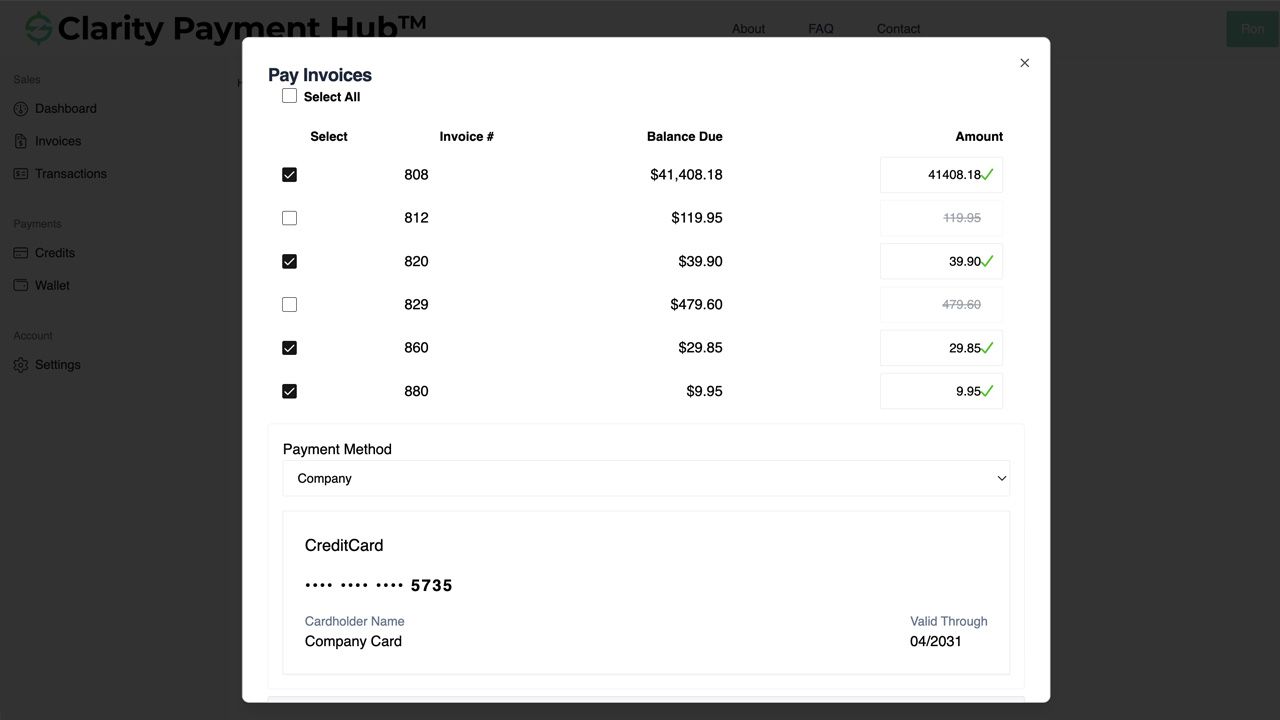
And the customer doesn't always pay one invoice at a time. The signature B2B payment workflow is a controller sitting down, selecting thirty open invoices from a list, and authorizing one consolidated transaction — with clean per-invoice cash application on your ERP side.
The self-service invoice experience — find, review, pay
When a B2B customer opens your payment portal, they're answering a specific question: "what do I owe, and how do I pay it fastest?" Every element of the Payment Hub experience is built to answer that in under 90 seconds.
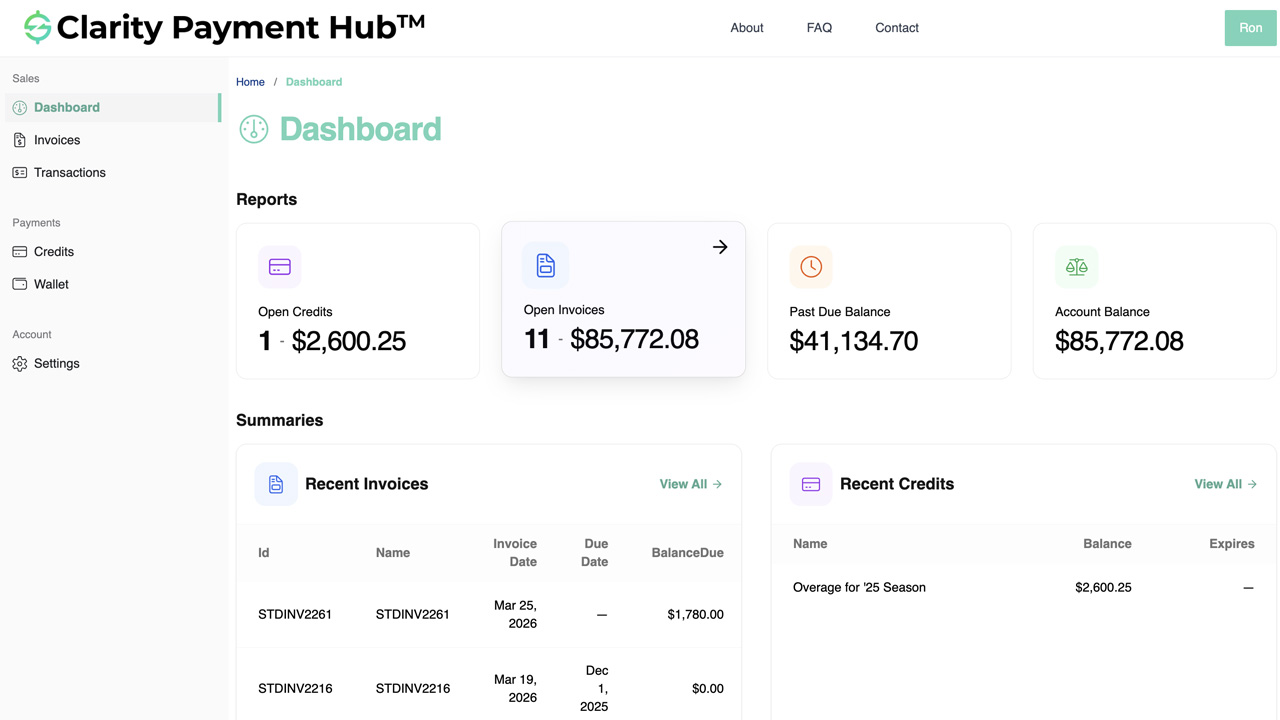
Open invoices list at login
The first thing a customer sees is the list of everything they owe — invoice number, date, amount, due date, days-past-due. Sortable, filterable, paginated for accounts with hundreds of invoices. Pulled from your ERP in real time, so the list is never stale.
Search by invoice, PO, or job
Customer types an invoice number, PO reference, or project code and the matching invoice opens instantly — with full line-item detail, tax, shipping, and account history. Replaces "can you resend invoice 4218?" phone calls entirely.
Invoice detail & PDF download
Full invoice view with line items, tax, freight, PO reference, and notes — exactly as the ERP rendered it. One-click PDF download for the customer's records, and a print-friendly view. The invoice the customer sees is the invoice your ERP stores.
Tokenized saved payment methods
Credit cards and ACH bank accounts saved to the account once are reused in one click forever. Tokens live at the gateway's PCI-scoped vault, not on your servers. Multiple authorized contacts on the same customer share the saved methods, so whoever logs in can pay without re-keying.
Method routing by invoice size
You set the rules. Invoices under a dollar threshold surface card as the default; invoices above surface ACH as the default; commercial cards still qualify for Level 2/3 data enrichment where they're chosen. Policy runs automatically so customers don't debate method per invoice.
Credit memos & available balances
Unapplied account credits and credit memos appear in the same view, ready to be applied to open invoices before payment. Customer applies credits in one click; Payment Hub writes the credit-application back to the ERP and shows the remaining invoice balance for payment.
The six B2B payment patterns Payment Hub handles natively
Almost every B2B invoice payment fits one of six patterns. Consumer-checkout software handles only the first and fumbles the other five. Payment Hub treats each as a first-class flow.
Single-invoice payment
AP clerk paying one invoice from email reminder
Customer clicks pay-by-link in a reminder email, lands pre-authenticated at the specific invoice, selects a saved card or ACH, authorizes. Cash receipt posts to the ERP within seconds. 90-second path from email open to paid.
Consolidated multi-invoice payment
Controller working the open AP queue at month-end
Customer selects any number of invoices from the open list, Payment Hub sums the total, runs one authorization, and posts per-invoice cash receipts to the ERP. Level 2/3 data flows on every eligible line. The signature B2B workflow.
Pay-on-account
Customer sending a payment without specific invoice allocation
Customer pays a general amount toward the account balance; Payment Hub applies it to open invoices per your business rules (oldest first, largest first, or operator-specified). Remaining unapplied balance surfaces on the customer record as account credit for future use.
Credit memo application
Customer applying unapplied credits before paying the balance
Available credits and credit memos appear alongside open invoices. Customer applies credits to specific invoices, Payment Hub updates the balances in real time, and the remaining open amount (if any) is presented for payment. Reconciliation is clean in the ERP.
Partial / short-pay with reason code
Customer paying part of an invoice with a dispute reason
Customer pays $9,500 on a $10,000 invoice with reason code "Damaged goods." The paid portion posts as a receipt; the unpaid balance stays open with the reason code attached; dunning stops on the paid portion only. The short-pay routes to your AR worklist with full context — not as a mystery amount.
MOTO / phone-in via AR staff
Customer preferring to call in, AR keying on their behalf
AR staff opens the customer in Virtual Terminal, selects the invoice(s), keys or selects a tokenized card / ACH on file, and submits. Level 2/3 data pulls from the ERP automatically — phone-entered transactions get the same interchange savings as portal transactions.
Watch the Demo
Portal Screenshot
Commercial cards, ACH, and the unit economics of B2B
Every B2B invoice has a right payment method. Small tickets make card processing cheap and easy; large tickets make ACH the economics-correct default. Commercial cards with Level 2/3 data enrichment can clear for less than 2% on B2B tickets where consumer cards clear at 3%+. Payment Hub encodes the right rules and runs them automatically.
The method routing policy — your rules, applied automatically
You configure the rules once; Payment Hub applies them on every invoice across every channel — portal, pay-by-link, MOTO, scheduled auto-debit. A representative policy most Clarity customers start with:
| Invoice context | Default method | What Payment Hub does automatically |
|---|---|---|
| Any invoice, consumer / non-corporate customer | Card (consumer or commercial) | Tokenized at gateway vault, 3DS2 step-up if risk requires, posted to ERP in real time |
| Invoice ≤ configurable threshold (e.g. $2,500) | Card (commercial) with L2/3 data | Line-item, tax, customer code, PO ref pulled from ERP and passed to gateway automatically |
| Invoice > configurable threshold (e.g. $2,500) | ACH / eCheck | Tokenized bank account; NACHA SEC code (CCD / CTX) selected based on customer type |
| Net 30 customer opted into auto-debit | ACH auto-debit on due date | Authorized once, scheduled against ERP due date, receipt posts when the bank confirms |
| Commercial card presented by customer choice | Card (commercial) with L2/3 data | Always enrich with L2/3 data when BIN qualifies, regardless of invoice size |
| Surcharge-eligible card in a surcharging state | Card + compliant surcharge | State-by-state rule enforcement, pre-authorization disclosure, surcharge tracked separately in ERP |
Compliant surcharging where permitted
Payment Hub supports credit-card surcharging on B2B card transactions in states and networks that permit it — state-by-state rule enforcement, network caps (typically 3% max), legally required pre-authorization disclosure, debit and prepaid cards excluded automatically. Surcharges track as a separate line in the ERP so accounting sees the pass-through clearly. Customers who prefer to avoid the surcharge typically shift to ACH, which further improves economics.
Industries where B2B invoice payment automation wins
The shape of "B2B" varies by vertical — distribution is commercial-card heavy, manufacturing is milestone / deposit driven, government is Level 3 / CEDP compliance focused, professional services is retainer and project billing. Payment Hub applies the right pattern per industry automatically.
B2B Distribution & Wholesale
The signature Payment Hub vertical. High commercial-card volume, Net 30 terms, consolidated month-end payments, large-ticket ACH, and volume discounts that need line-item data enrichment for Level 3.
- Consolidated multi-invoice payment workflow
- Level 2/3 commercial-card savings on every eligible line
- ACH default above invoice threshold
- Real-time cash application in ERP
Manufacturing
Milestone billing, balance-on-delivery payments, dealer-network commercial-card programs, service contracts. Deposits and progress invoices sit on the customer account until the next authorized buyer clears them.
- Deposits tied to sales orders & project codes
- Milestone payments with PO reference tracking
- Level 2/3 on dealer commercial cards
- Service-contract recurring on ACH
Healthcare & Life Sciences
Commercial-side B2B: vendor / lab / supply invoices between healthcare systems, practice-management billing to payers, and practice-to-vendor AP. Patient-pay flows covered by a separate AR pattern; this is the B2B side.
- Inter-entity B2B invoice payment
- Commercial-card Level 2/3 on qualifying transactions
- ACH for large interprovider / system payments
- Practice-management / ERP posting
Nonprofit & Fundraising
Foundation sponsor invoices, corporate-giving pledge collection, event-sponsorship billing, and grant-disbursement flows. The B2B side of nonprofit finance, separate from donor recurring.
- Sponsor & foundation invoice portal
- Corporate-pledge receivable collection
- Grant-disbursement tracking
- Fund-accounting GL posting with designation
Education
Institutional billing: vendor and supplier payments, research-program invoicing, continuing-ed corporate accounts, and B2B credentialing program fees. Tuition belongs to a different payment flow; this is the commercial side.
- Institutional vendor & supplier AR
- Corporate continuing-ed accounts
- B2B research and grant invoicing
- SIS / ERP posting for institutional GL
Government & Public Sector
Commercial suppliers invoicing municipalities, states, and federal agencies — the highest-value Level 3 / CEDP compliance use case in the Clarity book. Government purchase cards demand line-item detail or lose the interchange tier entirely.
- CEDP-ready Level 3 on government commercial cards
- High-dollar invoices on ACH by default
- PO reference and customer-code passing
- Posting to Tyler, Oracle, SAP, or Dynamics financials
Professional Services & Agencies
Retainer invoicing, project billing, hourly invoices, disbursements, and trust / IOLTA segregation for legal workflows. High-value individual invoices, often on Net 30 with auto-debit for anchor clients.
- Monthly retainer auto-debit on ACH
- Project and hourly invoice pay-by-link
- Trust / IOLTA account segregation
- PSA / ERP real-time posting
Subscription, SaaS & Membership
Annual-plan invoices, enterprise-tier subscriptions, and B2B renewal flows where the invoice sits alongside a subscription but pays via the same consolidated B2B pattern. Mid-cycle add-on invoices also flow through this path.
- Annual-plan invoice on ACH
- Enterprise-tier renewal invoicing
- Mid-cycle add-on invoices
- Real-time subscription / ERP posting
Book a 30-minute walkthrough and we'll run the consolidated-payment, short-pay, and credit-application flows against a sandbox of your ERP — plus pull a rough L2/3 + ACH savings model against your existing AR book.
ERP integration — per-invoice cash application in real time
B2B invoice payments only matter if the money reconciles cleanly to the invoice. Clarity Connect — Payment Hub's integration engine with 25+ ERP connectors — syncs bidirectionally with your ERP in real time, so consolidated, partial, credit-applied, and short-pay transactions all land in the GL exactly where they should.
Inbound from ERP
Customers, contacts, open invoices with full line items, PO references, credit memos, account balances, aging, payment history, terms — all in real time through each ERP's supported API layer.
Outbound to ERP
Per-invoice cash receipts, credit applications, short-pay records with reason codes, Pay-on-Account allocations, surcharge line items, and tokenized payment-method references — written the moment the customer authorizes.
25+ ERP connectors
NetSuite, Acumatica, Dynamics 365 BC / F&O, Dynamics GP / NAV, SAP S/4HANA Cloud and ECC, Sage 100 / 300 / Intacct, Oracle EBS, Epicor P21 / Kinetic / Eclipse / Eagle, Infor SX.e / CloudSuite, SYSPRO, Workday, Tyler, and more.
No ERP modifications
Clarity Connect uses only documented, supported integration points. No schema changes, no ERP-side custom code, no plugins to maintain across upgrades. ERP-vendor-compliant.
For cloud ERPs (NetSuite, Acumatica, Dynamics 365 BC, SAP S/4HANA Cloud), Clarity Connect talks directly to the ERP's cloud APIs. For on-premise ERPs (Dynamics GP / NAV, Sage 100 / 300, SAP ECC, Oracle EBS, SYSPRO, Epicor P21 / Eclipse / Eagle), we use a lightweight outbound-only secure agent that calls from inside your network — no inbound firewall ports, no VPN tunnel, no public ERP exposure.
Security, PCI scope, and B2B authorization controls
B2B payment flows touch stored tokenized payment credentials, multi-contact authentication, and authorization artifacts on recurring debits. Payment Hub is built to push your deployment to the lightest compliance scope available while supporting the role-based authorization B2B customers need.
- Tokenization at the gateway vault. Cards and ACH accounts are tokenized at the gateway's PCI-scoped vault. Raw PAN and raw bank credentials never touch Payment Hub's infrastructure and never touch your servers.
- SAQ A PCI scope. Because cardholder data is captured and stored entirely inside the gateway's environment via hosted fields or tokenization SDK, your PCI self-assessment drops to SAQ A — the lightest self-assessment available.
- Role-based access per contact. Each customer account can have multiple authorized contacts (AP clerk, controller, purchasing manager) with role-based spending authority — read-only, pay up to threshold, full payment authority, Pay-on-Account approval.
- NACHA-compliant ACH authorization. Every recurring or one-time ACH debit captures NACHA-required authorization (electronic signature or audit-trailed click-to-authorize) with the 2-year retention window NACHA requires. SEC code selection (CCD / CTX / WEB / TEL / PPD) happens automatically.
- Commercial-card L2/3 automatic. Line-item, tax, customer-code, and PO reference flow from the ERP to the gateway on every eligible transaction — maintaining the interchange-tier qualification with no manual rekeying.
- SOC 2 Type II. Clarity Ventures operates to SOC 2 Type II standards. Security, availability, confidentiality, and data-handling controls are independently audited on an ongoing basis.
- Outbound-only ERP agent. For on-premise ERPs, no inbound firewall ports, no VPN tunnel, no public ERP exposure.
B2B Invoice Payments FAQ
The questions B2B AR, IT, and finance teams ask before rolling out self-service invoice payments in Clarity Payment Hub.
Why don't consumer-style checkout pages work for B2B invoice payments?
Consumer checkout assumes one buyer paying for one order from a cart. B2B invoice payments are almost the opposite: a customer account with many open invoices, multiple authorized buyers per account, PO references, project or job tracking, credit memos sitting unapplied, short-pays with reason codes, commercial cards that qualify for Level 2/3 interchange savings, and high-dollar amounts where ACH is the economics-correct default.
Clarity Payment Hub is built for that shape — a list view of open invoices, multi-invoice selection, credit application, short-pay handling, and commercial-card data enrichment in one branded self-service portal.
Can customers pay multiple invoices in one transaction?
Yes — this is one of the most-used B2B flows in Payment Hub. From the open invoices list, a customer selects any number of invoices (three, thirty, or three hundred), Payment Hub sums the total, runs a single authorization against the selected payment method, and posts individual cash receipts back to the ERP against each selected invoice.
One customer click, one customer-facing transaction, clean per-invoice cash application in the ERP. For commercial-card transactions, Level 2/3 data enrichment runs on every eligible invoice in the batch automatically.
How does Payment Hub handle commercial cards and Level 2/3 data?
When a B2B customer pays with a qualifying commercial card (Visa or Mastercard purchasing, corporate, or fleet card), Payment Hub pulls the line-item detail, sales tax, customer code, PO reference, freight, duty, and product codes from your ERP and passes them to the underlying gateway on every eligible transaction. This qualifies the card for the lowest Level 2/3 interchange tiers.
Commercial-card merchants commonly save 0.5–1.0% per transaction when Level 2/3 data is passed correctly — roughly $250–$500 on a $50,000 invoice, every time. Works on Worldpay, Cybersource, Fortis, PayTrace, Stripe, Braintree, Authorize.Net, Global Payments, and other supported gateways.
What happens when a customer wants to apply a credit memo to an open invoice?
The customer sees available account credits in the portal alongside the open invoices and applies them with a click. Payment Hub validates that the credit is applicable (same customer, open balance, no prior application), updates the invoice balance in real time, posts the credit application to the ERP, and surfaces any remaining balance for payment.
If the credit covers the invoice in full, the invoice closes as satisfied-by-credit; if partial, the remaining balance stays open for payment by another method. The AR team doesn't field the phone call; the ERP stays in sync.
Can customers make partial or short payments?
Yes. Payment Hub supports partial payments with optional reason codes — for example, a customer paying $9,500 on a $10,000 invoice with a short-pay reason of "Damaged goods" or "Return pending."
The paid portion posts to the ERP as an applied receipt; the unpaid balance stays open with the reason code attached; dunning stops on the paid portion and continues on the remaining balance only. The short-pay exception routes to your AR team's worklist with the reason code, the customer history, and the invoice detail — so AR works dispute resolution, not mystery-amount investigation.
Does this work for customers with multiple authorized buyers?
Yes. B2B customer accounts commonly have multiple authorized contacts — AP clerk, controller, purchasing manager, owner — each with different permissions. Payment Hub supports per-contact authentication and role-based access at the customer-account level: a junior AP clerk can view open invoices and submit payments up to a dollar threshold, while a controller has approval rights on larger payments or Pay-on-Account.
Saved payment methods live at the account level, so any authorized contact can charge the same stored card or ACH without re-entering credentials. Audit trail captures which contact authorized each transaction for compliance and dispute handling.
What about phone-in payments from customers who won't use a portal?
Payment Hub supports MOTO (Mail Order / Telephone Order) entry through an AR-staff Virtual Terminal. When a B2B customer calls in, your AR rep opens the account in Payment Hub, selects the invoice(s) the customer wants to pay, and keys in or selects a tokenized card or ACH on file.
Level 2/3 data is pulled from the ERP automatically — even on phone-entered transactions — so commercial-card interchange savings apply regardless of channel. The MOTO payment posts to the ERP through the same real-time pathway as portal transactions.
How does Pay-on-Account work?
Pay-on-Account lets a customer submit a general payment toward the overall account balance without specifying which invoice(s) it applies to. Payment Hub then allocates the payment to open invoices per your configured business rules — typically oldest-first, largest-first, or a custom rule that matches your AR application policy.
Any remaining unapplied balance surfaces on the customer record as account credit, available for future invoice application. The allocation logic posts to the ERP exactly as if AR had manually applied it — so your aging and cash-application stay clean without AR involvement.
Which gateways does this work with?
Every supported Payment Hub gateway — Worldpay, Adyen, Cybersource, Fortis, Elavon, PNC, PayTrace, Nuvei, Stripe, Braintree, Authorize.Net, Global Payments, NMI, USAePay, and consumer wallets where applicable. Payment Hub is gateway-agnostic; your B2B invoice payment experience stays constant if you change processors.
Level 2/3 commercial-card enrichment, ACH (including each gateway's branded ACH product like eCheck.Net or ACH Direct Debit), and all six B2B payment patterns work identically across the supported gateway library.
What's the implementation time?
A typical Payment Hub + ERP go-live takes 48 hours once Clarity receives ERP sandbox credentials and gateway API credentials. No new servers, no middleware, no custom code on your ERP side.
Most customers roll out to a single business unit or customer segment first to validate the DSO and unit-economics impact, then expand from there. Implementation is a flat subscription with the ERP integration included — no transaction markup, no per-invoice fees from Clarity.
Can we keep our existing gateway and acquiring relationship?
Yes. Payment Hub is gateway-agnostic — you keep your existing merchant account, acquiring bank, negotiated rates, and gateway credentials. Payment Hub sits above the gateway as the B2B customer-experience layer and ERP integration; the processing flows through your current gateway at your current rates. Clarity does not insert a transaction markup or skim basis points.
Does the portal carry our brand or Clarity's?
Yours. The portal runs under your domain (pay.yourcompany.com or similar), carries your logo, your colors, your fonts, and your copy. Customers do not see Clarity Ventures branding in the customer-facing flow. The admin interface your AR team uses is a Clarity product but lives behind your authentication and is not customer-facing.