


Self-Service
Balance & Aging
Inbound Calls
Integrated
Timeline
One portal, two audiences, one live source of truth
So what does the customer get with Payment Hub? Most "customer payment portals" are marketing-department PDF replacements — a web page that replays yesterday's statement. Clarity Payment Hub's portal is different: it reads and writes directly from your ERP through Clarity Connect, so the customer sees exactly what your finance team sees, refreshed to the moment. A brand-new invoice posted 30 seconds ago? Already visible to the customer. A payment captured on the phone 10 seconds ago? Already reflected in the balance. A credit issued by AR this morning? Already available to apply. One data stream, two views, zero reconciliation debt between them.
You get both the Virtual Terminal or Embedded ERP UI. The twist that actually matters: your sales reps, AR clerks, branch managers, and controllers get access to the same portal in a team-facing skin. When a customer calls and asks "what's my balance?", the rep is looking at the identical live ERP number the customer sees on their own screen. When the rep takes a payment over the phone, it posts to the same ERP record the customer would have hit from self-service — with one audit trail that tells you who initiated the transaction and on whose behalf.
Customer view vs team view — same data, two interfaces
If you want to see EXACTLY what the customer sees, then the portal has two front-ends running over one data model. The customer-facing skin shows the customer what they need for self-service. The team-facing skin shows sales reps, AR clerks, branch managers, and controllers everything the customer sees plus the operational context they need to act — collections notes, credit holds, payment-method expiration flags, cross-sell opportunities. Both sides write back to the ERP in real time.
Customer-facing portal
Self-service, 24/7, branded to look like part of your business
- Real-time outstanding balance & aging buckets
- All open invoices — pay one, several, partial, or all
- Past-due flag on overdue invoices with one-click-to-pay
- Available account credits — apply to open invoices or balance
- Saved tokenized payment methods (card & ACH)
- Autopay enrollment, pause, and cancel — self-serve
- Payment history, downloadable receipts, statements
- New payment method entry — raw PAN never stored
- Billing contact management & address updates
Team-facing portal
Same ERP data, operational context, take action with or for the customer
- Everything the customer sees — exact same numbers
- Take payment on behalf of customer (phone MOTO, saved method)
- Credit hold status, payment-plan notes, collection history
- Card expiration warnings, recent decline flags
- Multi-customer dashboard — sort by aging, by balance, by activity
- Email / SMS pay-link to customer from any invoice in one click
- Apply or issue credits with audit trail
- View autopay status, enroll or unenroll on customer's behalf
- Full audit log of every portal action (who, when, what)
Real-time outstanding balance — the moment of truth
The first question every customer has when they log in is "what do I owe?". The first question every sales rep has when a customer calls is "what do they owe?". Both questions answer to the same live ERP-sourced number. No reconciling. No call-backs. No stale PDF emailed last week.
Watch the Demo
Portal Screenshot
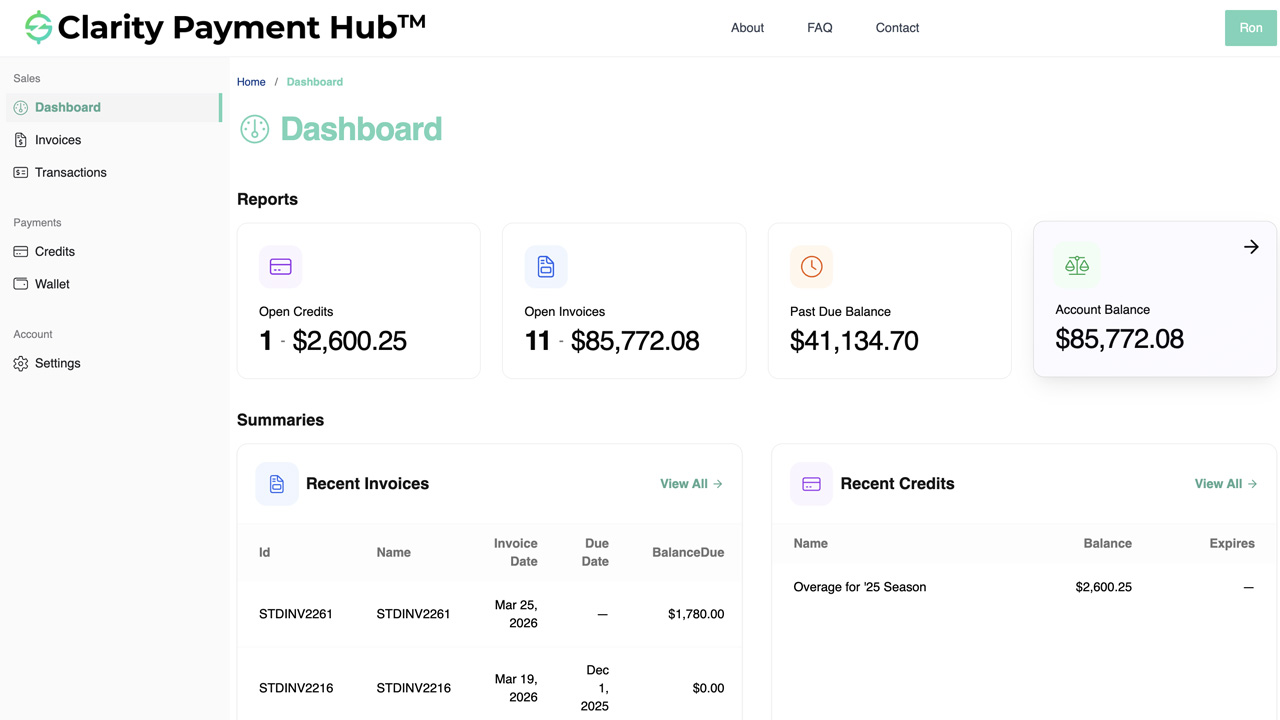
Behind that single balance number is a live Clarity Connect query to your ERP running every time the portal loads. The number reflects: invoices posted through this morning, payments captured in the last hour, credits issued yesterday, adjustments made 10 minutes ago. If AR just voided an invoice, the balance drops. If a new shipment invoiced 30 seconds ago, the balance ticks up. The customer never sees a stale number; your rep never sees a stale number. Both operate with the same confidence that what they're looking at is correct right now.
How Payment Hub powers self-service at both ends
Eight capabilities make the portal genuinely useful rather than a marketing veneer. Each one is ERP-integrated — the portal isn't a standalone web app with a nightly sync; it reads and writes through Clarity Connect to the ERP in real time.
Live ERP data fetch
Portal reads open invoices, balances, aging, credits, and saved methods from your ERP through Clarity Connect on every refresh — no sync delay, no overnight batch. NetSuite, Acumatica, Dynamics, Sage, SAP, Epicor, Infor, and more.
Pay-one / pay-many / partial
Customer selects a single invoice to pay, a bundle of invoices into one consolidated transaction, a partial amount against a single invoice, or everything outstanding in one click. Each option posts cleanly back to the ERP as the right record.
Tokenized saved methods
Cards and ACH credentials tokenize at the gateway vault — never stored on Payment Hub servers or in the customer's browser. Customer selects "save for next time"; the token attaches to their account. One-click payment on future visits.
Autopay self-enrollment
Customers enroll in autopay themselves: pick a saved method, pick a rule (every invoice, every over $X, monthly statement), confirm terms. Customers can pause or cancel anytime. Your team sees autopay status and can enroll / unenroll on request.
Apply account credits
Customer sees available credits in the portal and applies them against open invoices — either in full or partially. Credit selection posts back to the ERP as a credit application, adjusting the invoice balance in real time.
Aging view + past-due flags
Portal breaks aging into Current, 31–60, 61–90, 90+ buckets with past-due invoices prominently flagged. Customer sees what needs attention; rep sees the same aging for collections prioritization.
Statements & receipts — downloadable
Customer downloads monthly statements, individual invoice PDFs, payment receipts, and autopay confirmations on-demand — all generated from current ERP data, not from stale statement PDFs emailed weeks ago.
Full audit trail + branding
Every action — customer or team — logs with who, when, what. Portal is branded to match your business (logo, colors, URL subdomain) — feels like your product, not Clarity's. White-label or co-branded deployment supported.
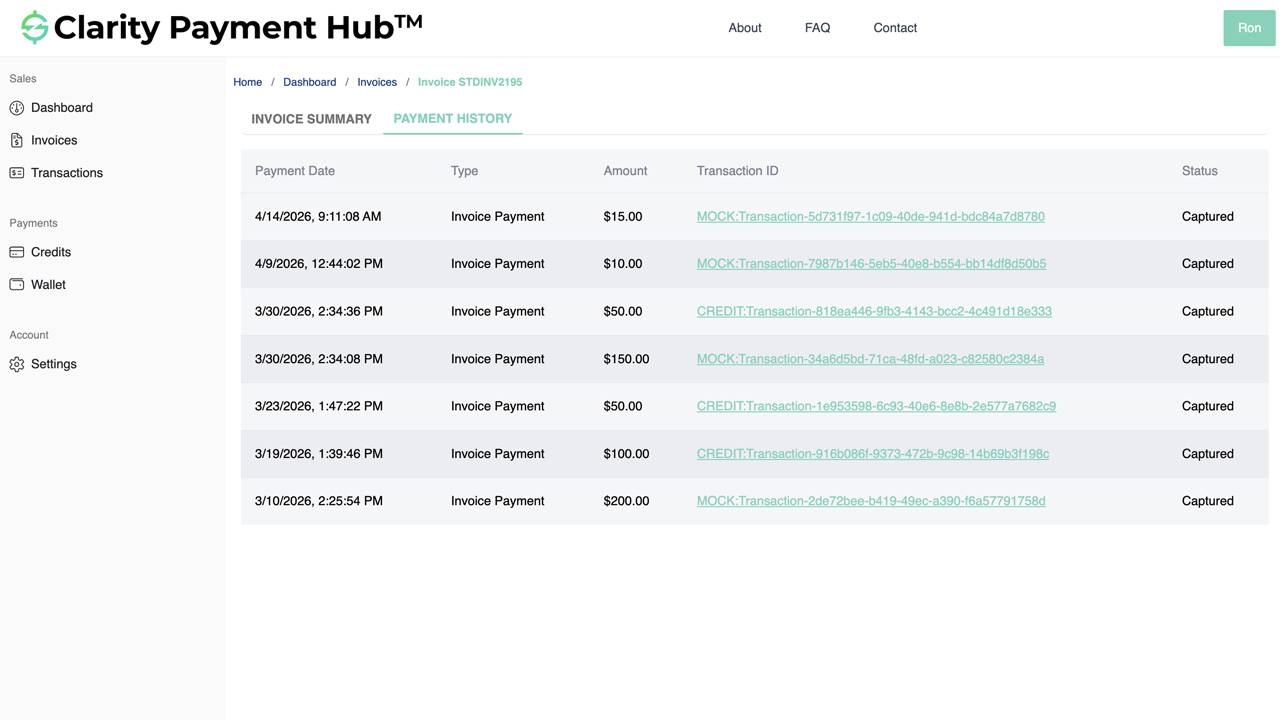
A customer-initiated workflow — login to paid in 90 seconds
A concrete walk-through: a customer logs into the portal, sees their balance, applies a credit, pays two invoices consolidated, enrolls in autopay for the future, and logs out — all in 90 seconds. Every step writes back to the ERP in real time; your AR team sees every step as it happens.
Customer logs into the portal
Acme Widgets' AP manager logs into yourcompany.com/pay (or your branded subdomain). Portal authenticates against the customer record in your ERP. Clarity Connect fetches the live balance, open invoices, aging, credits, and saved methods. Dashboard renders in < 1.5 seconds.
ERP auth Live data fetchCustomer sees the real-time picture
Balance: $18,420 outstanding. Three open invoices: INV-4820 ($3,120, Net 30, due next week), INV-4881 ($5,400, past due by 14 days), INV-4902 ($9,900, Net 30, due in three weeks). Available credit: $320 from last month's return. Saved method: Visa ending 4421.
Balance · aging · creditsAP manager selects two invoices to pay
Selects INV-4820 and INV-4881 (total $8,520). Clicks "apply available credit" — the $320 credit applies against INV-4881, reducing the total selection to $8,200. Selects saved Visa 4421.
Multi-invoice Credit appliedPayment submits; gateway authorizes
Payment Hub identifies Visa 4421's BIN as Visa Purchasing (commercial), flags the transaction for L3 enrichment. Clarity Connect pulls invoice line items from the ERP for both invoices, packages them into the L3 envelope. Gateway authorizes $8,200 in < 2 seconds at L3 rates.
L3 enriched < 2s authERP posts the cash application
Clarity Connect writes to the ERP: INV-4820 closes ($3,120 applied), INV-4881 closes ($5,080 cash + $320 credit = $5,400 applied), the $320 credit is consumed, cash receipt lands in GL 1010 for $8,200. Customer's balance updates to $9,900 — only INV-4902 remains open. AR team's dashboard picks up the payment in real time.
Real-time ERP posting AR sees it instantlyCustomer enrolls in autopay
Customer clicks "Enroll in autopay". Picks the saved Visa 4421. Selects rule: "pay every invoice automatically on its due date". Reviews and confirms terms. Autopay enrollment posts to Payment Hub's scheduler. INV-4902 is now set to auto-pay on its due date.
Self-enroll autopayPortal confirms and emails receipt
Portal shows "Payment successful — $8,200 applied to 2 invoices. Autopay enrolled." Receipt email goes to customer's billing contact automatically. Customer can download the receipt PDF; customer can see the transaction in payment history already. Total elapsed time so far: 90 seconds.
Receipt emailed History updatedYour rep sees it in the team portal
Acme's assigned sales rep opens their team dashboard next morning. Acme's past-due is cleared (no longer needing a collections call). Autopay is enrolled on the remaining invoice. L3 savings of ~$61 are logged on the transaction. No work for the rep — the portal did the entire interaction without anyone on your side needing to be involved.
Zero team interventionPast-due self-service — clearing aging without the phone call
A meaningful share of past-due aging is just reminder-driven — customers intended to pay but missed the due date, and once they see the past-due flag, they pay. Payment Hub's portal makes that path frictionless: past-due invoices are prominently flagged, one-click pay clears them, and automated reminder emails carry direct pay-links straight to the invoice-ready-to-pay screen.
Watch the Demo
Portal Screenshot
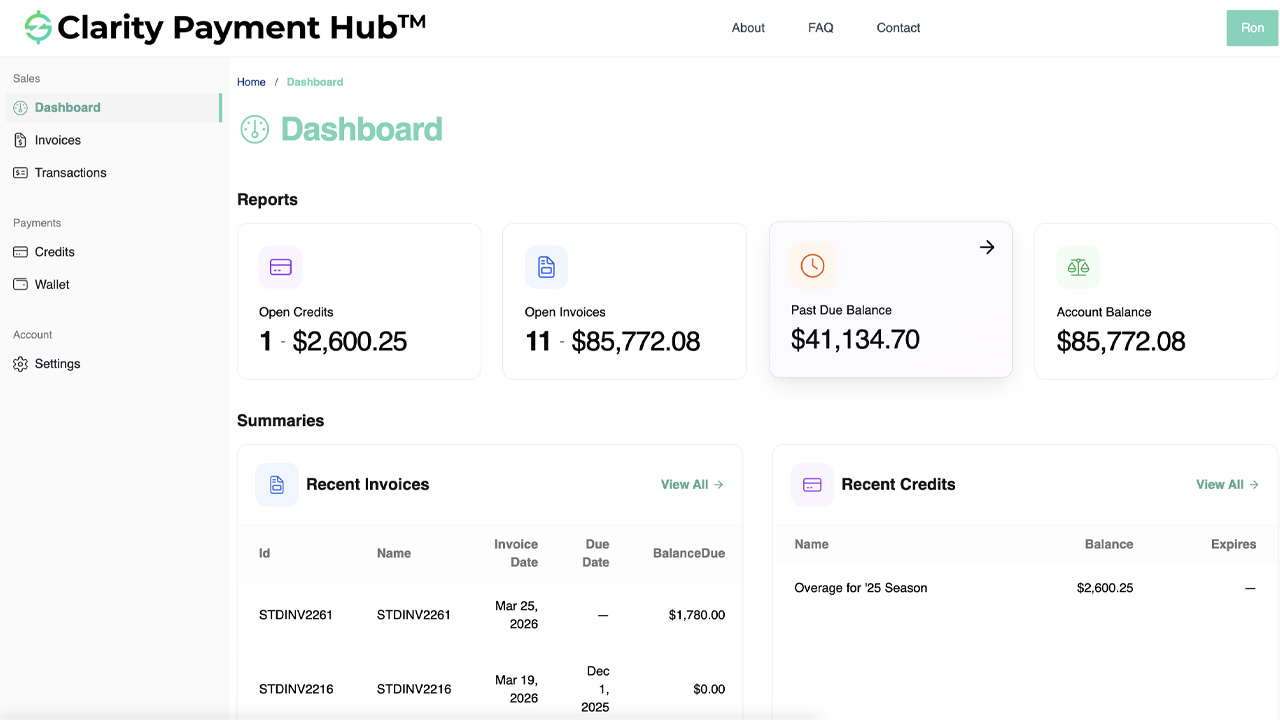
When combined with automated past-due reminder emails (triggered by the ERP's aging status), the typical result is that a majority of 30–60-day aging clears itself through customer self-service. Your AR team's collections effort shifts from routine "friendly reminder" calls on small past-due balances to higher-value dispute resolution and true collections on the aged-over-90 bucket. DSO reductions of 5–12 days in the first 90 days are typical for B2B operations with a mix of responsive and unresponsive customers.
Industries where self-service payment pays off most
Self-service payment portals deliver the most value wherever a high volume of routine invoice-inquiry and payment-processing work currently lands on human AR staff — and wherever customers are willing or eager to transact without a phone call. B2B businesses with repeat customers dominate the strong-fit list.
Wholesale & Industrial Distribution
Repeat B2B customers ordering weekly / monthly with Net-30 terms. Portal eliminates "what's my balance" calls to inside sales; customers self-serve across invoice payment, partial-pay, and credit application. Often the highest-ROI deployment.
- Repeat B2B buyers with running balances
- Contractor / distributor-to-distributor
- Fleet / parts / supply recurring orders
Manufacturing & Industrial
B2B manufacturing with Net-30 / Net-45 customers, deposits on larger orders, and routine invoice flows. Portal handles invoice payment, deposit tracking, autopay enrollment, and past-due resolution — all without tying up controller time on routine lookups.
- Multi-invoice account relationships
- Deposit-driven order workflows
- Customer AP team as portal user
Government & Municipal Billing
Utility bills, permit fees, tax assessments, parking citations, court fines. High-volume, recurring, constituent-facing payment operations. Portal eliminates counter-traffic and phone calls for routine payment; staff focuses on exceptions & appeals.
- Municipal utility (water / gas / electric) billing
- Permit / license fee collection
- Citation / fine payment
Healthcare (Patient Billing)
Patient-responsibility billing after insurance processing — copays, deductibles, procedure balances. Portal gives patients the self-service they increasingly expect, with payment plans, split-pay, and family-account support. Reduces medical-billing collections pressure.
- Patient balance bills
- Payment plans & installments
- Family / household account views
Professional Services B2B
Law firms, CPA practices, engineering consultancies, IT services, architectural firms. Client-facing portal for project retainer invoices, milestone invoices, and final billings. Client AP teams self-serve; firm partners save time on billing inquiries.
- Retainer & milestone billing
- Matter-level invoice detail
- Saved method for repeat engagements
Education (Tuition & Fees)
Higher ed tuition, K-12 tuition and activity fees, continuing-ed registration. Students / parents self-serve tuition payment, fee payment, and payment-plan enrollment. Bursar and registrar offices focus on exceptions rather than routine transactions.
- Student / parent portal with balance
- Payment plans & installments
- Family / sibling account consolidation
Nonprofit & Association Dues
Membership dues, event registration fees, sponsorship invoices, donor pledge fulfillment. Portal serves members / donors / sponsors with self-service — dues renewal, pledge tracking, tax-receipt downloads. Operations team focuses on development & programs.
- Annual dues renewal
- Event registration + sponsor invoices
- Pledge installment self-serve
Retail & Pure eCommerce
Pure-retail / pure-DTC eCommerce typically doesn't have "invoices" — payment happens at checkout and there's no ongoing AR. Portal value is lower. Hybrid retail (wholesale B2B side of a retail business) gets full portal benefit on the B2B side.
- B2B wholesale side of retail: strong
- Pure D2C checkout: minimal portal use
- Post-purchase returns / credits: some value
Self-Service Payment Portal FAQ
The questions sales, AR, IT, and operations ask before rolling out the self-service portal to customers.
What can customers actually do in the self-service portal?
Customers log into a branded payment portal, see their ERP-sourced real-time account detail — open invoices, total outstanding balance, available account credits, saved payment methods, payment history, statements — and act on any of it.
They can pay a single invoice, pay several invoices consolidated into one transaction, make a partial payment, apply an account credit, download a statement or receipt, save a new payment method (tokenized), update billing contacts, or enroll in autopay. All of it is available 24/7 without a phone call to your AR team.
Does the sales / AR team see the same thing the customer sees?
Yes. The same real-time ERP-sourced data drives both the customer-facing portal and the internal team view — your AR clerk, sales rep, controller, or branch manager sees the customer's current open invoices, balance, credits, payment history, and saved methods in a team-facing version of the same portal.
When a customer calls asking "what do I owe", the rep on the phone is looking at the identical number the customer would see if they logged in — no lookups, no spreadsheet, no "let me check with accounting and call you back." The team view adds operational context (credit hold notes, collections history, payment-method expiration flags, cross-sell opportunities) that the customer doesn't see, but the core balance and invoice data is identical across both audiences.
How real-time is 'real-time' exactly?
Sub-second in the typical case. When a new invoice posts in the ERP, the customer portal reflects it within seconds. When a payment captures through Payment Hub, the customer's balance updates immediately — the customer sees "payment processed" with the new balance on the screen they're still looking at.
When AR adjusts an invoice or applies a credit in the ERP, the customer's portal picks up the change on next refresh. There's no nightly-batch "portal sync" that leaves customers looking at yesterday's data. The portal isn't a copy of ERP data — it's a live read from the ERP through Clarity Connect every time it renders.
Can customers see past-due / aging information?
Yes. The customer portal includes an aging view — Current, 31–60, 61–90, 90+ — showing which invoices are in each bucket and the total owed in each. Past-due invoices are flagged on the main open-invoices list with a visual indicator so customers see at a glance what needs attention. Customers can click any past-due invoice to pay it directly.
For businesses where automated past-due reminders are configured, customers receive an email with a direct pay link that takes them to the exact invoice in the portal ready to pay in one click. This combination — portal visibility plus proactive reminder emails — typically clears a meaningful share of 30–60 day aging without staff time.
Do customers need separate logins for each location or entity we operate?
No. A customer who does business with multiple locations, entities, or subsidiaries of your organization sees a consolidated view across all of them — total outstanding across all entities, invoices from each, aging rolled up or broken down by entity.
They have one login that represents their overall relationship with your business, regardless of how many ERP entities or branches they buy from. This matters for multi-location distributors and franchise operators where the customer has one procurement relationship but buys from five of your branches.
Does the portal accept all payment methods we do?
Yes. Credit card (Visa, Mastercard, AmEx, Discover), ACH / eCheck, saved tokenized methods, wallet methods (Apple Pay, Google Pay, Amazon Pay, PayPal) where your gateway supports them, and customer account credits.
The portal respects whatever method configuration you've set — if your policy allows ACH for invoice payments over $2,000 but requires card below that threshold, the portal enforces that. Commercial cards automatically trigger Level III enrichment for the interchange savings. Surcharging (where permitted by state law) is configured centrally and applied uniformly to portal transactions.
Can customers save payment methods to the portal for later use?
Yes. Payment methods (cards and ACH) are tokenized at the gateway vault and stored on the customer's account — not on Payment Hub's servers or on the customer's browser. The customer selects "save this card" at any payment moment and the tokenized reference attaches to their profile.
On next login, they see the method listed (last 4 digits, expiration, nickname) and can pick it for one-click payment. They can add or remove methods, mark one as default for autopay, and delete methods they no longer use. Raw PAN never touches Payment Hub; this is also why the portal keeps your compliance footprint light (lower PCI SAQ scope).
Does enrolling in autopay through the portal work?
Yes. Customers self-enroll in autopay from the portal — pick a saved payment method, pick the trigger rule (every invoice, every invoice over $X, monthly statement, etc.), review terms, and confirm. The enrollment stores in Payment Hub; every triggering event runs the scheduled payment automatically.
Customers can pause, update, or cancel autopay anytime from the same portal. Your AR team also sees which customers are on autopay and can enroll or unenroll on a customer's behalf if the customer prefers to handle it over the phone. Autopay runs the existing saved method; if the method fails or expires, the customer gets an email and the autopay pauses until they update.
What does the portal look like to end customers — is it branded?
Fully branded. The portal lives at your subdomain (e.g., pay.yourcompany.com or app.yourcompany.com/pay), uses your logo, your color palette, your receipt templates, your terms-of-service language. Customers experience it as part of your business, not as a Clarity product. Email notifications (receipts, past-due reminders, autopay confirmations) come from your sender address with your branding.
White-label deployment is standard. Co-branded deployments (your branding plus "Powered by Clarity Payment Hub") are available when partners want the attribution.
How does the portal handle security and PCI scope?
Raw card data never touches Payment Hub infrastructure or your servers. The customer's payment-form keystrokes post directly to the gateway's PCI-scoped vault through a hosted iframe / JS-token pattern; a tokenized reference comes back to Payment Hub for future use. This keeps the portal in SAQ A / SAQ A-EP scope (the lightest PCI scope), dramatically lowering your compliance burden versus self-hosting card handling.
Authentication supports SSO (SAML, OAuth, Microsoft / Google identity providers) for B2B customers who want to use their corporate login; it also supports magic-link email authentication for customers whose AP teams don't have corporate SSO. Two-factor authentication is optional / configurable.
Can a customer pay partial on an invoice or split payment across multiple methods?
Yes. Partial payment: customer selects an invoice and enters any amount less than or equal to the invoice balance; the payment applies, invoice balance decrements in the ERP in real time. Split-payment: customer applies an account credit to an invoice and pays the remainder with a saved card, or splits a payment across two cards if the gateway supports it.
Every partial / split payment posts cleanly to the ERP — no manual reconciliation between the invoice record and the partial-payment records, no stranded cash receipts on the customer's account.
How long does a portal deployment take?
48 hours to go-live once Clarity receives your ERP sandbox credentials, gateway credentials, customer portal subdomain preference, and basic branding assets (logo, color, terms text). The portal is available to customers the moment the DNS points to the right endpoint.
For a complete rollout — communicating to customers, training AR / sales staff on the team-facing view, configuring autopay rules, setting up past-due reminder templates — most businesses budget 2–4 weeks from go-live to full adoption. Your existing gateway, merchant account, ERP, and customer records all carry forward; nothing needs to be migrated or reconfigured on the backend.