


Architecture
· Returns
Native
Integrated
Timeline
The checkout comes with 20+ years of ecommerce DNA built in
Clarity's history with commerce and payment processing is decades long. Most payment-hub products treat checkout as a payment form — a few input fields for card and address bolted onto a template. Clarity Payment Hub's checkout comes from somewhere different: the Clarity eCommerce platform, Clarity's own 20+ year ecommerce codebase. That changes what you get.
Built on the Clarity eCommerce platform
Clarity started over 20 years designing and building custom B2B integrated eCommerce solutions and built a business of it. Clarity eCommerce is that platform we've been building for 20+ years to run B2B and B2C ecommerce storefronts. It has cart, product catalog, customer-specific pricing, shipping and tax engines, sales order processing, invoice payment, returns and RMAs, customer accounts with order history, and tokenized wallet — all as first-class primitives. Clarity Payment Hub is built from and on that platform.
In practice, that means the checkout you get from Payment Hub isn't a payment widget. It's a real ecommerce checkout. The customer sees a cart they can edit, a line-item-aware total with shipping and tax, a tokenized wallet with saved methods, an order review step, and a post-purchase confirmation. Your ERP sees a proper sales order with line items, customer, tax, and shipping — not just a lump-sum authorization.
As a modular platform, if you need a full branded storefront with catalog browse, product pages, and customer portal, Clarity eCommerce is the sibling product that does the whole thing end-to-end. If you already have a storefront and need the checkout, payment, order, and ERP integration piece, Payment Hub is that layer — running on the same architecture.
How Payment Hub handles ecommerce checkout
Eight concrete capabilities run the checkout experience. Each one is inherited from the Clarity eCommerce codebase and integrated with your ERP through Clarity Connect.
Real cart with editable line items
Customers add, remove, adjust quantities, apply promo codes, and see running totals. Tax and shipping recalculate on change. Cart persists across sessions for logged-in customers; ERP pricing rules apply throughout.
Customer-account aware pricing & terms
B2B customers see their negotiated pricing, contract rates, and credit terms — pulled from the ERP in real time. Consumer customers see standard pricing. The checkout behaves differently for each, automatically.
Shipping & tax calculation
Real-time shipping rates from carriers (or flat / tiered rules you configure), destination-aware tax calculation (via Avalara, TaxJar, or ERP-native tax engines), and multi-ship-to address support for B2B drop-ship or multi-site fulfillment.
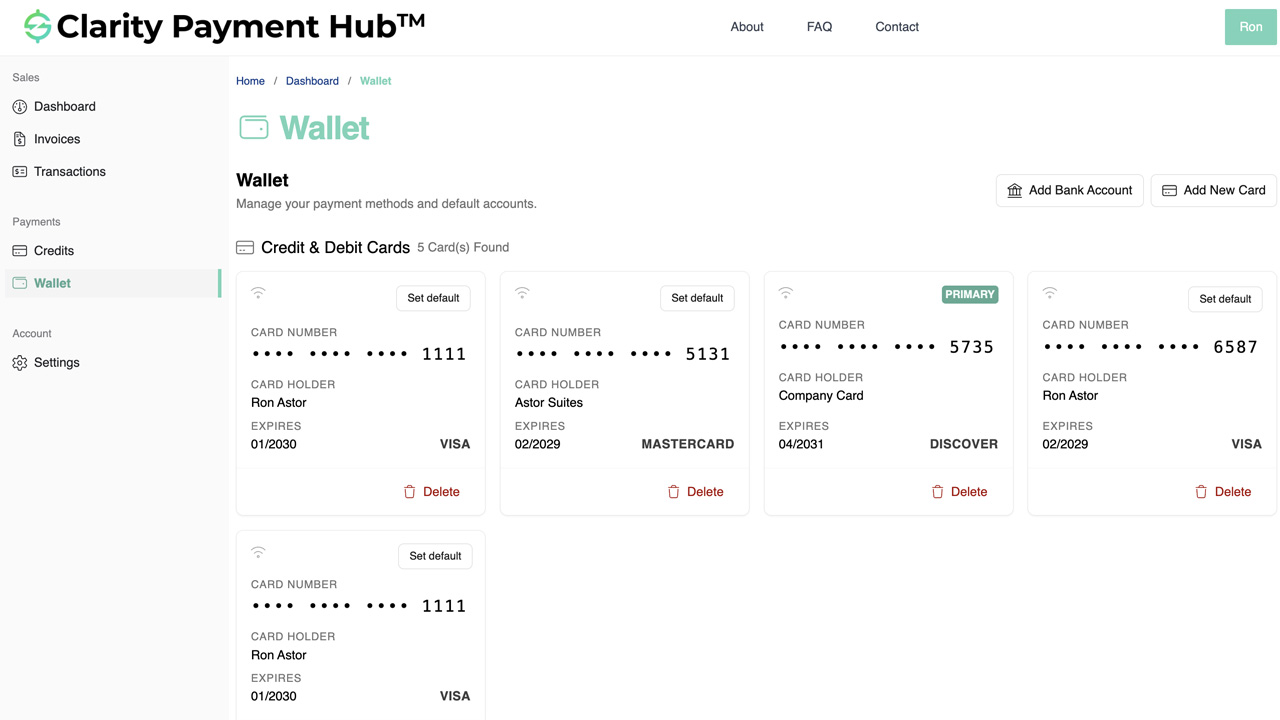
Tokenized saved-method wallet
Cards and ACH saved to the account tokenize at the gateway's PCI-scoped vault on first use. Repeat checkouts are one click. Raw PAN never touches your servers. For B2B, saved methods share across authorized contacts on the customer account.
Sales order creation in the ERP
On checkout, Payment Hub writes a sales order to your ERP with full line items, customer, ship-to, bill-to, tax, shipping, PO reference, and any discounts. The ERP handles fulfillment; Payment Hub handles the payment and the order handoff.
Commercial-card Level 2/3 from the cart
Cart line items, tax, customer code, PO reference, and shipping flow to the gateway on qualifying commercial-card transactions — qualifying the card for lowest-tier interchange. Ecommerce carts are actually the ideal L2/3 data source; Payment Hub uses them natively.
Returns & RMAs
Customer initiates return from the account portal (or customer service initiates it on their behalf). Payment Hub validates the return policy, creates the RMA in the ERP, and — once approved and received — processes the refund back to the original tokenized payment method. Partial returns pro-rate shipping and tax per your rules.
Real-time order + cash posting to ERP
Sales order, cash receipt (if paid now) or open invoice (if charged-to-account), inventory allocation, and tax records all post to your ERP through Clarity Connect at checkout completion. No nightly batch; no reconciliation mystery.
Watch the Demo
Portal Screenshot
Sales orders, invoices, and returns — same checkout, different transaction type
The reason Clarity eCommerce lineage matters is that ecommerce covers more than "cart → card → receipt." A real ecommerce codebase handles three distinct transaction types natively — and Payment Hub inherits all three.
Sales orders
Customer browses, adds to cart, checks out. Payment Hub creates a sales order in the ERP with full line items, customer, ship-to, tax, shipping, and PO reference. Payment may be immediate (card / ACH / wallet) or charged-to-account on Net terms.
- Cart with editable line items
- Shipping & tax calculation
- Saved tokenized wallet
- Pay-now or charge-to-account
- SKU-level Level 2/3 for commercial cards
- Real-time sales-order creation in ERP
Invoice payment
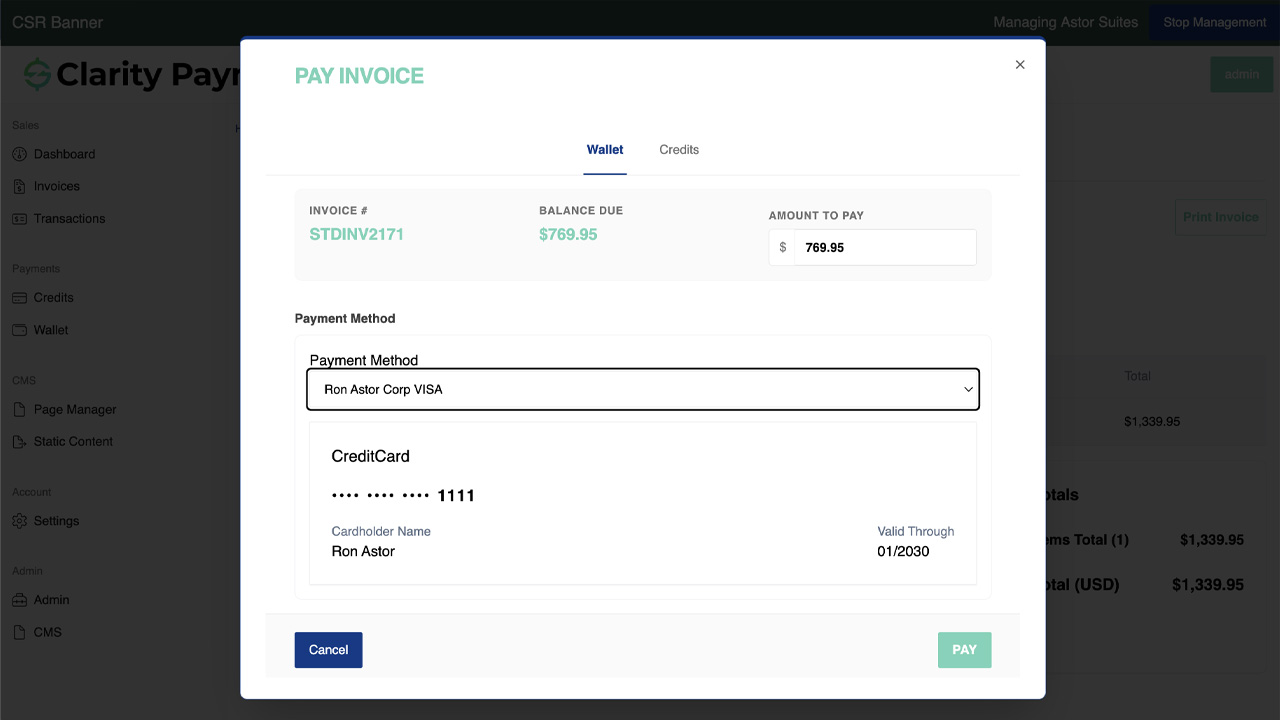
Customer signs in, sees open invoices, pays one or many. Same checkout engine, different entry point — the "cart" is an invoice selection instead of a product selection. Consolidated payment, credit-memo application, and short-pay all flow through the same codebase.
- Open invoices list from the ERP
- Single or consolidated multi-invoice payment
- Credit memo application
- Short-pay with reason codes
- Level 2/3 per invoice on commercial cards
- Per-invoice cash application to ERP
Returns & RMAs
Customer initiates a return against a prior order, or customer service does it on their behalf. Payment Hub validates against the return policy, creates the RMA in the ERP, and processes the refund to the original tokenized method when the return is received.
- Customer-initiated return request
- Customer-service-assisted return
- Return policy validation
- RMA creation in the ERP
- Refund to original method (card, ACH, wallet)
- Partial returns with pro-rated shipping & tax
The ecommerce checkout workflow — cart to confirmation
A concrete walk-through of what happens when a returning B2B customer places a new ecommerce order. Each step is Payment Hub doing work that would otherwise fall on a separate ecommerce platform or on a payment widget plus manual ERP entry.
Customer signs in & browses the catalog
Returning customer signs in with their account credentials. Payment Hub loads their ERP-sourced account — customer-specific pricing, negotiated rates, saved ship-to addresses, tokenized saved methods, credit limit, Net terms. Product catalog reflects their pricing tier.
ERP-aware pricing Multi-ship-toCart builds with real line items
Customer adds products to cart — Widget Pro × 3 at the customer-specific price. Payment Hub calculates subtotal, freight, and tax based on ship-to jurisdiction. Cart persists across session if customer navigates away.
Live totals Persistent cartCheckout review — shipping, PO, notes
Customer selects ship-to address (from saved list or enters new), chooses shipping method (real-time carrier rates or tiered flat rules), adds a PO reference, and optionally a note for fulfillment. Tax recalculates for the chosen ship-to jurisdiction.
Carrier rates PO referencePayment method — saved wallet or new entry
Customer sees the account's tokenized wallet: a saved commercial card and a saved ACH account from prior purchases. Selects the commercial card — saved, no re-keying, no PAN exposure. Or can enter a new card / ACH / wallet method that Payment Hub tokenizes on the spot.
Saved wallet TokenizedReview & authorize
Customer reviews full order summary — line items, shipping, tax, total, ship-to, payment method. One click authorizes. For Net-terms customers, there's also a "charge to account" option instead of pay-now.
Single click Net or pay-nowGateway authorization with Level 2/3 data
Payment Hub submits the card authorization to the gateway with full L2/3 data — line items from the cart, tax, customer code, PO reference, shipping. Commercial card qualifies for lowest interchange tier. Gateway returns approval; Payment Hub records the transaction reference.
L2/3 enrichment Best interchange tierSales order + cash receipt post to ERP
Payment Hub writes two records through Clarity Connect: a sales order with all line items, ship-to, shipping, tax, PO reference, and customer; and a cash-receipt record applied to that order. Inventory allocation follows the ERP's standard rules; fulfillment is now the ERP's job.
Sales order Cash receipt Real-timeConfirmation email + order detail in customer portal
Customer receives a branded order-confirmation email with the order number, line detail, shipping info, and expected delivery. Order also appears in the customer's order history in the portal. Customer can track, reorder, initiate return — all from the same platform.
Branded confirmation Order historyIndustries where ecommerce checkout matters
The Clarity eCommerce lineage means Payment Hub's checkout is equally comfortable in B2B-heavy verticals (distribution, manufacturing, professional services) and B2C-heavy ones (nonprofit giving, education merchandise). The vertical-specific patterns — pricing tiers, tax handling, recurring, terms — all pull from the ERP rather than being hard-coded into the checkout.
B2B Distribution & Wholesale
Ecommerce is increasingly the default channel for B2B parts / distribution reordering. Customer-specific pricing, Net terms, saved cart, consolidated invoice payment in the same portal, and SKU-level Level 2/3 on commercial cards.
- Customer-specific pricing tiers
- Net-terms charge-to-account option
- Multi-ship-to & drop-ship
- Level 2/3 on commercial cards
Manufacturing
Aftermarket parts ecommerce, dealer-portal reordering, service-part catalogs, and configured-product sales orders. PO reference and project codes flow from the checkout into the ERP for correct cost allocation.
- Aftermarket parts catalog
- Dealer reorder portal
- Configured-product sales orders
- PO / project code tracking
Healthcare & Life Sciences
Medical supply ecommerce, lab / research supply portals, and practice-to-vendor B2B ecommerce. Customer-specific catalog and contract-price visibility, with practice-management / ERP posting for purchase tracking.
- Medical supply catalog
- Research / lab supply ecommerce
- Contract-priced customer catalogs
- Practice-management / ERP posting
Nonprofit & Fundraising
Merchandise storefronts, event-ticket sales, sponsorship packages, and donor-gift catalogs. Same checkout handles the ticket / merch purchase alongside a donation via pay-on-account, with fund-accounting GL posting.
- Merchandise & gift catalog
- Event-ticket ecommerce
- Sponsorship package sales
- Fund-accounting GL posting
Education
School bookstore ecommerce, continuing-ed course catalogs, alumni-merchandise storefronts, and institutional-vendor B2B ecommerce. Customer-account checkout handles family / student accounts, SIS integration, and institutional AR.
- Bookstore & merchandise ecommerce
- Continuing-ed course sales
- Alumni storefront
- Institutional-vendor B2B ecommerce
Government & Public Sector
Permit / license / document-request ecommerce, utility-service ordering, citizen-facing merchandise (park passes, transit cards), and government-supplier B2B ecommerce. CEDP Level 3 on commercial-card government purchases.
- Permit / license ecommerce
- Utility-service ordering
- Citizen merchandise (passes)
- Government-supplier B2B
Professional Services & Agencies
Productized service ecommerce — packaged consulting, fixed-fee offerings, templated deliverables sold as catalog items. Project codes and client-accounting lines flow from the checkout into the PSA / ERP system.
- Productized service catalog
- Fixed-fee package ecommerce
- Templated deliverable sales
- PSA / ERP project posting
Subscription, SaaS & Membership
Plan-selection checkout for new subscribers, add-on and upgrade purchasing for existing members, and physical-merchandise or event-access sales alongside subscriptions. Subscription recurring sits on top of the same checkout engine.
- Plan-selection signup
- Add-on and upgrade checkout
- Physical merchandise for subscribers
- Subscription recurring on same engine
Book a 30-minute walkthrough and we'll run the sales-order, invoice-payment, and return flows against a sandbox of your ERP. Live in 48 hours; your existing gateway stays.
ERP integration — the checkout writes a real sales order
The difference between a checkout and a payment widget is what lands in your ERP. Payment widgets write a single lump-sum cash-receipt; Payment Hub writes a proper sales order with line items, ship-to, tax, shipping, PO — plus the cash receipt or open invoice alongside it. Your ERP sees an ecommerce order, not a mystery deposit.
Inbound from ERP
Customer record, customer-specific pricing, contract rates, credit limit, Net terms, saved ship-to addresses, product catalog, tax jurisdictions, PO references, historical orders, open invoices — all pulled in real time.
Outbound to ERP
Sales orders with full line items, cash receipts (if pay-now), open invoices (if charge-to-account), credit applications, RMAs, refund records, tokenized-method references — all written at the moment of the corresponding customer action.
25+ ERP connectors
NetSuite, Acumatica, Dynamics 365 BC / F&O, Dynamics GP / NAV, SAP S/4HANA Cloud and ECC, Sage 100 / 300 / Intacct, Oracle EBS, Epicor P21 / Kinetic / Eclipse / Eagle, Infor SX.e / CloudSuite, SYSPRO, Workday, Tyler, and more.
Inventory stays with the ERP
Payment Hub doesn't duplicate inventory management. Orders post to the ERP and the ERP's standard inventory-allocation, fulfillment, pick-pack-ship, and shipment-confirmation processes take over. Payment Hub just makes sure the order landed correctly.
For cloud ERPs (NetSuite, Acumatica, Dynamics 365 BC, SAP S/4HANA Cloud), Clarity Connect talks directly to the ERP's cloud APIs. For on-premise ERPs, a lightweight outbound-only secure agent calls from inside your network — no inbound firewall ports, no VPN tunnel, no public ERP exposure. Multi-warehouse and multi-entity setups route orders to the correct ERP destination based on ship-to, product, or customer routing rules.
Security, PCI scope, and ecommerce-grade fraud controls
Ecommerce checkout carries a specific risk profile — card-not-present transactions, first-time buyers, guest checkout, and reshipment fraud patterns. Payment Hub's Clarity eCommerce heritage brings matching controls alongside the lightest-available PCI scope.
- Tokenization at the gateway vault. Every card and ACH saved to the customer wallet tokenizes at the gateway's PCI-scoped vault on first use. Raw PAN and raw bank credentials never touch Payment Hub's infrastructure and never touch your servers.
- SAQ A PCI scope. Because cardholder data is captured and stored entirely inside the gateway's environment via hosted fields or tokenization SDK, your PCI self-assessment drops to SAQ A — the lightest self-assessment available.
- 3-D Secure 2 / SCA on risk-flagged transactions. Where your gateway supports it (most do), Payment Hub triggers 3DS2 step-up authentication on risk-flagged checkout attempts — transferring chargeback liability to the issuer and meeting PSD2 SCA requirements for EU customers.
- AVS & CVV on every card-not-present transaction. Address-verification service and CVV match flow on every checkout card transaction. Mismatches route to your risk queue per your rules.
- Velocity & threshold controls. Configurable daily / weekly / account-level transaction caps, dollar thresholds per customer, and new-customer velocity rules to slow down account-takeover and stolen-card attempts.
- Guest-checkout risk controls. Non-account guest checkouts carry tighter fraud rules — first-transaction dollar caps, required 3DS2, mismatch handling — since there's no customer history to lean on.
- SOC 2 Type II. Clarity Ventures operates to SOC 2 Type II standards. Security, availability, confidentiality, and data-handling controls are independently audited on an ongoing basis.
- Outbound-only ERP agent. For on-premise ERPs, no inbound firewall ports, no VPN tunnel, no public ERP exposure.
eCommerce Checkout FAQ
The questions ecommerce, IT, and finance teams ask before rolling out Payment Hub checkout on Clarity eCommerce architecture.
Is Payment Hub a full ecommerce platform or a payment widget?
Payment Hub is built from and on the Clarity eCommerce platform — 15+ years of production ecommerce architecture. That means the checkout is a real checkout, not a payment widget tacked onto a template. Cart, product catalog awareness, shipping and tax calculation, multi-currency, sales order creation, invoice payment, returns and RMAs, customer accounts with order history, saved tokenized payment methods — all inherited directly from the Clarity eCommerce codebase.
If you also want a full branded ecommerce storefront with catalog browse and product pages, Clarity eCommerce is the product that does that end-to-end; Payment Hub handles the checkout / payment / ERP portion of the same architecture.
Does it handle B2B and B2C ecommerce, or only one?
Both. B2B ecommerce brings customer-specific pricing, Net terms, PO reference tracking, commercial-card Level 2/3 data enrichment, multi-ship-to addresses, and sometimes approval workflows. B2C ecommerce brings guest checkout, one-time payment, consumer wallets (Apple Pay, Google Pay, PayPal), and simpler tax and shipping models.
Clarity Payment Hub's checkout handles both patterns — the Clarity eCommerce lineage was architected for B2B first, with full B2C support, rather than the other way around. Same codebase, same ERP integration, different defaults per customer segment.
Does the sales order post to our ERP in real time?
Yes. When a customer completes checkout, Payment Hub writes a sales order to your ERP through Clarity Connect with correct line items, customer account, ship-to address, tax, shipping, and any PO reference. The cash receipt (if paid at checkout) or open invoice (if charged to account on Net terms) is written alongside the order.
Inventory allocation follows your ERP's standard logic — Payment Hub doesn't duplicate inventory management, it writes the order and lets your ERP handle the fulfillment side.
How does it handle returns and RMAs?
Returns and RMAs are part of the Clarity eCommerce DNA and flow through Payment Hub natively. Customer initiates a return from the portal (or customer service initiates on their behalf), Payment Hub validates the return policy, creates the RMA in your ERP, and — once the return is approved and received — processes the refund back to the original tokenized payment method.
If the original payment was card-present or tokenized card, the refund goes to the same card; if ACH, the refund goes to the same bank account. For partial returns, Payment Hub handles the pro-rated refund including shipping and tax adjustments per your rules.
Does the checkout support saved payment methods for repeat customers?
Yes — this is one of the most-used features of the Clarity eCommerce checkout. Customers save card or ACH to a tokenized wallet on first purchase; on subsequent visits, the wallet appears at checkout with one-click re-use. Tokens live at the gateway's PCI vault, not on your servers.
For B2B customers, saved methods are shared across authorized contacts on the same account, so any buyer at the customer can charge the same saved method. Customers can manage their wallet from the account portal — add, remove, set default.
Does commercial-card Level 2/3 data enrichment work in ecommerce checkout?
Yes. When a B2B customer pays a qualifying commercial card at ecommerce checkout, Payment Hub pulls the SKU-level line items from the cart plus tax, customer code, and PO reference from your ERP, and passes all of it to the gateway on the transaction.
This qualifies the card for the lowest Level 2/3 interchange tiers — commonly saving 0.5–1.0% per transaction. Ecommerce carts are actually the ideal L2/3 data source because the line-item, tax, and shipping fields are already structured at checkout. Works across Worldpay, Cybersource, Fortis, PayTrace, Stripe, Braintree, Authorize.Net, Global Payments, and other supported gateways.
Can we pair ecommerce checkout with invoice payment on the same site?
Yes — most Clarity deployments do exactly this. A B2B customer signs in to pay an open invoice AND places a new ecommerce order in the same session. Payment Hub uses one set of saved payment methods, one customer record, one ERP integration.
Orders post as new sales orders to the ERP; invoice payments post as cash receipts against open invoices; both on the same platform in the same branded storefront. Customers don't switch between a store and a payment portal — it's one experience.
Does it support guest checkout for B2C orders?
Yes. Non-account guest checkout is supported for B2C flows where the customer doesn't want to create an account. Payment Hub captures order data, tokenizes the card for the specific transaction, and posts a sales order to the ERP under a generic "guest checkout" customer record — or optionally creates a lightweight customer record from the checkout data for future marketing.
Guest checkouts carry tighter fraud-control defaults (required 3DS2, AVS/CVV matching, first-transaction dollar caps) since there's no customer account history to lean on.
Can we customize the checkout look and flow?
Yes. The checkout runs under your domain with your brand — logo, colors, fonts, and copy. Layout and flow are configurable (single-page vs. multi-step checkout, required vs. optional fields, guest vs. login-required). Because the underlying platform is Clarity eCommerce, deeper customization (custom fields, workflow steps, conditional logic) is also available where needed.
Does it work with our existing ecommerce storefront, or do we have to switch?
If you already have a branded storefront (Shopify, BigCommerce, WooCommerce, custom build), Payment Hub can be the checkout, payment, and ERP-integration layer behind it — running the checkout portion of the customer experience while your storefront handles catalog, product pages, and marketing. The integration depends on the storefront platform; most mainstream platforms support the handoff via their checkout APIs.
If you want a full branded storefront built on Clarity's architecture with Payment Hub handling checkout natively, Clarity eCommerce is the storefront product; Payment Hub and Clarity eCommerce share DNA, so the experience is seamless.
How long does implementation take?
A typical Payment Hub ecommerce + ERP go-live takes 48 hours once Clarity receives ERP sandbox credentials, gateway API credentials, and product-catalog access. No new servers, no middleware, no custom code on your ERP side.
Your existing gateway and merchant account stay intact. For deployments that include a branded Clarity eCommerce storefront alongside Payment Hub, the storefront timeline is longer (3–12 weeks depending on scope); the checkout / payment / ERP portion is still 48 hours once the storefront is ready.
What about refunds to gift cards or store credit?
Where your gateway supports gift cards and store credit, Payment Hub supports refund-to-credit in addition to refund-to-original-method. Customer or customer-service agent selects the refund method (original card, store credit, exchange), and Payment Hub executes accordingly with correct ERP posting — either a refund transaction to the original method or a credit-memo / store-credit entry in the ERP.