



What Is the "Change Your Password" Feature?
Update your own profile information. The Change Your Password feature in Clarity Payment Hub allows you to update your portal password directly from your account settings, instantly and without requiring support intervention. When you need to change your password, whether for routine security updates, compliance policy requirements, or because you suspect unauthorized access, you do not need to call your vendor's support team or submit a ticket. Instead, you log in, navigate to your account settings, verify your current password, enter your new password, and you are done. The change takes effect on your next login attempt.
Forgot or need to change your password? This feature is especially important for compliance. Many organizations require employees to change passwords every 90 days, or immediately if there is any indication that account security has been compromised. In systems where password changes require contacting support, these policies become operationally burdensome and are often not followed, creating security vulnerabilities. Self-service password management eliminates that friction, making it easy and instant to comply with security policies.
It's the weekend. The portal also supports password reset functionality if you forget your password. A "Forgot Password" link on the login page sends you a secure email with a reset link, allowing you to regain access without support involvement. Combined with the ability to change your password anytime, this creates a complete, secure password management system that keeps your account safe while respecting your time and your vendor's support capacity.
The Problem: Dependent on Support for Password Management
In many B2B payment systems, changing your password requires contacting your vendor's support team and submitting a request. This creates several problems. First, it creates operational friction, you have to find a phone number or email, compose a request, wait for a response, and then verify that your password has been changed. A task that should take two minutes becomes a multi-step process that takes hours or days.
Second, it creates security risks. If your account has been compromised and you suspect an unauthorized login, you need to change your password immediately. But if that requires contacting support during business hours, you are exposing your account to further risk during the wait period. Security best practices require that you be able to regain account control instantly, not after a support ticket is resolved.
Third, it creates compliance burden. Organizations with password security policies that require regular password changes, every 90 days, for example, find that these policies are often not followed because the friction of contacting support makes the requirement feel burdensome. Support teams also report that password change requests constitute a significant portion of their support ticket volume, diverting them from higher-value work.
Requesting a password change through support means waiting for business hours, ticket response time, and processing time. What should be instant becomes a multi-hour or multi-day process.
If you suspect unauthorized access, you need to change your password immediately. Depending on support makes it impossible to regain control of your account instantly.
Security policies requiring regular password changes are difficult to enforce when compliance requires contacting support. Employees avoid the friction and skip password updates, creating compliance gaps.
Password change requests are a disproportionate portion of support ticket volume. Supporting self-service password changes frees support teams to focus on actual problems rather than routine account maintenance.
How Clarity Payment Hub Solves Password Management Friction
Clarity Payment Hub provides instant, self-service password management. You can change your password anytime from your account settings without contacting support. The process takes seconds: verify your current password, enter your new password, confirm it, and save. Your new password takes effect on your next login attempt.
The feature supports strong password requirements, a minimum length, mix of character types, and validation rules that ensure you create secure passwords. If you forget your password, a self-service password reset feature on the login page sends you a secure email with a time-limited reset link, allowing you to regain access without support involvement. Together, these features create a complete, modern password management system that prioritizes both security and user convenience.
Change your password anytime from your account settings. No support tickets, no delays. Changes take effect on your next login.
The portal enforces strong password requirements, minimum length, mix of character types, ensuring that your new password is secure and resistant to common attacks.
Forgot your password? Use the "Forgot Password" link on the login page to receive a secure reset email. Regain access to your account instantly without support involvement.
Self-service password changes make it easy to comply with security policies that require regular password updates or emergency password changes.
Changing your password may log out active sessions on other devices as a security measure, ensuring that only you have access to your account.
Works with your security policies. Clarity Payment Hub supports enterprise security practices including strong password requirements, periodic password changes, and account lockout policies. Your portal helps your organization maintain compliance with industry standards and internal security policies.
The Missing LinkBetween Paymentsand Your ERP
Clarity Payment Hub closes that gap, connecting your orders, invoices, and payment channels into one flow.
Speak to a Platform ArchitectSee It in Action: Changing Your Password
Watch the Demo
Portal Screenshot
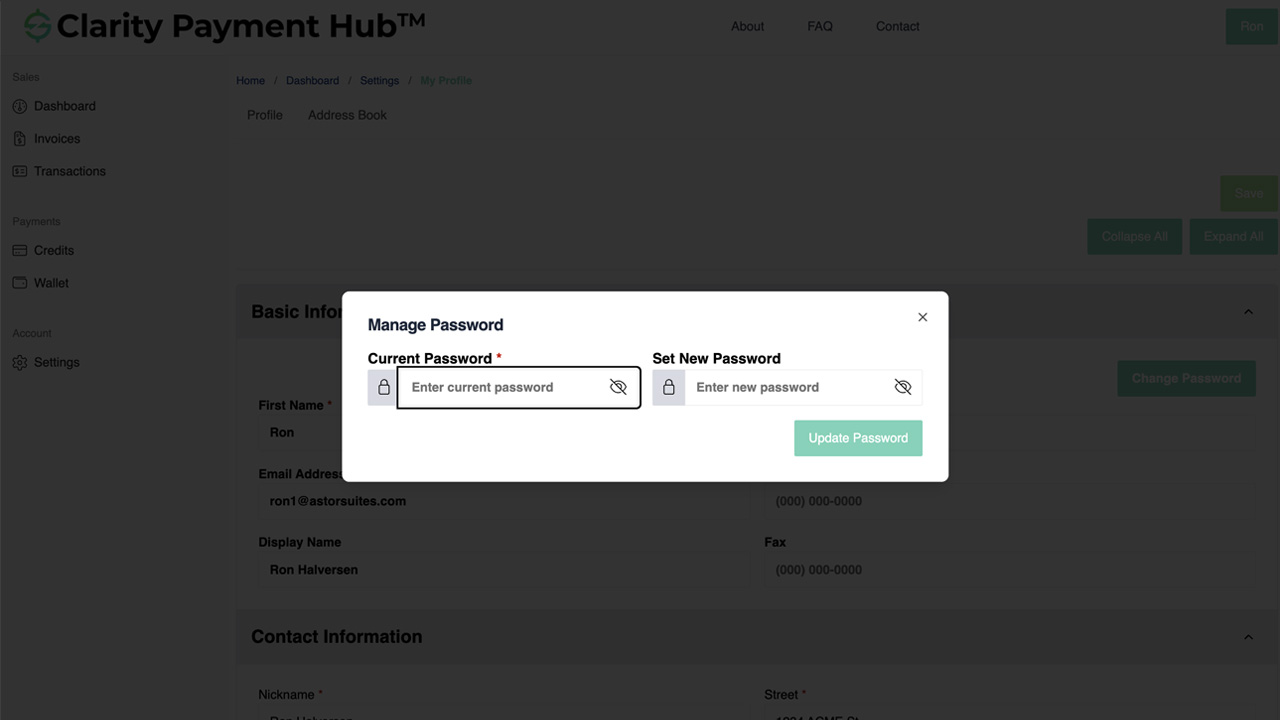
Step-by-Step Walkthrough
Sign in to your Clarity Payment Hub account with your current credentials.
Click your profile icon or account name in the top right corner. Select Account Settings or Security Settings.
In your account settings, locate the Password or Security section. Click Change Password.
For security verification, enter your current password. This confirms that you are authorized to make account changes.
Enter your new password in the "New Password" field. The portal displays real-time feedback on password strength. A strong password includes uppercase, lowercase, numbers, and special characters.
Re-enter your new password in the "Confirm Password" field to verify you typed it correctly. Click Save or Change Password. Your password is immediately updated.
Benefits and Business Impact
Self-service password management may seem like a small feature, but it delivers significant operational and security benefits:
If you suspect unauthorized access or account compromise, you can change your password immediately without waiting for support. This eliminates the window of vulnerability that exists when password changes require support involvement.
Self-service password changes make it trivial to comply with security policies that require regular password updates. No more friction-driven compliance gaps.
Your vendor's support team no longer spends time processing password change requests. That team can focus on actual problems and higher-value support work.
Account security management feels modern and instant. No more ticket requests or waiting for support, you control your password.
Changing your password takes 30 seconds from your account settings, compared to 30 minutes to an hour of support wait time.
Self-service password management encourages regular password changes and rapid response to suspected compromises, improving your organization's overall security posture.
The impact of self-service password management extends beyond individual accounts. At an organizational level, the ability to instantly respond to security incidents, maintain compliance with password policies, and reduce support overhead makes this feature a cornerstone of modern B2B account security.
Frequently Asked Questions
How often should I change my password?
Industry best practices recommend changing your password every 90 days as a routine security maintenance measure. Additionally, you should change your password immediately if you suspect your account has been compromised or if you have shared your password with anyone.
What makes a strong password?
A strong password contains at least 12 characters and includes a mix of uppercase letters, lowercase letters, numbers, and special characters (such as !@#$%^&*). Avoid using easily guessable information like birthdays, names, or common words.
Can I change my password if I forgot it?
If you have forgotten your password, use the "Forgot Password" link on the login page. You will receive an email with a secure link to reset your password. You do not need to know your current password to use the reset feature.
How long does it take for a password change to take effect?
Your password change takes effect immediately. The next time you log in to your Clarity Payment Hub account, you will need to use your new password.
Will changing my password log me out of active sessions?
Changing your password may log you out of active sessions on other devices as a security measure. If you are currently logged in, you will need to log in again with your new password on that device.
Can I see my password after I change it?
No. For security reasons, your password is never displayed after you set it. Passwords are stored using one-way encryption, so even system administrators cannot see your password. If you forget your new password, use the "Forgot Password" feature on the login page.
What if I cannot change my password?
If you encounter issues changing your password, contact your vendor's customer support team. They can help troubleshoot the issue or assist with a password reset if needed.
Related Features
Faster AR. Fewer headaches.
See Clarity Payment Hub running inside your ERP, or spin up a free trial environment and click around on your own. Either way, you’ll see exactly how it handles your invoice mix, your gateway, and your Level II/III savings &mdash. Before you commit to anything.
Supported
Go-Live
Savings