



What Is the "Add Payment Method to Wallet" Feature?
It's your own secure digital wallet. The Add Payment Method to Wallet feature in Clarity Payment Hub allows you to securely store multiple payment cards and bank accounts in an encrypted, PCI-compliant vault. Once a payment method is saved, you can use it for any future payment with a single click, no need to re-enter card numbers, expiration dates, or banking details every time you pay.
But is it secure? The wallet uses industry-standard tokenization, which means your sensitive financial data is never stored on your vendor's servers. Instead, when you add a card or bank account, it is immediately encrypted and stored by the payment processor. Your vendor only sees a masked token that identifies your saved payment method. This architecture keeps your payment information secure while enabling the speed and convenience of saved payment methods.
For B2B buyers, this is especially valuable to store and use your corporate cards. In the past, every time you needed to pay an invoice, you had to call your vendor's AR department and read them your credit card number over the phone. This exposed your card information to risk, slowed down the payment process, and left your vendor vulnerable to PCI compliance violations if they were writing down card numbers. The wallet eliminates all of that by allowing you to securely save payment methods once, then use them whenever you need them, no phone calls, no card details read aloud, no handwritten notes containing sensitive information.
The Problem: Repeated Card Entry and Payment Friction
In most B2B payment scenarios, the experience is stuck in the past. Every time you need to pay an invoice, you have to provide your payment information again, either by calling your vendor's AR team and dictating your credit card number, or by entering it into an unsecured form. This repetitive friction creates multiple problems: it slows down payments, exposes your financial data to risk, and creates frustrating customer experience inconsistent with modern consumer expectations.
From a vendor's perspective, the problems are equally acute. Vendors cannot securely store card information without sophisticated PCI compliance infrastructure, so they often resort to writing down card numbers, storing them in unencrypted files, or asking customers to provide their card information repeatedly. Each of these approaches violates PCI DSS standards and exposes the vendor to significant compliance and fraud risk. Industry research shows that roughly 40 percent of B2B payment failures are attributable to payment method friction alone, customers abandon transactions because providing payment information is too cumbersome.
Every time you pay an invoice, you have to call your vendor and verbally read your credit card number. This is slow, exposes your card data to being overheard, and subjects your vendor to PCI compliance violations.
When vendors manually write down or store card information, they expose themselves to fraud, data breaches, and severe PCI DSS penalties. Your card information could be compromised without your knowledge.
Providing payment information for every transaction slows down the entire payment process. What should be a five-minute task becomes a 20-minute phone call or back-and-forth email exchange.
When paying online requires entering card details every time, customers abandon transactions at higher rates. Studies show payment method friction increases abandonment by 20 percent or more.
Vendors handling card information manually face expensive PCI DSS compliance requirements, annual audits, and potential fines for violations. A single data breach can cost hundreds of thousands of dollars in remediation and penalties.
How Clarity Payment Hub Solves Payment Method Security and Friction
Clarity Payment Hub provides a PCI-compliant, tokenized wallet that lets you save as many payment methods as you need, securely and without exposing your financial information. The first time you add a card or bank account, it is encrypted and stored by the payment processor, not by your vendor. From that moment forward, you can pay any invoice by simply selecting your saved payment method, no phone calls, no repeated data entry, no card information shared over unsecured channels.
Your vendor benefits equally. By using Clarity's tokenized wallet, they eliminate their PCI DSS compliance burden. They never handle, store, or see your actual card numbers. They only see masked tokens (like "Visa ending in 4532") that identify your saved payment methods. This architecture drastically reduces the vendor's compliance requirements and eliminates the fraud and breach risk associated with handling raw card data.
Your payment data is encrypted and stored by the processor, never on your vendor's servers. This eliminates compliance risk on both sides and protects your financial information with enterprise-grade security.
Add as many credit cards and bank accounts as you need. Useful for different cost centers, business units, or payment approval workflows.
Once saved, selecting a payment method for any transaction is as simple as clicking it from your wallet. No re-entry, no phone calls, no friction.
Your vendor only sees the last four digits of your card or the name of your bank account. Your full card number and routing information are never visible in the portal.
Add, delete, or update saved payment methods anytime from your account settings. Full control over which payment methods are active and available.
Works with your gateway of choice. Clarity Payment Hub integrates with virtually any payment gateway or processor. Your saved payment methods are compatible with whatever processor your vendor has chosen, giving you flexibility without being locked into a single payment system.
The Missing LinkBetween Paymentsand Your ERP
Clarity Payment Hub closes that gap, connecting your orders, invoices, and payment channels into one flow.
Speak to a Platform ArchitectSee It in Action: Adding and Using Payment Methods
Watch the Demo
Portal Screenshot
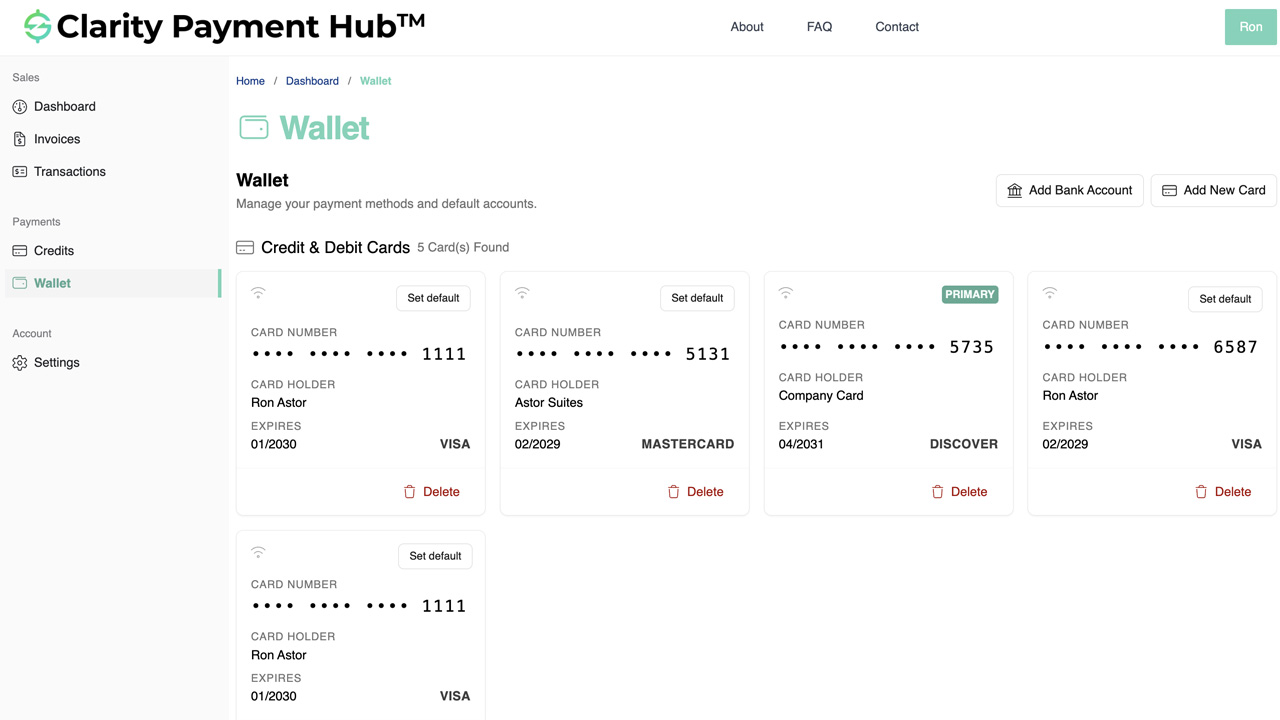
Step-by-Step Walkthrough
Navigate to your company's Clarity Payment Portal and sign in. Click your profile icon or account name and select Account Settings or Payment Methods.
In the Payment Methods or Wallet section, click "Add New Payment Method" or the plus icon to start the process.
Select whether you want to add a credit card (Visa, Mastercard, Amex, Discover) or an ACH bank account.
Fill in your card number, expiration date, and CVV (for credit cards) or account number and routing number (for ACH). Information is encrypted as you type.
Click Save. Your payment method is tokenized and stored securely by the processor. It immediately appears in your wallet as a masked entry (e.g., "Visa ending in 4532"). You can now use this method for any payment.
Benefits and Business Impact
Saving payment methods to a secure wallet fundamentally improves the payment experience for both you and your vendor. Here are the key business benefits:
With saved payment methods, paying an invoice that previously took a 15-minute phone call now takes 30 seconds. One-click selection and instant processing means your payments move faster and your vendors collect sooner.
By using tokenization, your card information is never transmitted in unencrypted form or stored on unsecured servers. This dramatically reduces your fraud risk and eliminates the danger of your card data being compromised in a vendor data breach.
Your vendor no longer handles raw card data, which eliminates their PCI DSS compliance burden and the associated costs of audits, infrastructure, and fines. This risk reduction benefits your vendor and strengthens your business relationship.
Saved payment methods eliminate friction from the payment process. You experience the same convenience and speed you get from consumer apps like Amazon or your bank, creating a more satisfying B2B experience.
Save different payment methods for different cost centers or business units. No need to maintain separate accounts or call your vendor to specify which card to use, simply select the right method at payment time.
With saved payment methods reducing friction, payment attempts are more likely to succeed on the first try. This eliminates retries, follow-up emails, and administrative overhead.
The impact extends across your entire organization. Finance teams see faster payment cycles and higher payment completion rates. Your vendors benefit from reduced compliance risk and faster cash collection. And you benefit from the convenience, security, and control that come from managing your payment information securely.
Frequently Asked Questions
How does the payment wallet keep my card information safe?
The Clarity Payment Hub wallet uses PCI DSS-compliant tokenization. When you save a card, it is immediately encrypted and stored by the payment processor, never on your vendor's servers. Your vendor only sees a masked token that identifies your saved payment method, like "Visa ending in 4532." Your actual card number is never visible to anyone but the processor.
Can I save multiple payment methods?
Yes. You can save unlimited credit cards, debit cards, and ACH bank accounts to your wallet. This is useful if you have different payment methods for different cost centers, departments, or payment workflows.
What payment methods does the wallet support?
Clarity Payment Hub supports all major credit cards (Visa, Mastercard, American Express, Discover) and ACH bank transfers. Some vendors may also support additional payment methods depending on their payment gateway configuration.
Can I delete a saved payment method?
Yes. You can delete any saved payment method from your wallet at any time. Once deleted, that method cannot be used for future payments. If it is set as your default, you will be prompted to select a new default.
Is there a limit to how many payment methods I can save?
No. You can save an unlimited number of payment methods in your wallet. Each method is securely stored and available whenever you need to pay.
Will my vendor see my actual card numbers?
No. Your vendor never sees your full card number. They only see a masked token that identifies the saved payment method, such as "Visa ending in ...4532." Your actual card number is held securely by the payment processor and never transmitted to or stored by your vendor.
Can I update a saved payment method?
You can delete an old payment method and save a new one. For example, if your card expires or is being replaced due to suspected fraud, simply delete the old card from your wallet and add the new one.
Related Features
Faster AR. Fewer headaches.
See Clarity Payment Hub running inside your ERP, or spin up a free trial environment and click around on your own. Either way, you’ll see exactly how it handles your invoice mix, your gateway, and your Level II/III savings &mdash. Before you commit to anything.
Supported
Go-Live
Savings