



What Is the "Add Address to Profile" Feature?
The best way to keep track of your customers is to let them update their address and phone when they change them. The Add Address to Profile feature in Clarity Payment Hub gives your customers the ability to manage their own address information directly within their portal account. Rather than calling your AR department or submitting address change requests via email, customers can log in, access their account settings, and add, edit, or delete billing and shipping addresses in minutes. These changes immediately sync to your ERP system through Clarity Connect, ensuring that all future invoices, orders, and shipments reflect the correct address information without requiring manual intervention from your team.
In today's world where a ton of workers are remote, this feature is particularly valuable for organizations where customers have multiple billing locations, regional offices, project sites, or subsidiary entities. Rather than maintaining separate customer records for each address, customers can simply add multiple addresses to a single account and specify which address should be used for billing, shipping, or both. This flexibility simplifies operations on both sides of the relationship while keeping address data accurate and current.
In traditional B2B environments, with multiple offices, warehouses and locations, address changes are a surprisingly common source of friction. Customers call to update an address, the information is written down or emailed, a staff member manually enters it into the ERP, and often errors creep in: typos in the street address, incorrect postal codes, missing suite numbers. These mistakes lead to failed deliveries, returned mail, invoice disputes, and customer frustration. The Add Address to Profile feature eliminates that entire cycle by putting address control directly in the customer's hands, with instant ERP synchronization guaranteeing accuracy.
The Problem: Address Management Delays and Billing Errors
In most B2B environments, address management remains a manual, error-prone process. When a customer needs to change an address, whether due to a move, expansion, or new project location, they have to call your AR or customer service team and request the change. This simple task becomes a multi-step process that wastes everyone's time and often introduces mistakes that compound down the line.
The real cost of poor address management goes beyond inconvenience. Failed deliveries, misrouted shipments, and incorrect billing addresses trigger customer complaints, support escalations, and increased churn. Studies show that roughly 20 percent of invoice-related customer service inquiries are address-related, consuming significant staff hours that could be spent on more strategic work. For companies with large customer bases, even a 5 percent error rate in address data can translate to thousands of failed transactions annually.
When your team manually keys address changes into the ERP, typos and data entry mistakes are inevitable. A missing digit in a postal code or a misspelled street name causes delivery failures, returned mail, and customer frustration.
Customers must call during business hours to request an address change, wait for the request to be processed, and then verify the change was correctly entered. A 24-hour turnaround is fast in this scenario, but modern customers expect instant updates.
Outdated or incorrect shipping addresses lead to failed delivery attempts, returned packages, and increased logistics costs. Each failed delivery can cost $15–$50 in return postage and handling fees alone.
When the billing address on an invoice does not match the customer's current address, it creates confusion and disputes. Customers question whether the invoice is for them, which slows payment and complicates reconciliation.
Your support team spends hours fielding address change requests via phone, email, and chat. This work does not move the business forward and distracts from resolving actual customer problems or disputes.
How Clarity Payment Hub Solves the Address Management Problem
Clarity Payment Hub empowers customers to take control of their own address information through an intuitive, secure account settings interface. Rather than being dependent on your support team, customers can add, edit, or delete addresses directly in the portal. The moment they click Save, the new address is validated, stored in the customer's profile, and synced to your ERP system through Clarity Connect. No manual intervention required. No delays. No errors introduced by manual data entry.
The feature supports unlimited addresses per customer, with clear labels to distinguish between billing addresses, shipping addresses, or both. Customers can mark any address as their default for faster checkout and payment workflows, and they can change their default at any time. If a customer has multiple projects, locations, or subsidiaries, they can manage all of them in one place without needing separate customer accounts or ongoing support requests.
Clarity Payment Hub validates addresses in real time as customers enter them, catching obvious errors (missing postal codes, invalid state codes) before they are saved, reducing downstream problems.
Every address added or updated in the portal is automatically synced to your ERP through Clarity Connect. Future invoices, orders, and shipments use the updated address without manual posting or intervention.
Customers can maintain multiple billing, shipping, and project addresses in a single account profile. Specify which addresses apply to invoicing, shipping, both, or special purposes like RMA locations.
Addresses can be updated anytime, day or night, without requiring calls, emails, or support tickets. Customers control their own information and see updates reflected immediately in their account.
Customers can set a default billing and shipping address for faster future transactions. One-click address selection eliminates data entry friction and reduces payment abandonment.
Works with any ERP system. Whether you run Microsoft Dynamics, NetSuite, SAP, Epicor, or another ERP platform, Clarity Connect bridges your accounting software to the payment portal. Address changes sync to your ERP immediately, keeping your customer master data accurate and current across the entire system.
The Missing LinkBetween Paymentsand Your ERP
Clarity Payment Hub closes that gap, connecting your orders, invoices, and payment channels into one flow.
Speak to a Platform ArchitectSee It in Action: Managing Addresses in the Customer Portal
Watch the Demo
Portal Screenshot
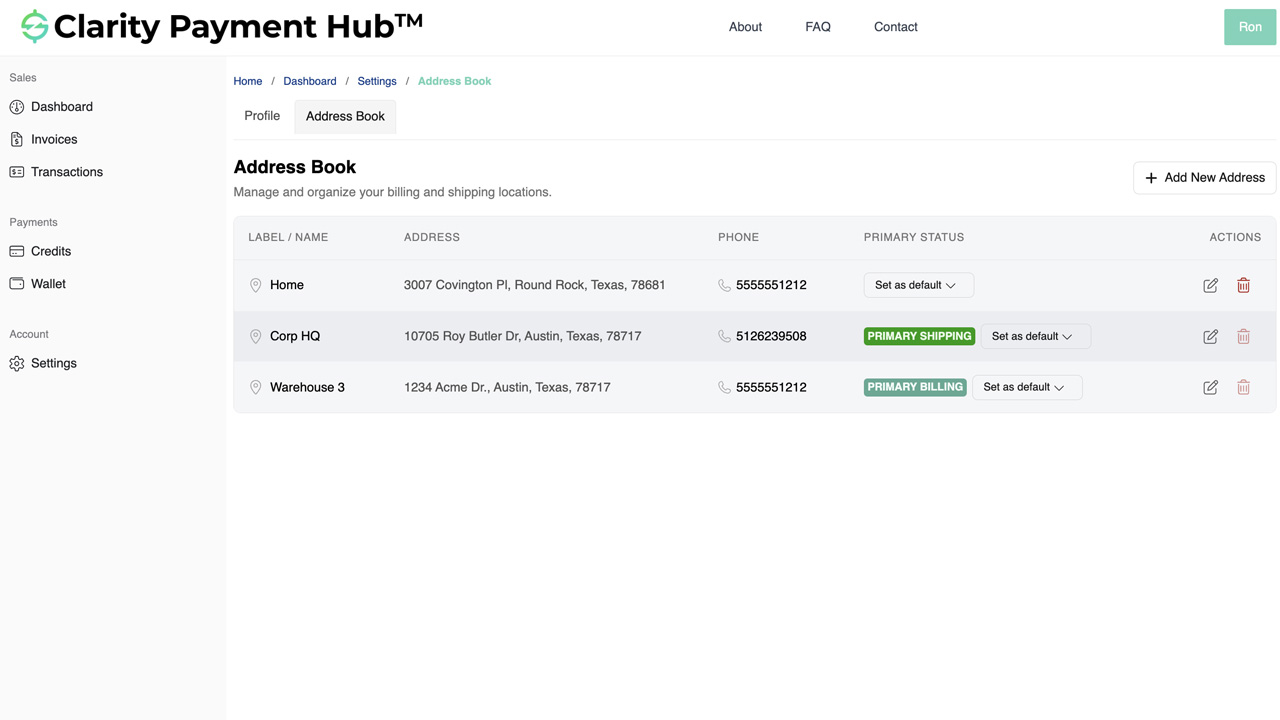
Step-by-Step Walkthrough
Navigate to your company's Clarity Payment Portal and sign in with your customer credentials. You are taken to your dashboard.
Click on your profile icon or account name in the top right corner and select Account Settings. This opens your account management interface.
In Account Settings, locate the Addresses or Address Book section. You see all addresses currently saved to your account, with options to edit, delete, or set as default.
Click the "Add New Address" or "Plus" button to open the address entry form. Fill in street address, city, state, postal code, and country. Specify whether the address is for billing, shipping, or both.
Click Save. The system validates the address, saves it to your profile, and immediately syncs it to your vendor's ERP. You see a confirmation message and the new address appears in your address list.
Benefits and Business Impact
Implementing self-service address management in Clarity Payment Hub improves operations across your organization, reduces support overhead, and delivers a better customer experience. Here are the key benefits:
When customers manage their own addresses, your support team is freed from handling address change requests. This eliminates hundreds of support tickets annually and frees your staff to focus on resolving actual customer issues and building relationships.
Every address change processed by your team costs approximately $5–$10 in labor. Self-service address management eliminates this cost entirely. For a mid-size company, this translates to tens of thousands of dollars in annual savings.
Because customers enter and validate their own address information, manual entry errors are virtually eliminated. Real-time validation catches obvious problems before they impact billing, shipping, and invoicing processes.
Customers can update their address information instantly, 24/7, without waiting for support. This modern, self-service approach improves customer satisfaction and reduces frustration caused by outdated address information.
Accurate, current address information reduces failed delivery attempts and returned shipments. Fewer logistics failures mean lower return postage costs, faster shipment cycles, and improved on-time delivery rates.
When customers can update their own addresses, many address-related disputes are prevented before they occur. Billing address mismatches, invoice routing problems, and delivery failures drop significantly.
The impact of self-service address management extends to every department that touches customer or order data. Operations teams see fewer shipping errors and faster fulfillment. Finance teams spend less time reconciling billing address discrepancies. Customer service teams can focus on genuine support needs rather than manual data entry. And your customers gain the convenience and control they expect in a modern B2B relationship.
Frequently Asked Questions
Can I update my billing and shipping addresses myself?
Yes. With Clarity Payment Hub, you can add, edit, and delete your billing and shipping addresses directly in your customer portal profile. Changes are saved immediately and synced to your vendor's ERP system.
Will my address updates affect my invoices?
Address updates you make in your profile will apply to all future invoices and orders. Past invoices retain their original addresses for historical accuracy and audit purposes. This ensures that your invoice history remains accurate and compliant.
Can I have multiple addresses in my profile?
Yes. You can add multiple billing addresses, shipping addresses, or both. When making a payment or placing an order, you will be able to select which address to use. You can also set a default address for faster future transactions.
How long does it take for my address to sync to the ERP?
Address changes sync to your vendor's ERP system in real time through Clarity Connect, typically within seconds of you clicking Save. Your vendor's team will see the updated address immediately in their system.
What if I make a mistake when entering my address?
You can edit any saved address at any time from your portal profile. Simply click the address, make your corrections, and click Save. The updated address is immediately reflected in your account and synced to the ERP.
Are there any restrictions on the addresses I can add?
You can add addresses in any country supported by your vendor's ERP system. Most modern ERPs support international addresses, but check with your vendor if you need to add addresses outside your current region.
Does my vendor need to approve my address changes?
No. Address changes you make in the Clarity Payment Hub portal are applied immediately without requiring vendor approval. This simplifies your experience and eliminates delays caused by manual support requests.
Related Features
Faster AR. Fewer headaches.
See Clarity Payment Hub running inside your ERP, or spin up a free trial environment and click around on your own. Either way, you’ll see exactly how it handles your invoice mix, your gateway, and your Level II/III savings &mdash. Before you commit to anything.
Supported
Go-Live
Savings