



What Is the "Add Default Billing Method" Feature?
The added benefit of scheduled or batched payments. The Add Default Billing Method feature in Clarity Payment Hub allows you to designate one of your saved payment methods as your "default" or preferred method. When you have a default method set, it is automatically pre-selected whenever you initiate a payment, eliminating the need to choose a method every time. For customers who consistently use the same card or ACH account, this is a significant convenience gain that speeds up the entire payment process.
This feature is designed to reduce friction in B2B payment workflows. In traditional scenarios, every payment requires you to either call your vendor and specify which card to use, or select a payment method from a dropdown menu. For customers processing dozens of payments per month, this seemingly small repetition adds up to wasted time and creates opportunities for payment abandonment. By setting a default method, you eliminate those micro-friction points and make the payment experience as smooth as consumer apps like Apple Pay or Google Pay, where a single click confirms payment.
The default method is both flexible and optional, allowing you to change it instantly. If you need to use a different payment method for a particular transaction, you can override your default at payment time without affecting your default settings. This flexibility means your default method is a convenience, not a restriction.
The Problem: Payment Method Selection Friction and Abandonment
In B2B payment environments, seemingly small friction points can have outsized impacts on payment completion rates. Research shows that payment method selection friction, the need to search a dropdown or remember which card was used last time, increases payment abandonment by 15 to 20 percent. When your AR team processes dozens of invoices per week, these micro-delays compound, leading to delayed cash collection and increased administrative overhead as payment attempts fail or are postponed.
From a vendor's perspective, the cost is significant. Every abandoned payment attempt generates a follow-up email, phone call, or escalation. Industry data shows that reminding customers about unpaid invoices costs an estimated $5–$15 per reminder. A company with 1,000 monthly invoice payments experiencing even a 10 percent abandonment rate due to payment friction incurs $5,000–$15,000 in recovery costs annually, not counting the impact on cash flow and working capital.
Choosing a payment method for every transaction creates minor cognitive friction. When customers process many payments, this small decision point compounds, reducing enthusiasm to complete payments.
Every second spent selecting a payment method is a second where payment completion is at risk. Faster checkout is proven to reduce abandonment and speed cash collection.
Studies show that every additional step in the payment process increases abandonment. Even a simple dropdown selection can cause 15–20 percent of payment attempts to be abandoned.
Each abandoned payment requires follow-up contact with the customer, an email, phone call, or escalation. These recovery efforts cost $5–$15 each and consume significant AR team time.
Your AR team wastes time answering questions like "Which card did I use last time?" or "Do you have my Amex on file?" A default method eliminates these calls entirely.
How Clarity Payment Hub Solves Payment Method Selection Friction
Clarity Payment Hub eliminates payment method selection friction by allowing you to set a default payment method that is automatically pre-selected whenever you initiate a payment. The result is one-click checkout that works exactly like consumer payment apps, you see your default method already selected, you review the payment amount, and you click "Pay." That is it. No dropdown menus, no method selection, no friction.
The feature is flexible. You can change your default method anytime from your account settings, useful when you switch payment accounts or want to rotate between different cards. And if you ever need to use a different method for a particular payment, you can override your default at checkout without affecting your default settings. This combines the speed of pre-selection with the flexibility to adapt to changing business needs.
Your default method is automatically pre-selected at checkout, eliminating the need to search a dropdown or make a choice for every transaction.
With your method already selected, confirming a payment requires just one click. This minimalist experience reduces abandonment and speeds up the entire payment cycle.
If you need to use a different payment method for a single transaction, you can override your default at checkout without affecting your default settings for future payments.
Change your default method anytime from your account settings. The change takes effect immediately and applies to all future payments.
If your default method fails to process, you will be prompted to select an alternative method from your wallet, ensuring payment completion even if your primary method declines.
Complements your wallet perfectly. When combined with the Add Payment Method to Wallet feature, setting a default method creates a smooth payment experience. Save multiple methods, set one as default for everyday use, and override it whenever needed for flexibility.
The Missing LinkBetween Paymentsand Your ERP
Clarity Payment Hub closes that gap, connecting your orders, invoices, and payment channels into one flow.
Speak to a Platform ArchitectSee It in Action: Setting and Using Your Default Method
Watch the Demo
Portal Screenshot
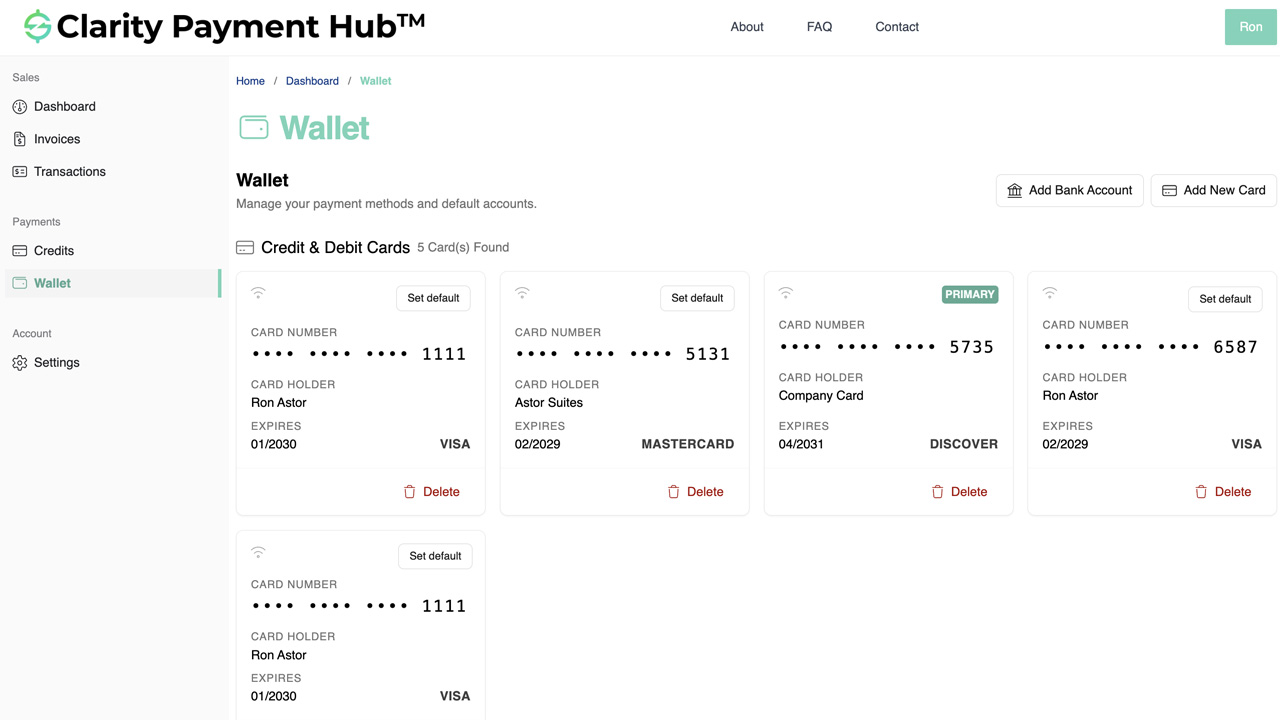
Step-by-Step Walkthrough
Navigate to your Clarity Payment Portal and sign in with your customer credentials.
Click your profile icon or account name in the top right corner and select Account Settings.
Go to the Payment Methods or Wallet section. You see all payment methods you have saved to your account.
Next to any saved payment method, click the "Set as Default" button, star icon, or radio button. A confirmation message appears.
Your selected method is immediately marked as default. The next time you initiate a payment, this method will be pre-selected. You can now confirm payment with one click, or choose a different method if needed.
Benefits and Business Impact
Setting a default payment method may seem like a small feature, but the business impact is substantial. Here are the key benefits:
One-click checkout reduces payment friction and abandonment rates by 10–15 percent. For companies processing thousands of payments, this translates to hundreds of thousands of dollars in recovered revenue.
Eliminating method selection reduces the time to complete a payment from 30–60 seconds to under 10 seconds. Faster payments speed up vendor cash collection and improve DSO.
Fewer abandoned payments means fewer follow-up calls, emails, and escalations. Your vendor's AR team spends less time on recovery efforts and more time on strategic work.
One-click checkout matches the frictionless experience customers expect from consumer payment apps. This improves satisfaction and reduces frustration.
While your default method simplifies most payments, you can override it at checkout for those instances when you need a different method. Simplicity with flexibility.
Eliminate questions like "Which card did I use last time?" A default method means your vendor's team spends less time answering payment-related questions.
The cumulative impact of reduced friction extends to your vendor's entire accounts receivable operation. With fewer abandoned payments, lower follow-up costs, and faster cash collection, the business case for default payment methods is clear.
Frequently Asked Questions
Can I change my default payment method anytime?
Yes. You can change your default payment method at any time from your account settings. Simply click "Set as Default" next to a different saved payment method, and it becomes your new default immediately.
What if I want to use a different payment method for one transaction?
You can always override your default method at payment time. When paying an invoice, you will see the option to select a different payment method from your wallet. Choose any saved method or enter a new one for that single transaction. Your default will remain unchanged for future payments.
Do I need a default payment method?
Setting a default payment method is optional but recommended. It speeds up the payment process by pre-selecting your preferred method. If you have not set a default, you will be asked to select a method each time you pay.
Can I have different defaults for different types of transactions?
You can have one default payment method for standard transactions. If you need different payment methods for different cost centers or business units, you can change your default before each transaction or select a different method at payment time.
What happens if my default payment method is declined?
If your default payment method fails to process due to insufficient funds, expired card, or other issues, you will be prompted to select a different method from your wallet or enter a new one. This ensures payment completion even if your primary method experiences a problem.
Can my vendor see which method is my default?
No. Your vendor cannot see which payment method is marked as your default. They only see which method is selected when you actually make a payment. Your default designation is private to your account.
Does my default payment method change if I delete it?
If you delete your default payment method, you will be prompted to select a new default from your remaining saved payment methods. The system will not allow you to proceed without a default method, ensuring a smooth payment experience.
Related Features
Faster AR. Fewer headaches.
See Clarity Payment Hub running inside your ERP, or spin up a free trial environment and click around on your own. Either way, you’ll see exactly how it handles your invoice mix, your gateway, and your Level II/III savings &mdash. Before you commit to anything.
Supported
Go-Live
Savings