



What Is the "Check Open Invoices" Feature?
Paid, Partially Paid, Over Due, Pending, etc. With hundreds of invoices and statuses, how do your customers quickly pay what's currently due? The Check Open Invoices feature in Clarity Payment Hub provides customers with a complete, real-time view of all outstanding invoices from your company. When a customer logs into the portal, they see a complete list of open invoices pulled directly from your ERP through Clarity Connect. Each invoice displays invoice number, date issued, due date, amount, and balance due, all synchronized in real time.
This is an actionable, aggregated view, but it is more than just a list. The feature includes powerful search and filter capabilities that let customers quickly find what they are looking for. Need to find all invoices due this week? Click the date filter. Looking for invoices over a certain amount? Use the amount range filter. Need to see invoices for a specific department or cost center? The portal can display that view. Customers can sort by date, amount, or due date, and they can search by invoice number to find a specific bill in seconds.
If it's aggregated, do they still see the details? When a customer clicks on an invoice, they see the complete detail view: line items with quantities and unit prices, taxes, shipping charges, any applied credits, due date, and current balance due. This is the exact same data that lives in the vendor's ERP system, so customers can verify charges and reconcile their internal records before deciding to pay. If everything looks correct, they can click "Pay Now" and proceed directly to the payment flow without leaving the context of the invoice.
The Check Open Invoices feature solves one of the most common pain points in B2B accounts receivable: customers cannot find or understand what they are supposed to pay, leading to delays, disputes, and wasted AR time explaining basic invoice information. By making invoice information transparent and searchable, Clarity Payment Hub puts the power in customers' hands and eliminates friction from the collections process.
The Problem: Invoice Confusion Drives Disputes and Delays
In many organizations, finding a specific invoice is surprisingly difficult. A customer receives an invoice or a monthly statement, then has a question: "Is invoice 5047 paid yet?" "I see an invoice from last month I don't recognize, can you explain it?" "What was that $15,000 charge for?" Their only option is to email or call the AR department and wait. The AR team hunts through the ERP, looks up the invoice, and emails back an explanation. Days may pass before the question is answered.
This friction creates a cascade of problems. Customers delay payments because they are confused about what they owe. Payment disputes arise from misunderstandings that could have been resolved instantly if the customer had access to the invoice information. AR teams spend hours answering invoice detail questions instead of working on strategic collections activities. And vendors miss collection opportunities because the friction in the process discourages customers from paying promptly.
Without a centralized list, customers do not know which invoices are still open. They guess based on old statements, receipts, or memory. This confusion leads to payment delays and disputes about what is actually due.
AR teams spend hours every week answering "What invoices do I owe?" and "Can you explain this invoice?" calls. Each call requires someone to log into the ERP, run a report, explain details, and follow up. This is low-value, repetitive work that does not move the business forward.
When customers cannot see invoice detail, they dispute charges they do not understand. "Why was I charged for that?" "I don't remember ordering that much." These disputes are often resolved when the customer actually sees the invoice, but only after AR time has been wasted investigating.
The friction of finding and understanding an invoice delays payment decisions. Customers sit on invoices longer while they try to get clarity. That delay inflates DSO and delays cash collection.
Asking customers to call or email for invoice details creates a slow, asynchronous process. A customer needs an explanation, emails the AR team, waits for a response, reads it, and then finally has the information they need to pay. Days of delay for information that should be instantly available.
How Clarity Payment Hub Solves Invoice Discovery and Payment
Clarity Payment Hub eliminates invoice confusion by providing customers with a complete, searchable, real-time list of all open invoices. The moment a customer logs into the portal, they see every outstanding invoice with all key information: invoice number, date, due date, amount, and balance due. The list is synchronized directly from the vendor's ERP through Clarity Connect, so it is always accurate and always current.
Rather than wading through a static PDF statement or calling for help, customers can use powerful search and filter tools to find exactly what they are looking for in seconds. They can view the complete invoice detail, ask any questions offline, and then proceed directly to payment. The result is faster payment decisions, fewer disputes, and significantly less burden on the AR team.
All open invoices are pulled directly from the vendor's ERP and synchronized in real time through Clarity Connect. Every new invoice appears in the portal within moments, and paid invoices are automatically removed from the open list.
Customers can search by invoice number, filter by date range, amount range, department, or cost center, and sort by date, amount, or due date. Finding a specific invoice takes seconds, not hours on the phone with AR.
Clicking on an invoice shows the full breakdown: line items with quantities and unit prices, taxes, shipping, credits, due date, and balance due. Customers can verify charges and reconcile their own records before paying.
From the invoice detail view, customers can select the amount they want to pay and click "Pay Now." The payment flow opens in context, with the invoice amount pre-filled, reducing friction and abandonment.
Customers can select multiple invoices and submit a consolidated payment in a single transaction. This is especially valuable for customers with multiple open invoices who want to pay in bulk.
Works with any ERP, any invoice structure. Whether invoices are simple or complex, whether customers are organized by department, cost center, or location, Clarity Payment Hub adapts to your ERP's structure. Clarity Connect handles the data mapping, so the portal displays invoices exactly as your system defines them.
The Missing LinkBetween Paymentsand Your ERP
Clarity Payment Hub closes that gap, connecting your orders, invoices, and payment channels into one flow.
Speak to a Platform ArchitectSee It in Action: Find and Pay an Invoice
Watch the Demo
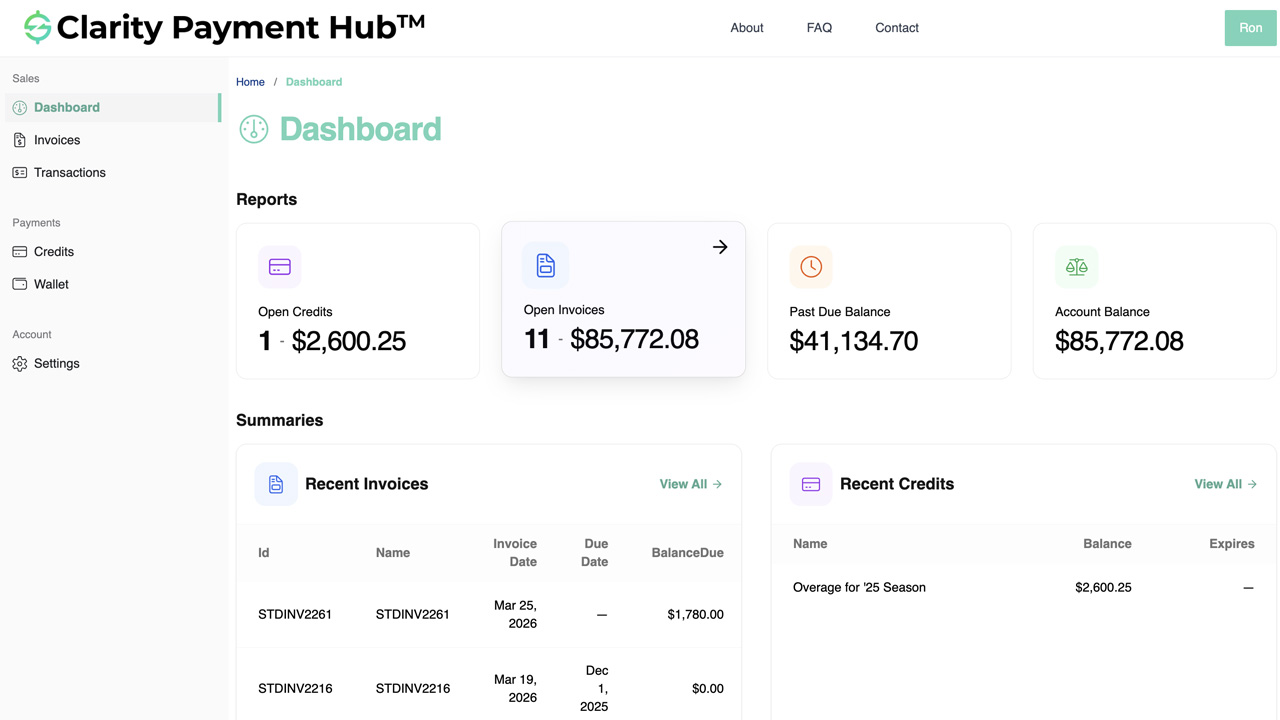
Portal Screenshot
Step-by-Step Walkthrough
Sign in to your Clarity Payment Portal and click on the Invoices or Open Invoices section. You will see a list of all outstanding invoices pulled directly from the vendor's ERP.
Use the search bar to find an invoice by number, or use the filter options to narrow by date range, amount, or department. You can sort the list by date due, amount, or date issued to find what you need quickly.
Click on any invoice row to see the complete detail: line items with quantities and prices, taxes, shipping, due date, and balance due. This is the exact data from the vendor's ERP, so you can verify all charges.
Review the invoice detail and decide whether to pay the full amount or a partial payment. From the invoice view, click "Pay Now" to proceed to the payment flow with the invoice amount pre-filled.
Select a payment method from your secure wallet or enter a new one, confirm the amount, and click "Pay." The transaction processes in real time, the payment posts to the vendor's ERP, and the invoice balance is updated immediately.
Benefits and Business Impact
Making open invoices transparent and searchable transforms how customers interact with your company. Customers get instant answers to their questions, make faster payment decisions, and feel more in control. Your AR team gains back hours every week. And your organization benefits from faster collections and fewer disputes.
When customers can find and understand their invoices instantly, they can make payment decisions faster. No more waiting for AR callbacks or email explanations. This transparency drives faster payments and reduces DSO.
AR teams can eliminate 2–3 hours per week of calls and emails about invoice details. Customers find the answers themselves. That frees your team from repetitive work and allows them to focus on exceptions, disputes, and strategic collections.
When customers can see invoice line items, taxes, and charges before paying, disputes decline dramatically. Customers find answers to their own questions and reconcile their records without AR involvement.
Customers appreciate the transparency and self-service control. They get instant answers to their questions without calling during business hours. This improves customer satisfaction and strengthens the relationship.
When customers can easily find and understand invoices, the portion of invoices that get paid on time increases. Some customers never pay simply because the process is too much friction. Transparency eliminates that obstacle.
Fewer AR calls, fewer disputed invoices, and faster payments mean lower overall collection costs. Your team spends less time on routine inquiries and more time on high-value exceptions that truly need intervention.
Companies deploying Clarity Payment Hub consistently report that invoice transparency through the portal becomes one of the most frequently used features. Customers adopt it because it solves a real problem. AR teams love the time savings. And finance teams appreciate the reduced friction and faster collections that result.
Frequently Asked Questions
How are open invoices determined in Clarity Payment Hub?
Open invoices are pulled directly from your vendor's ERP system in real time. An invoice is considered open if the balance due is greater than zero. Once a payment is applied through the portal and posts back to the ERP, the invoice is automatically removed from the open list.
Can I filter open invoices by date or amount?
Yes. The portal provides multiple filtering and search options including invoice number, date range, amount range, department, and cost center depending on how the vendor has configured the system. You can also sort by date due, amount, or date issued.
What information is included in the invoice detail view?
The invoice detail shows all information from the vendor's ERP system: invoice number, date issued, due date, line items with quantities and unit prices, taxes, shipping charges, any applied credits, and the remaining balance due. You have complete visibility into what was billed.
Can I pay multiple invoices at once?
Yes. Many implementations allow you to select multiple invoices and make a consolidated payment in a single transaction. Check with your vendor to see if batch payment is enabled for your account.
Can I make a partial payment on an invoice?
Yes. When you select an invoice to pay, you can choose to pay the full amount due or enter a custom amount for a partial payment. The partial payment posts to the invoice, and the remaining balance stays open until fully paid.
How long does it take for a payment to post to the invoice?
Payments process in real time through the payment gateway and post to the vendor's ERP immediately through Clarity Connect. You will see a confirmation on screen and via email, and the invoice balance is updated instantly. No batch processing delays or waiting.
What if I have a question about a charge on an invoice?
If you have a question about a specific charge, you can now see all the detail, line items, quantities, unit prices, purchase order references, and project codes. This information should answer most questions. If you still need clarification, you can contact the vendor's AR team, but now you can provide specific details about which charge you are questioning.
Related Features
Faster AR. Fewer headaches.
See Clarity Payment Hub running inside your ERP, or spin up a free trial environment and click around on your own. Either way, you’ll see exactly how it handles your invoice mix, your gateway, and your Level II/III savings &mdash. Before you commit to anything.
Supported
Go-Live
Savings