



Why Is the "Find an Invoice" Feature important?
Studies show that if it's hard to find, they won't deal with it until forced. Do not slow down the cash flow into your business. Make it the path of least resistance. The Find an Invoice feature in Clarity Payment Hub is a powerful self-service invoice discovery tool that lets your customers quickly locate any invoice they've received. Instead of calling your AR team, searching through email folders, or digging through spreadsheets, they simply log into the Clarity Payment Portal and use the search and filter tools to find exactly what they're looking for, whether that's a specific invoice number, all invoices from last month, invoices over a certain amount, or all past-due invoices.
So how does it work? Behind the scenes, Clarity Connect, Clarity's integration platform, automatically syncs all invoice data from your ERP system to the portal in real time. When an invoice is created, updated, or marked as paid in your accounting system, that change is reflected instantly in the portal. Customers always see accurate, current information without any manual intervention or data delays.
How do they find past invoices for tax purposes let alone to make a payment? This feature transforms a common pain point in B2B billing. Today, when a customer needs to locate an invoice, they typically resort to one of the following: calling your AR department during business hours, searching through dozens of emails, asking a colleague if they remember receiving it, or going through a cloud storage folder. Each scenario wastes time for both the customer and your team. The Find an Invoice feature eliminates that friction entirely by putting accurate invoice data directly in the customer's hands, searchable and filterable in seconds.
The feature is built into the Clarity Payment Hub Customer Portal, which runs on Clarity's enterprise-grade eCommerce platform, the same technology Clarity has perfected over nearly 20 years of powering high-volume storefronts and marketplaces. The result is a portal that is fast, intuitive, and responsive, even for customers managing hundreds or thousands of invoices.
The Challenge: Why Finding an Invoice Is Surprisingly Difficult Today
In most B2B environments, locating an invoice is unnecessarily complicated. The invoice data lives in your ERP system, but your customers don't have direct access to it. That gap creates a predictable cascade of inefficiencies:
When customers need to find an invoice, their first instinct is to search through email. They dig through their inbox or attachment folders, try different search terms, and sometimes end up asking colleagues if they have a copy. This takes time and often fails if an email was deleted or misfiled.
When email searching fails, customers call your AR department asking "Can you send me that invoice from November?" or "I'm looking for invoice number 12345." Your team is pulled away from higher-value work to manually retrieve and resend invoice PDFs, a task that might consume 5–10 minutes per call and can account for 10–20% of AR phone volume in many organizations.
Even after finding an invoice, customers often don't know whether it's been paid, is overdue, or is current. They may think an invoice is outstanding when it was paid weeks ago, or vice versa. This creates confusion, erodes trust, and leads to duplicate payment requests.
When AR teams send invoice copies to customers, they're often pulling PDFs from their file system, email, or ERP, documents that may be outdated or superseded. If an invoice was adjusted or corrected in the ERP after the original PDF was generated, the customer receives contradictory information.
The friction of finding an invoice delays customer decision-making about payment. If a customer can't quickly locate an invoice when they're ready to pay, they may defer payment until later, stretching out your DSO. Some customers give up entirely and pay late.
How Clarity Payment Hub Solves Invoice Discovery
Clarity Payment Hub's Find an Invoice feature puts the power of invoice discovery directly in your customers' hands through a simple, intuitive interface backed by real-time ERP data. Rather than building a custom invoice portal from scratch, you get a pre-built, pre-tested solution that integrates smoothly with your existing ERP and can be live in less than 48 hours.
Here is how Clarity addresses each of the pain points above:
Customers enter an invoice number, or even part of a number, and results appear in real time. No waiting, no wrong answers. The search is intelligent enough to handle common variations and partial matches.
Find all invoices from a specific month, quarter, or year. Customers can narrow to "invoices from January 2026" in one click, eliminating the guesswork of trying to remember when an invoice arrived.
Search for invoices within a specific dollar range. This is useful when a customer remembers the approximate amount but not the invoice number: "Find me the invoice for around $5,000."
Display only open invoices, only paid invoices, or both. Customers immediately see which invoices need payment and which have been settled. This eliminates the confusion of not knowing whether an invoice is outstanding.
Every invoice, payment, adjustment, and status change in your ERP is automatically synced to the portal through Clarity Connect. Customers always see the authoritative, current data, no stale information, no discrepancies.
Clarity Connect: The backbone of accuracy. Clarity Connect is Clarity's integration platform, developed over 15+ years and now powering thousands of live merchant and B2B payment scenarios. It continuously syncs data from your ERP, ensuring that the invoice data customers see in the portal is always in sync with the source of truth, your accounting system. No cron jobs, no batch runs, no manual imports. Just smooth, real-time data flow.
The Missing LinkBetween Paymentsand Your ERP
Clarity Payment Hub closes that gap, connecting your orders, invoices, and payment channels into one flow.
Speak to a Platform ArchitectSee It in Action: Finding an Invoice
Watch the Demo
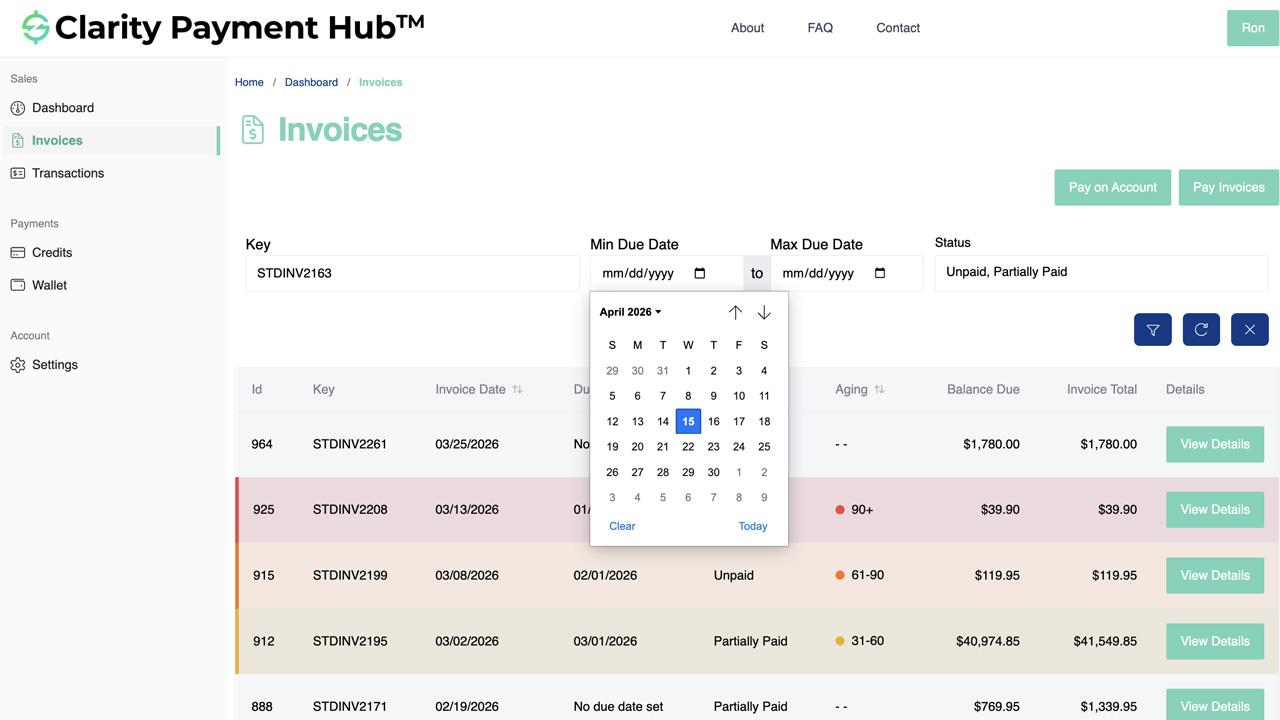
Portal Screenshot
Step-by-Step Walkthrough
Navigate to your company's Clarity Payment Portal, either as a standalone site or embedded in your website, and sign in with your customer credentials. The portal home page displays a quick summary of your account and navigation to invoices, payments, and account information.
From the main navigation or dashboard, click "Invoices" to access the invoice discovery interface. You'll see a list of all your invoices from your vendor's ERP, sorted by date (most recent first) and status.
If you know the invoice number, enter it in the search box at the top. Results appear instantly as you type. You don't need the exact number, partial searches work too, so "123" will match invoices 1234567, INV-12345, and similar variations.
Don't know the invoice number? Use the filter options below the search bar: select a date range (e.g., "January 1 to January 31, 2026"), an amount range (e.g., "$1,000 to $5,000"), or a status (e.g., "Open and Overdue"). Combine multiple filters to drill down precisely.
Click on any invoice in the filtered results to see the full details, line items, taxes, balance due, and due date. From there, you can pay the invoice, print a copy, or export it for your records. All actions are available right in the portal.
Benefits and Business Impact
Implementing the Find an Invoice feature unlocks measurable benefits across your customer relationships, your AR team's efficiency, and your bottom line:
When customers can find invoices themselves, the volume of "Where's my invoice?" calls drops by 60–80%. That's dozens or hundreds of hours per month freed up for your AR team to focus on collections, disputes, and strategic work instead of acting as a lookup service.
Customers who can quickly locate and review an invoice are more likely to pay it promptly. Removing friction from the discovery process removes a barrier to payment. Studies show that companies automating AR workflows see DSO improvements of 1–13 days or more.
Because customers always see current, accurate data synced directly from your ERP, there's no discrepancy between what they think they owe and what your system shows. No more "I thought that was paid" disputes or confusion about invoice status.
Your customers expect the self-service convenience they get from their consumer apps and online banking. A professional, responsive invoice portal signals that you're a modern, customer-focused vendor. This strengthens relationships and competitive positioning.
With real-time ERP sync, both you and your customers have complete visibility into invoice status at any moment. Your AR team can see which invoices customers have accessed, helping with follow-up and collections strategy. Customers see aging clearly and can prioritize payment.
Fewer support calls, fewer manual invoice resends, fewer email back-and-forths, all add up to real cost reduction. A mature AR operation might spend $5–$10 per invoice on manual processing. Self-service reduces that to near zero for routine lookups.
The cascade of benefits touches every area of your business. Finance teams get cleaner data and faster collections. Your AR staff gains job satisfaction from meaningful work rather than clerical lookups. Your customers enjoy the frictionless experience they've come to expect. And your company's working capital improves measurably.
Frequently Asked Questions
Can I search for invoices by invoice number?
Yes. The Clarity Payment Hub portal includes a search bar where you can enter an invoice number and instantly locate that invoice. The search is fast, returning results as you type, and it works even with partial invoice numbers. This is the fastest way to find a specific invoice if you know the number.
How do I filter invoices by date?
The invoice list includes date filter controls where you can select a start date and end date range. This is helpful for finding invoices from a specific period, such as a particular month or fiscal quarter. You can also use preset filters like "This Month," "Last 30 Days," or "Last Quarter" for even faster navigation.
Can I filter invoices by amount?
Yes. Clarity Payment Hub allows you to filter invoices by amount range. For example, you can show only invoices between $1,000 and $5,000, or use other range parameters. This is useful when you need to locate invoices of a certain size or reconcile payments by amount without knowing the invoice number or exact date.
Can I see both open and paid invoices?
Yes. The portal displays invoices by status, so you can filter to see only open invoices, only paid invoices, or both. You can also filter by "overdue" to identify invoices past their due date. This gives you complete visibility into your invoice history and payment status without having to dig through emails or call your vendor.
Is the invoice data real-time synced from the ERP?
Yes. Clarity Connect automatically syncs invoice data from your vendor's ERP to the payment portal in real time. When an invoice is created, updated, or marked paid in the ERP, it is reflected instantly in the portal. No manual imports, no delays, no stale data, you always see the current truth from your vendor's accounting system.
What if I can't find an invoice I'm looking for?
If an invoice doesn't appear in the portal, it could mean it hasn't been created in your vendor's ERP yet, it may belong to a different billing entity or customer account, or there could be a brief synchronization delay. Contact your vendor's AR team or your account representative to verify the invoice details and status. In rare cases, invoices may be filtered by account permissions if your customer account has restrictions.
Can I export or download a list of invoices after filtering?
Yes. Clarity Payment Hub supports exporting filtered invoice lists as CSV or PDF files. This is useful for your internal accounting records, reporting, or reconciliation processes. The exported file includes all the invoice details shown in the portal: invoice number, date, amount, balance due, and status. Some customers use exports for automated reconciliation with their own accounting systems.
Related Features
Faster AR. Fewer headaches.
See Clarity Payment Hub running inside your ERP, or spin up a free trial environment and click around on your own. Either way, you’ll see exactly how it handles your invoice mix, your gateway, and your Level II/III savings &mdash. Before you commit to anything.
Supported
Go-Live
Savings