



What Is the "Print an Invoice" Feature?
Can't your customers just use the system print function? Yes, but the results will most likely not be what you want. The Print an Invoice feature in Clarity Payment Hub gives your customers the ability to generate professional, print-ready copies of any invoice directly from the customer portal with your logo, remittance address, contact info, notes, disclaimers, etc. that you want on your "official" invoices. With a single click, they can either print to any printer connected to their computer or download the invoice as a PDF file to their system. The invoice includes all details, invoice number, date, line items, quantities, unit prices, taxes, balance due, and payment terms, formatted cleanly for either a physical or digital record.
So how do you get the invoice from your ERP to them cleanly? Behind the scenes, Clarity Connect automatically pulls the current invoice data from your ERP system, ensuring that the invoice customers print or download is always the authoritative, up-to-date version. If an invoice was adjusted, corrected, or credited in your accounting system after the original invoice was generated, the customer gets the current state, not an outdated PDF sitting in an email archive.
Is it automated? This seemingly simple feature solves a surprisingly significant operational problem. Today, when a customer requests an invoice copy, your AR team typically has to search their email or file system, find the original PDF, and send it. This task can consume 5–10 minutes per request and often happens multiple times per customer per month. It is clerical work that adds no strategic value and distracts from higher-priority collections and dispute resolution. The Print an Invoice feature transfers this responsibility to the customer, making their life easier and freeing your team to focus on what matters.
The feature is built into the Clarity Payment Hub Customer Portal, which runs on Clarity's battle-tested enterprise eCommerce platform. That infrastructure means the print and download functions are fast, reliable, and work consistently across devices and browsers.
The Challenge: Manual Invoice Requests Drain Your Team
Requests for invoice copies are a persistent, underestimated drain on AR resources. Consider these familiar scenarios:
An AP representative asks for an invoice copy for their records, their manager requests one for reconciliation, and then an auditor asks for it again. Your AR team responds to the same request multiple times, sometimes from the same customer, sometimes for invoices already paid.
Invoice copy requests consume AR staff time that should be spent on collections, cash forecasting, and dispute resolution. Staff members spend 30–60 minutes per day hunting down and emailing invoice PDFs instead of strategic work. That time adds up to 2–4 hours per week per person in a typical AR department.
When an AR team member emails an invoice PDF that was generated weeks or months ago, it may not reflect recent adjustments, credits, or corrections made to the invoice in the ERP. The customer receives outdated information, creating confusion and potential disputes over the true balance due.
When AP departments need invoice copies for audit purposes or regulatory compliance, they may have multiple versions floating around, the original email attachment, a resend from AR, and the version in their ERP. Tracking which is the official version becomes difficult, risking compliance issues.
Your customers can manage their own personal finances, shopping, and banking entirely online. Yet printing an invoice from your company still requires picking up the phone and asking your team to send an email. This friction frustrates modern customers who expect self-service everywhere.
How Clarity Payment Hub Solves the Invoice Copy Problem
Clarity Payment Hub's Print an Invoice feature puts invoice copy generation entirely in your customers' hands, eliminating the back-and-forth and freeing your AR team. Rather than maintaining custom print templates and email workflows, you get a pre-built, pre-tested solution that generates professional-quality invoices on demand, always synced with your ERP through Clarity Connect.
Here is how the feature specifically addresses each of the pain points above:
Customers see a Print button and a Download button on every invoice. One click opens a browser print dialog or downloads a PDF. No wait, no email, no request. They get the copy instantly, any time of day or night.
Every time a customer prints or downloads an invoice, Clarity Connect pulls the latest data from your ERP. If the invoice was adjusted, credited, or paid since it was originally issued, the customer sees the current state, the authoritative version from your accounting system.
The invoice print layout is optimized for readability and compliance: clear fonts, proper spacing, all required data fields, and optional company branding. When printed, it looks like a professional business document suitable for accounting records and audits.
Need copies of multiple invoices? Customers can select several invoices at once and download them as a consolidated PDF or as individual files. This is invaluable for month-end accounting closes or audit preparation.
Because customers self-serve, your AR team never needs to touch an invoice copy request again. They're freed from this clerical task entirely, with more time for collections, credit decisions, and customer relationship building.
Real-time data integrity from Clarity Connect. The Print an Invoice feature demonstrates one of Clarity Connect's core strengths: maintaining a live, synchronized view of your ERP data in the portal. When an invoice is created, updated, credited, or fully paid in your accounting system, those changes are immediately reflected when customers print or download. This ensures audit compliance and eliminates discrepancies between what customers see and what's in your official records.
The Missing LinkBetween Paymentsand Your ERP
Clarity Payment Hub closes that gap, connecting your orders, invoices, and payment channels into one flow.
Speak to a Platform ArchitectSee It in Action: Printing and Downloading Invoices
Watch the Demo
Portal Screenshot
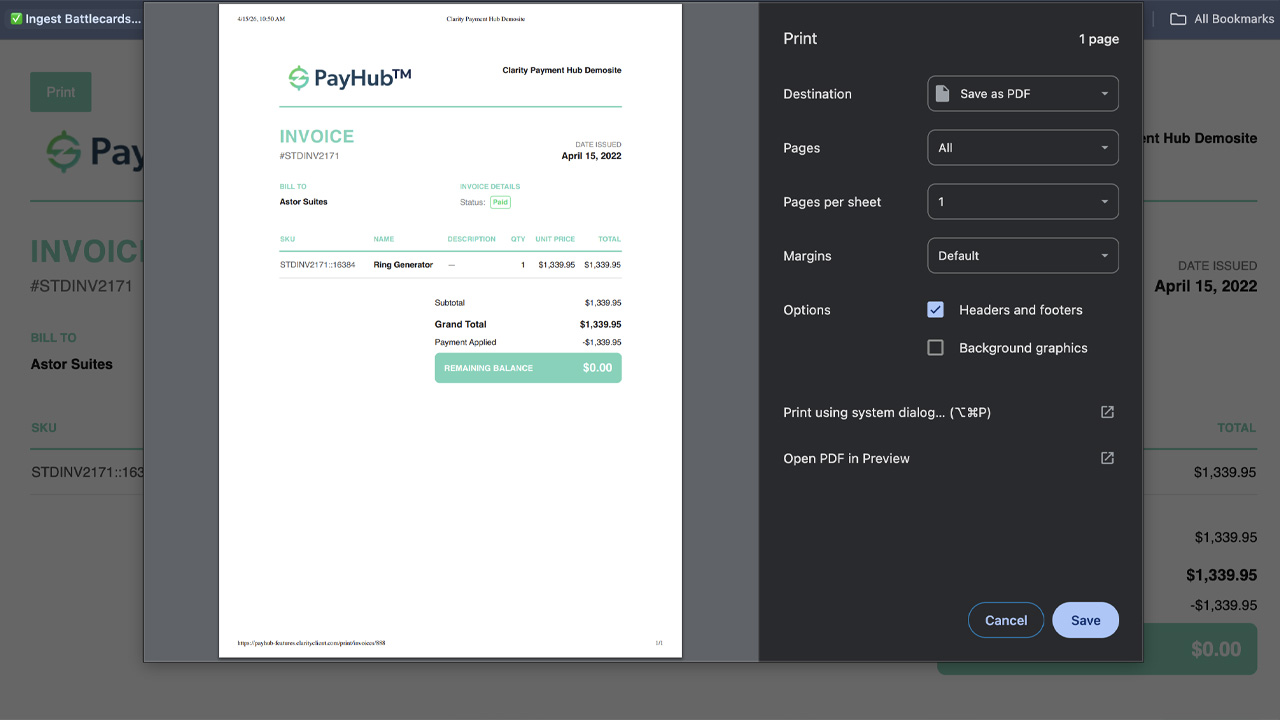
Step-by-Step Walkthrough
Sign in to your Clarity Payment Portal and use the invoice search and filter tools to locate the invoice you want to print. Click on the invoice to open the detailed view.
The invoice detail page displays all the information: invoice number, date, due date, line items with quantities and prices, subtotals, taxes, and the current balance due. Two prominent buttons are visible at the top: Print and Download.
If you want a physical copy, click the Print button. Your browser's print dialog appears, allowing you to select your printer, number of copies, page range, and other settings. Click Print in the dialog to send the invoice to your selected printer.
If you prefer a digital copy, click the Download button instead. Your browser's download dialog appears, letting you choose where to save the PDF file and optionally customize the filename. Click Save or Download to complete the process.
The printed or downloaded invoice is ready to use. File it in your records management system, attach it to an email, include it in your audit documentation, or store it in your cloud storage, whatever suits your workflow.
Benefits and Business Impact
Implementing the Print an Invoice feature delivers benefits that extend beyond just operational efficiency, it improves customer experience, strengthens compliance, and materially improves your AR team's productivity:
With customers self-serving invoice copies, AR teams can stop fielding copy requests entirely. For a team fielding 10–20 copy requests per day, this frees 1–2 hours per day or 5–10 hours per week. That time shifts to higher-value work: collections follow-up, dispute resolution, and cash forecasting.
Fewer invoice copy requests mean less email, less file management, less back-and-forth. The cost savings compound when you consider staff salaries, email infrastructure, and time spent on clerical work. For many organizations, this single feature can save $5,000–$15,000 per year in AR labor.
Your customers can now get invoice copies anytime, on their schedule, without waiting for an email response. This modern, frictionless experience improves satisfaction and signals that you're a customer-focused, technology-enabled vendor.
Because invoices are always pulled from your ERP via Clarity Connect, customers get the authoritative, current version. There is no risk of stale invoice copies creating audit discrepancies. Your customers have reliable, verifiable documents for their own audit and regulatory compliance needs.
With traditional email-based invoice delivery, multiple versions can float around. The Print an Invoice feature ensures every customer always gets the single source of truth from your ERP. No confusion about which version is official, no disputes over balance due.
When your customers' AP departments can download invoices directly and integrate them with their own accounting systems, their workflows become faster. They appreciate the convenience, which strengthens the relationship and may differentiate you from competitors.
The cumulative impact is significant. Your AR team gains job satisfaction from meaningful work. Your customers gain the self-service convenience they expect. Your accounting records gain integrity through ERP-sourced authoritative copies. And your organization gains real cost savings and efficiency gains that flow straight to the bottom line.
Frequently Asked Questions
Can I print an invoice from Clarity Payment Hub?
Yes. Every invoice in the portal has a Print button. Click it to open your browser's print dialog, where you can select your printer, number of copies, and other options. The printed invoice includes all the details: invoice number, date, line items, taxes, balance due, and due date.
Can I download an invoice as a PDF?
Yes. Instead of printing to a physical printer, you can click the Download button to save the invoice as a PDF file to your computer. You can then email the PDF, store it in your records management system, or attach it to your own internal documents as needed.
What information is included in the printed invoice?
The printed invoice includes all the invoice details: invoice number, invoice date, due date, line items with quantities and unit prices, subtotal, taxes, total amount due, and balance remaining. Your company's name, address, and other header information are also included in a professional layout.
Can my AP department use the printed copy for audit trails?
Absolutely. Many AP departments print or download invoices from the portal for their official record-keeping and audit trails. The printed or downloaded invoice is a certified copy directly from your vendor's ERP system, ideal for audit purposes, regulatory compliance, and internal filing.
Can I print multiple invoices at once?
Yes. Clarity Payment Hub allows you to select multiple invoices and perform batch actions, including printing or exporting them together as a consolidated PDF file or as individual files. This is helpful when you need to print a month's worth of invoices for your records or an audit.
Is the printed invoice print-friendly?
Yes. The invoice print layout is optimized for printing, with clear fonts, proper spacing, and all essential information formatted for readability on a standard letter-size page. When you click Print, your browser will show a preview so you can confirm the formatting before sending to your printer.
Can I save the downloaded PDF with a custom filename?
Yes. When you download a PDF invoice, your browser's download dialog lets you choose where to save the file and customize the filename. Many customers save invoices using a consistent naming scheme, like 'INV-[invoice-number]-[vendor-name]' for easy organization and retrieval.
Related Features
Faster AR. Fewer headaches.
See Clarity Payment Hub running inside your ERP, or spin up a free trial environment and click around on your own. Either way, you’ll see exactly how it handles your invoice mix, your gateway, and your Level II/III savings &mdash. Before you commit to anything.
Supported
Go-Live
Savings