



What Is the "Check Recent Invoices" Feature?
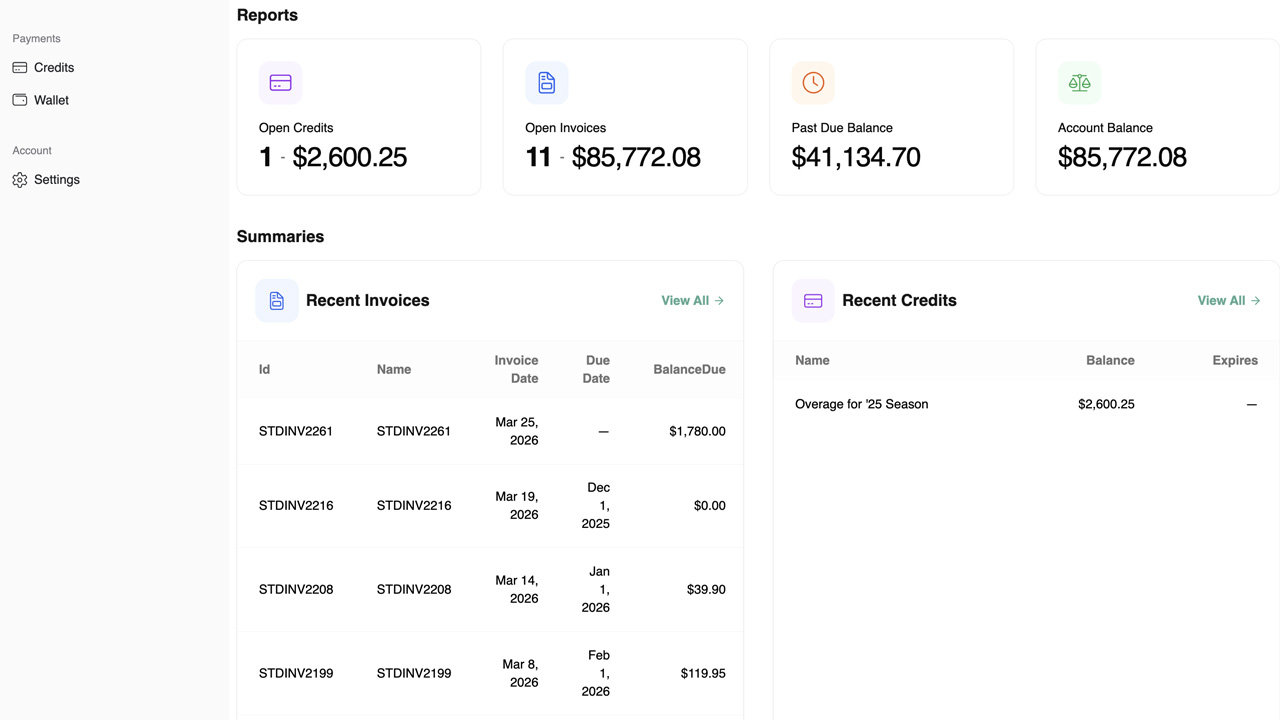
When you're looking for information, you want it easy to find. It's that simple. The Check Recent Invoices feature in Clarity Payment Hub puts your most recently issued invoices front and center every time you log into the portal. Instead of having to navigate through a menu to find the Invoices section, or waiting to receive a PDF or statement in the mail, the 5–10 most recent invoices are displayed prominently on your dashboard. You can see at a glance what has been billed to your account and when.
We built the widget and displayed on the dashboard so you don't have to search. The feature goes beyond simple visibility. Each invoice on the dashboard includes key information: the invoice number, date issued, due date, and total amount. Click on any invoice and you see the complete detail view: all line items with quantities and unit prices, taxes, shipping, due date, and current balance due. From that detail view, you can proceed immediately to payment without navigating away or losing context.
So how does it work? The recent invoices list is synchronized in real time from your vendor's ERP through Clarity Connect, which means you see new invoices within moments of the vendor posting them. You no longer have to wait for a statement to be printed, mailed, or emailed. You are not dependent on email delivery times or the mail system. New charges are visible instantly when you log in.
This feature solves a critical pain point in B2B payments: the delay between when an invoice is issued and when the customer becomes aware of it. By surfacing recent invoices immediately and making them easy to review and pay, Clarity Payment Hub accelerates the invoice-to-payment cycle and gives customers the immediate visibility they need to manage their account actively.
The Problem: Delays in Invoice Visibility and Payment Initiation
In traditional B2B invoice payment processes, customers are largely passive. A vendor issues an invoice, prints or emails it, and the customer eventually receives it, sometimes days later if the mail system is slow or email is missed. The customer then has to find the invoice in their inbox or filing system, review it, understand the charges, and decide whether to pay. By the time all of this happens, the invoice may already be due or nearly due. The window to prevent late payment may have already closed.
This delay creates multiple problems: customers are not aware of new charges until bills arrive, payments are often delayed because the discovery lag is long, and AR teams spend time chasing customers who did not know invoices had been issued. Meanwhile, the customer may not even realize they have been billed, leading to disputes and confusion when they finally discover the invoice weeks later.
It may take days or weeks for an invoice to reach a customer through email or mail. By the time they see it, it may already be due or past due. This delay inflates DSO and reduces the likelihood of on-time payment.
Customers have no way to know what has been billed to them until they receive a statement or email. They cannot check in to see what they owe or what is coming due. This lack of proactive visibility delays payment decisions.
Email can be delayed or missed. Mail can be lost or misrouted. Customers may not see an invoice for weeks after it was issued, creating surprises and late payments that could have been prevented with immediate visibility.
The longer the delay between invoice issue and customer discovery, the longer the invoice sits unpaid. This inflates DSO and delays cash collection significantly.
AR teams spend time calling or emailing customers to follow up on unpaid invoices, only to discover the customer did not know the invoice had been issued. This friction is avoidable if customers had immediate visibility.
How Clarity Payment Hub Solves Invoice Discovery Delay
Clarity Payment Hub eliminates the delay between invoice issue and customer awareness by displaying recent invoices prominently on the dashboard the moment a customer logs in. There is no waiting for email, no reliance on postal service, no need to navigate through menus to find invoices. The customer logs in, and the first thing they see is their 5–10 most recent invoices synced in real time from the vendor's ERP.
This immediate visibility accelerates the customer's ability to see new charges, understand what they owe, and make payment decisions. When a customer logs in daily or weekly to manage their account, they discover new invoices instantly. They can review details, ask questions offline if needed, and proceed to payment without friction. The result is faster payment initiation and significantly reduced DSO.
The 5–10 most recently issued invoices are displayed prominently on the dashboard when you log in. No navigation required. You see what is been billed at a glance.
New invoices appear in the portal within moments of being posted in the vendor's ERP through Clarity Connect. No batch processing delays, no email delivery delays, immediate visibility.
Click on any recent invoice to see full details: line items with quantities and prices, taxes, shipping, due date, and balance due. All information from the vendor's ERP is available for review.
From the invoice detail view, click "Pay Now" to proceed directly to payment with the invoice amount pre-filled. No context switching, no additional navigation needed.
If you have saved payment methods in your secure wallet, you can pay in seconds without re-entering card or ACH information. New method? You can add it and save for future use.
Works with any ERP, configurable view. Whether you use Dynamics, NetSuite, SAP, Epicor, Sage, or another platform, recent invoices are pulled and displayed based on your vendor's configuration. The number of recent invoices shown, the date range considered "recent," and the information displayed can all be customized to match your business needs.
The Missing LinkBetween Paymentsand Your ERP
Clarity Payment Hub closes that gap, connecting your orders, invoices, and payment channels into one flow.
Speak to a Platform ArchitectSee It in Action: Discover and Pay New Invoices Instantly
Watch the Demo
Portal Screenshot
Step-by-Step Walkthrough
Sign in to your Clarity Payment Portal with your customer credentials. You will see your dashboard immediately.
The dashboard prominently displays the 5–10 most recently issued invoices. You can see invoice numbers, dates issued, due dates, and amounts at a glance.
Click on any recent invoice to open the detail view. You will see all line items with quantities and unit prices, taxes, shipping, due date, and balance due.
Review the invoice detail to ensure all charges are correct and align with your own records. If you have questions, you can contact the vendor's AR team with specific details about the invoice.
From the invoice detail view, click "Pay Now" to proceed directly to the payment flow with the invoice amount pre-filled. Select your payment method and confirm to complete the payment.
Benefits and Business Impact
Putting recent invoices front and center on the dashboard transforms how customers engage with invoicing. Customers gain immediate visibility into new charges and can make faster payment decisions. AR teams gain relief from chasing customers who were unaware of invoices. And finance teams gain the DSO reduction that comes from faster invoice-to-payment cycles.
Eliminating the delay between invoice issue and customer discovery means customers see new invoices instantly and can begin payment decision-making immediately. This acceleration reduces DSO by 3–5 days or more.
When customers discover invoices immediately instead of days or weeks later, on-time payment rates increase. More invoices are paid before they become due because customers have time to process them and pay.
AR teams no longer have to chase customers who are unaware invoices have been issued. When customers have immediate visibility, they pay proactively instead of being reminded. This reduces collection call volume.
Customers who see recent invoices on login are empowered to manage their account actively. They can review charges, catch errors, and pay on their own terms without waiting for reminders or statements.
Faster payment cycles and reduced DSO mean cash is collected faster. For companies with hundreds or thousands of invoices monthly, a 3–5 day DSO reduction is worth significant working capital improvement.
You are no longer dependent on email delivery, spam filters, or postal service. Invoices are visible instantly in the portal, and delivery is guaranteed because they are pulled directly from your ERP.
Organizations deploying Clarity Payment Hub consistently report that the Check Recent Invoices feature drives measurable DSO reduction. Customers adopt it because they gain control and visibility. AR teams love the reduction in collection calls. And finance teams love the faster cash collection and working capital improvement.
Frequently Asked Questions
How many recent invoices are displayed on the dashboard?
Typically 5–10 of the most recently issued invoices are displayed prominently on the dashboard when you log in. This number can be configured by your vendor based on preference.
How are "recent" invoices determined, what time period?
Recent invoices are sorted by issue date, with the most recently issued invoices appearing first. Typically, recent means invoices issued within the last 30–60 days, though your vendor may configure this differently.
Can I sort or filter the recent invoices list from the dashboard?
The dashboard widget displays recent invoices in chronological order by default. For full search and filter capabilities, you can navigate to the Invoices section where you have options to filter by date, amount, department, and more.
Do recent invoices include only open/unpaid invoices or also paid ones?
Recent invoices typically show invoices that have been issued recently, whether they have been paid or not yet. The paid status is indicated for each invoice so you can see which ones still need payment.
How often are the recent invoices updated on the dashboard?
Recent invoices are updated in real time as new invoices are posted in the vendor's ERP system through Clarity Connect. New invoices will appear on your dashboard within moments of being issued, not hours or days later.
Can I pay a recent invoice directly from the dashboard?
Yes. You can click on any recent invoice on the dashboard to view its details, and then click "Pay Now" to proceed directly to payment. No need to navigate away to a separate invoices section, payment is just a few clicks away.
What if I do not see a new invoice on the recent invoices list that I expected?
If an invoice was just issued and is not yet showing on the dashboard, wait a few minutes for it to sync from the vendor's ERP to the portal. If you still do not see it after several minutes, contact your vendor's AR team to verify that the invoice has been posted in their system and that your customer account is properly configured.
Related Features
Faster AR. Fewer headaches.
See Clarity Payment Hub running inside your ERP, or spin up a free trial environment and click around on your own. Either way, you’ll see exactly how it handles your invoice mix, your gateway, and your Level II/III savings &mdash. Before you commit to anything.
Supported
Go-Live
Savings