



What Is the "Check Payment History" Feature?
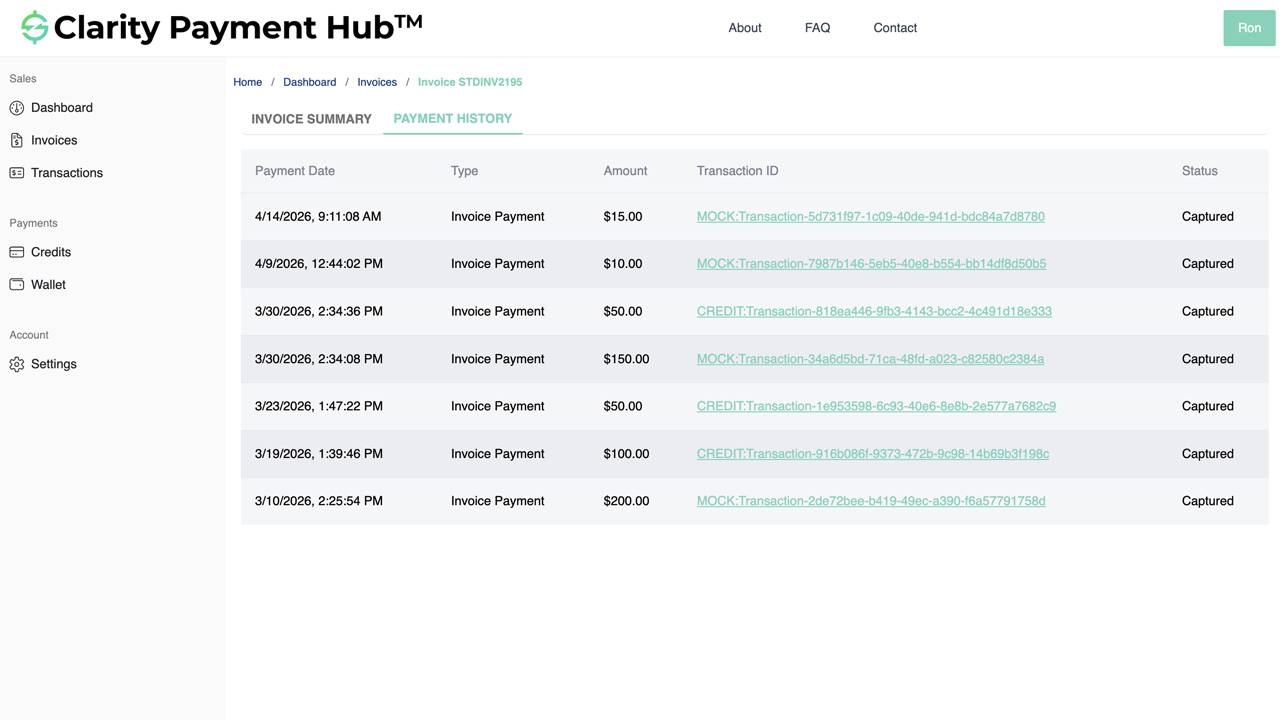
Did I make that payment? I'm sure I did. Now, you have your owned digital receipt. The Check Payment History feature in Clarity Payment Hub provides customers with a complete, searchable record of all payments made through the portal. When a customer logs into the portal and navigates to Payment History or Transactions, they see a chronological list of every payment they have submitted: the date, the amount, the payment method used, which invoices the payment was applied to, and a confirmation number. The history is synchronized directly from the vendor's ERP through Clarity Connect, so it is always accurate and always current.
Time-stamped, transaction ID, Invoice ID and amount are all recorded for every payment. This feature goes beyond a simple list. Customers can search by confirmation number, filter by date range or amount, sort by date or amount, and export the entire history in PDF or CSV format. If a customer needs to share their payment history with their accounting team or attach it to internal records, they can generate a statement instantly without asking the vendor for a report.
The Check Payment History feature solves one of the most frustrating pain points in B2B accounts receivable: payment disputes that arise from unclear or missing payment records. When a customer says "I know I sent that payment," but cannot provide proof, the AR team has to investigate and reconcile. When the customer can immediately show a confirmation number, date, and amount from the portal, the dispute is resolved instantly or prevented entirely.
Your customers have complete payment records automatically. Beyond dispute prevention, payment history transparency builds customer confidence. Customers appreciate being able to verify their own records without having to rely on the vendor to pull reports or send statements. And AR teams appreciate the reduction in payment verification calls and disputes.
The Problem: Payment Disputes and Verification Burden
In most traditional B2B payment environments, customers rely on the vendor to verify their payments. A customer submits a payment via check, bank transfer, or credit card, then anxiously waits to see if it posts to their account. Did it arrive? Did it apply to the right invoices? The customer has no way to know until they receive the next statement or call the AR department to ask. This lack of visibility creates friction, uncertainty, and disputes that could be easily prevented.
The result is that AR teams spend disproportionate time answering payment verification questions, investigating disputed payments, and reconciling discrepancies. Customers feel uncertain about their payment status. And both parties waste time and trust in a process that does not have to be this opaque.
Customers have no way to prove they sent a payment unless they have a bank confirmation email or receipt. The vendor cannot verify instantly from their side. This creates disputes when a customer insists they paid but the AR team cannot find the payment in the system.
A customer may not realize they have already paid an invoice and submit another payment, causing a duplicate that must be refunded. Or a customer thinks they paid but actually did not, and disputes being billed again. No visibility into what was actually paid creates confusion.
When a customer claims they sent a payment, the AR team must manually look it up in the ERP, run a bank reconciliation report, and respond to the customer. Each verification call costs time. Studies show AR teams spend 2–3 hours per week on payment verification inquiries.
Customers cannot pull their own payment records from the system. They have to ask for a statement, wait for it to be generated and sent, and hope all their payments are listed. This creates dependencies and delays in customer reconciliation.
Without instant visibility, a customer cannot confirm that their payment went through until they receive an email or the next statement. This uncertainty creates anxiety and repeat inquiries: "Did my payment work?" "Should I resend it?"
How Clarity Payment Hub Solves Payment History Visibility
Clarity Payment Hub eliminates payment disputes by giving customers instant, searchable access to their complete payment history. The moment a customer logs into the portal, they can navigate to Payment History and see every payment they have made: the date, the amount, the method, confirmation number, and which invoices it was applied to. The history is synchronized directly from the vendor's ERP through Clarity Connect, so it is always accurate and always complete.
More than just a list, the history is searchable and exportable. Customers can find any payment by confirmation number, filter by date range, or export the entire history for their accounting team. When a payment dispute arises, the customer can instantly show proof from the portal. When a customer needs to reconcile their records, they can pull a payment statement without asking the vendor. The result is faster dispute resolution, fewer verification inquiries, and dramatically improved customer confidence.
All payments made through the Clarity Payment Hub portal are automatically synced to the payment history, pulling data directly from the vendor's ERP through Clarity Connect. Every payment is recorded with date, amount, method, and status, nothing is missed.
Customers can instantly find any payment by entering its confirmation number. No need to scroll through history or call the AR team. One search and they have instant proof of when they paid, how much, and which invoices it was applied to.
Customers can narrow their payment history by date range, amount, or payment method. Want to see all payments from the last 30 days? Or all payments over $10,000? The filters make it easy to find what you need.
The entire payment history can be exported in PDF or CSV format, making it easy for customers to reconcile with their own accounting records or share with their finance team without requesting a custom report from the vendor.
When a payment dispute arises, customers have instant proof: a confirmation number, a timestamp, the amount paid, and which invoices it was applied to. Disputes are resolved faster because customers can show evidence immediately.
Sourced directly from your ERP. The payment history is not a separate log maintained by the portal. It is pulled directly from your ERP system through Clarity Connect, which means it is always in sync with your official accounting records. Customers see the same payment information your AR team sees, with no discrepancies.
The Missing LinkBetween Paymentsand Your ERP
Clarity Payment Hub closes that gap, connecting your orders, invoices, and payment channels into one flow.
Speak to a Platform ArchitectSee It in Action: View Your Payment History
Watch the Demo
Portal Screenshot
Step-by-Step Walkthrough
Sign in to your Clarity Payment Portal with your customer credentials. You will see the main dashboard with quick access to your account summary.
Click on "Payment History" or "Transactions" in the sidebar navigation. You will see a chronological list of all payments you have made through the portal.
Use the search bar to find a payment by confirmation number, or use the filters to narrow by date range, amount, or payment method. You can also sort the list by date or amount.
Click on any payment row to see the complete details: date paid, amount, payment method (credit card, ACH, etc.), which invoices the payment was applied to, and the confirmation number.
Generate an export of your payment history in PDF or CSV format. You can download it for your records, share it with your accounting team, or use it for reconciliation without asking the vendor for a statement.
Benefits and Business Impact
Transparent payment history transforms how customers and vendors interact around payment disputes and verification. Customers gain confidence and independence. AR teams gain time back. And both parties benefit from faster dispute resolution and stronger trust.
When a payment dispute arises, the customer has instant proof: confirmation number, date, amount, and which invoices were paid. Disputes that used to take days of investigation are resolved in minutes because both parties can see the same data.
AR teams eliminate 2–3 hours per week of payment verification calls. Customers check their own history instead of calling to ask "Did my payment post?" Each call saved frees time for higher-value work.
Customers can check their history before submitting a payment. If they have already paid an invoice, they will see it in the history and avoid sending a duplicate payment. This reduces refunds and reconciliation work for both parties.
Customers appreciate being able to verify their own payment records without depending on the vendor. They can pull statements, reconcile their records, and have complete confidence in their payment history.
When customers have instant access to complete payment records with confirmation numbers and timestamps, they feel more confident in the vendor relationship. Transparency builds trust and strengthens long-term business relationships.
Customers can export payment history in a format that syncs easily with their accounting system. This reduces manual reconciliation work and improves the accuracy of customer accounting records.
Organizations deploying Clarity Payment Hub consistently report that the Check Payment History feature reduces payment disputes and verification inquiries significantly. Customers love having instant proof of their payments. AR teams love the time savings and reduced conflict. And CFOs appreciate the improved accuracy and transparency in accounting records.
Frequently Asked Questions
How far back does my payment history go in Clarity Payment Hub?
Your payment history includes all payments made through the Clarity Payment Hub portal, going back as far as the vendor has configured the system, typically 1–3 years or even longer. You can set date filters to view any time period you want.
What information is included in each payment record?
Each payment record shows: the date you paid, the amount of the payment, the payment method you used (credit card, ACH, etc.), which invoices the payment was applied to, the payment confirmation number, and the transaction status. You have complete visibility into what you paid and when.
Can I verify that a payment I made has posted to the vendor's system?
Yes. Your payment history shows every payment submitted through the portal, along with its status. You can search by confirmation number, date range, or amount to verify that a specific payment went through and confirm which invoices it was applied to. The payment data is sourced directly from the vendor's ERP, so what you see is the same as what they see.
Can I search for a specific payment?
Yes. You can search by confirmation number, which is the fastest way to find a specific payment. You can also filter by date range, filter by amount, or filter by payment method. You can also sort the history by date or amount to find what you are looking for quickly.
Can I export my payment history for my accounting records?
Yes. You can export your entire payment history in PDF or CSV format directly from the portal. This gives you a backup record of all payments, makes it easy to reconcile with your own system, and allows you to share the history with your internal accounting team.
What if I see a discrepancy between my payment history in the portal and what the vendor told me?
If you see a payment in your portal history but the vendor claims they did not receive it, you have proof from the portal confirming when you submitted the payment and the confirmation number. Use this information to investigate with the vendor's AR team. Since the portal data is sourced from the vendor's ERP, the vendor will be able to find the payment using the confirmation number and date.
Does the payment history sync in real time with the vendor's records?
Yes. All payments made through the Clarity Payment Hub portal are immediately synced to the vendor's ERP through Clarity Connect. The payment history you see in the portal is sourced from the same system the vendor uses for accounting, so there are no discrepancies. What you see is exactly what the vendor sees.
Related Features
Faster AR. Fewer headaches.
See Clarity Payment Hub running inside your ERP, or spin up a free trial environment and click around on your own. Either way, you’ll see exactly how it handles your invoice mix, your gateway, and your Level II/III savings &mdash. Before you commit to anything.
Supported
Go-Live
Savings