



What Is the "Check Recent Payment" Feature?
Clarity added a new reporting widget on the dashboard called, "Recent Payments." The Check Recent Payment feature in Clarity Payment Hub puts your most recent payment front and center on your dashboard the moment you log in. You do not have to navigate to a separate transactions section or search for your payment, it is right there, prominently displayed with everything you need to know: payment date, amount, payment method (credit card, ACH, etc.), current status (processed, pending, posted), and a confirmation number.
So how do you know if the status is accurate? The status is synchronized in real time from your vendor's ERP through Clarity Connect, which means you see the current state of your payment without any lag. If the payment is still processing through the payment gateway, the status shows "processing." If it has been posted to your vendor's account, the status shows "posted." You can see at a glance whether your payment went through successfully.
For complete details on a transaction, click View All from the dashboard or View on the transaction from the management view, which takes you to the detailed transaction view. This view contains the exact date and time it was submitted, the exact amount, which payment method you used, which invoices the payment was applied to, and the full confirmation number. This information is your proof of payment, everything you need to provide to your accounting team or vendor if there is ever a discrepancy or question about whether you paid.
The Check Recent Payment feature solves one of the most common and anxiety-inducing pain points in B2B payments: uncertainty about payment status after submitting a payment. Instead of wondering and worrying, or having to call AR to ask, you know immediately and with confidence that your payment has been received and posted.
The Problem: Payment Uncertainty and Status Anxiety
In most B2B payment environments, after a customer submits a payment, there is a period of uncertainty. The customer does not know if the payment has been received, whether it has processed, or when it will post to their account. They may have gotten a confirmation email from their bank or credit card company, but they do not have confirmation from the vendor. The only way to know for certain is to wait for the next statement, or call AR and ask "Did my payment go through?"
This uncertainty creates stress and unnecessary support burden. Customers worry about whether they need to resend the payment. AR teams field calls from anxious customers asking about payment status when the information could be provided instantly and automatically through the portal. Both parties waste time and create friction over information that technology can surface in seconds.
After you submit a payment, you do not know if it was received. Did it process? Is it pending? Did it post? You have no way to know until you receive a statement or call the AR team. This creates anxiety and uncertainty.
Customers call or email AR asking "Did my payment post?" These are often routine, low-value inquiries that AR could eliminate by giving customers instant visibility into payment status through the portal.
Without portal visibility, customers lack instant proof that they submitted a payment. If there is a dispute, they have to ask the vendor for a confirmation, creating a back-and-forth instead of having proof readily available.
Waiting for a statement or an email confirmation creates a delay between payment submission and confirmation. This delay is unnecessary friction that damages customer confidence and creates unnecessary anxiety.
When a customer submits a payment, they may not know if it was correctly applied to the invoices they intended. Portal visibility clarifies exactly which invoices the payment was credited to.
How Clarity Payment Hub Solves Payment Status Uncertainty
Clarity Payment Hub eliminates payment status anxiety by showing your most recent payment on the dashboard with complete details and real-time status synchronized from your vendor's ERP. The moment your payment is submitted through the portal, a confirmation appears on your dashboard. As the payment processes through the payment gateway and posts to the vendor's ERP, the status updates automatically. You can see at a glance whether your payment is being processed, is pending, or has been posted.
More than just a status indicator, the recent payment widget shows you all the details you need: the exact amount, the date and time you submitted it, the method you used, which invoices it was applied to, and a confirmation number that is your proof of payment. You have instant answers to every question without making a single call to AR.
Payment status is synchronized in real time from the vendor's ERP through Clarity Connect. You see immediately whether your payment has been processed, is pending, or has been posted, no guessing or waiting.
The dashboard widget displays payment date, amount, method, status, and confirmation number. All the information you need is visible instantly without additional clicks or navigation.
Click on the payment to see which invoices it was applied to, how the amount was distributed, and the current balance on each affected invoice. Complete transparency into how your payment was posted.
Every payment has a unique confirmation number generated by the payment gateway. You have instant proof of payment for your records, for your accounting team, or for any future questions or disputes.
You can download or print your payment confirmation details, including the confirmation number and all transaction details. Share it with your accounting team or store it with your records.
Sourced directly from your vendor's ERP. Payment status is not a guess or an estimate, it is pulled directly from your vendor's accounting system through Clarity Connect. What you see is the official record of payment as the vendor sees it, with no discrepancies or delays.
The Missing LinkBetween Paymentsand Your ERP
Clarity Payment Hub closes that gap, connecting your orders, invoices, and payment channels into one flow.
Speak to a Platform ArchitectSee It in Action: Instant Payment Confirmation
Watch the Demo
Portal Screenshot
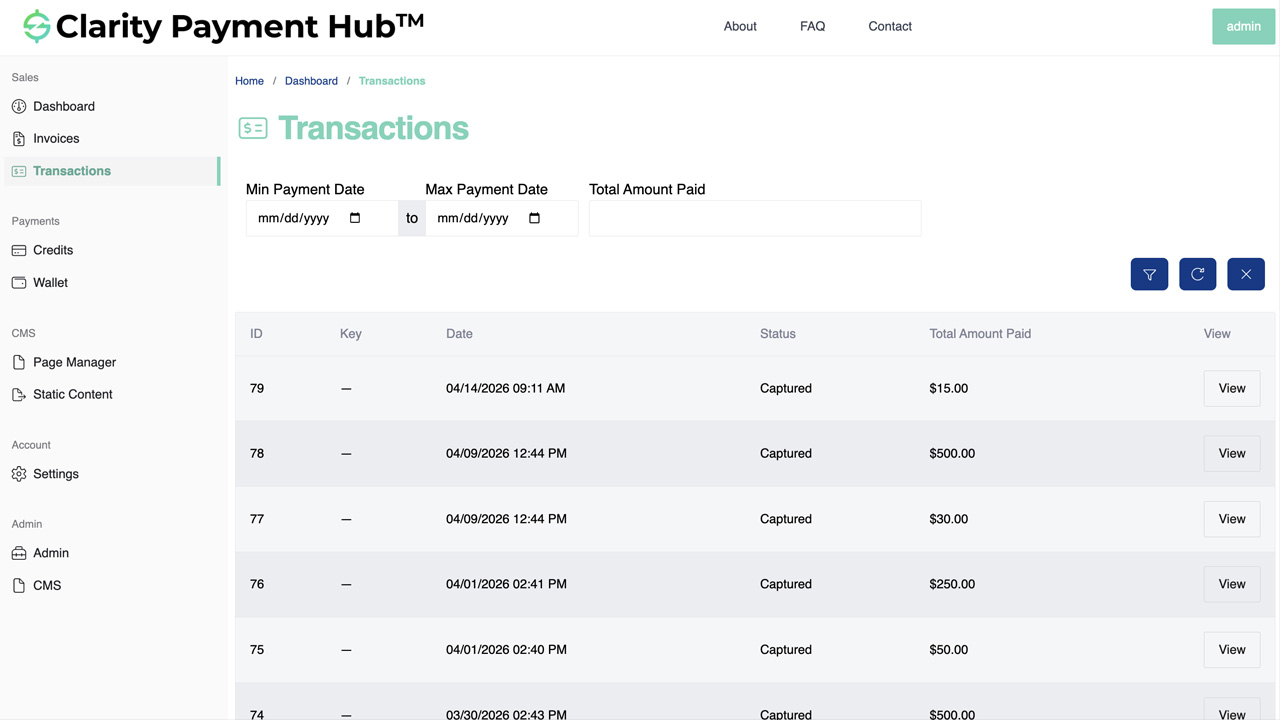
Step-by-Step Walkthrough
Navigate to the Invoices section, select the invoice you want to pay, choose your payment method, and click "Pay." Your payment is submitted immediately to the payment gateway.
You will see an on-screen confirmation message immediately, and when you log back in to the portal, your most recent payment is displayed prominently on the dashboard.
The recent payment widget shows the payment date, amount, method, current status (processed, pending, or posted), and confirmation number. You have instant confirmation that the payment went through.
Click on the recent payment widget to see the complete transaction details: the exact date and time submitted, the amount, the method, which invoices it was applied to, and the full confirmation number.
Download or print your payment confirmation details for your accounting records. You have proof of payment that you can share with your internal team or store with your records.
Benefits and Business Impact
Providing instant payment status visibility transforms the customer experience after payment submission. Customers gain confidence and peace of mind. AR teams gain relief from status inquiry calls. And both parties benefit from faster, clearer communication around payment confirmation.
The moment you submit a payment, you can see confirmation on the dashboard. You know immediately whether it was received and is being processed. No more anxiety or uncertainty about whether you need to resend the payment.
AR teams eliminate 1–2 hours per week of status inquiry calls. Customers check the portal instead of calling. This frees AR time for higher-value work and reduces support costs.
You have instant proof of payment with a confirmation number and all transaction details. No need to request a receipt or confirmation from the vendor. You have it immediately on the portal.
You can see exactly which invoices your payment was applied to and how the amount was distributed. No ambiguity or confusion about which charges were paid.
Your accounting team can reconcile payments faster because they have instant access to confirmation numbers and details. No need to request statements or reports from the vendor.
Customers feel more confident in the payment process when they have instant confirmation. This builds trust and improves the overall customer experience.
Organizations deploying Clarity Payment Hub find that the Check Recent Payment feature drives measurable improvements in customer satisfaction and AR efficiency. Customers love having instant confirmation. AR teams love the reduction in support calls. And both parties appreciate the transparency and trust that comes from instant payment status visibility.
Frequently Asked Questions
Where is my recent payment displayed in the portal?
Your most recent payment is displayed prominently on the dashboard when you log in. You can see the status, amount, date, and method at a glance without navigating to a separate section.
What information is shown for my recent payment?
The recent payment widget displays: the payment date, the amount paid, the payment method (credit card, ACH, etc.), the current payment status (processed, posted, pending, etc.), and the confirmation number. Click for additional details including which invoices were paid.
How do I know if my payment has posted to the vendor's system?
The payment status in the portal shows the current state of your payment. If the status shows "posted," your payment has been posted to the vendor's ERP system. If it shows "processing" or "pending," it is still being processed through the payment gateway.
Can I see which invoices my recent payment was applied to?
Yes. Click on your recent payment to see the full details, including which invoices or invoice numbers the payment was applied to, and how the payment amount was distributed among them.
How quickly does my payment appear in the recent payments section?
Your payment confirmation appears on the dashboard within seconds of submitting it. As the payment processes through the payment gateway and posts to the vendor's ERP system, the status updates automatically in real time.
Can I download or print my payment confirmation?
Yes. You can view your payment confirmation details and download or print them for your records. The confirmation number, date, amount, and status are all visible and printable, giving you proof of payment.
What if the status of my recent payment does not update?
Payment status updates in real time as the payment processes through the payment gateway and posts to the vendor's ERP. If the status does not update within a few minutes, wait briefly. If it does not update after 10–15 minutes, contact your vendor's AR team with your confirmation number.
Related Features
Faster AR. Fewer headaches.
See Clarity Payment Hub running inside your ERP, or spin up a free trial environment and click around on your own. Either way, you’ll see exactly how it handles your invoice mix, your gateway, and your Level II/III savings &mdash. Before you commit to anything.
Supported
Go-Live
Savings