


Payment Hub for Professional Services: Invoice-Centric AR, Automated
A self-service invoice payment portal for consulting, accounting, legal, architecture, engineering, and professional services firms — integrated with NetSuite, QuickBooks Enterprise, Dynamics 365 Business Central, Sage 100, and Sage 50.
Payment Hub for Professional Services: Overview
Clarity Payment Hub is a self-service invoice payment portal designed for professional services firms. It gives clients a branded, secure way to view and pay their invoices online — with every payment posting back automatically to NetSuite, QuickBooks Enterprise, Dynamics 365, Sage 100, or Sage 50 through Clarity Connect.
Professional services AR is deceptively simple: you invoice, clients pay, revenue recognized. In practice, the 'clients pay' step is where everything slows down. Invoices go out by email or mail, sit in AP queues, get forwarded to the wrong person, and eventually get cut as checks or paid by phone. Payment Hub compresses that timeline by giving clients a two-click path to pay — and eliminates the manual cash-app bottleneck on your side.
Firm administrators, controllers, billing coordinators, and partners use Payment Hub for visibility and automation. Clients use the portal because it takes two minutes instead of twenty.
The AR Problem in Professional Services
Professional services firms run on billable hours, retainers, and project fees. What you bill is what you earn — but what you collect is what pays the firm. Industry data for professional services consistently shows average DSO in the 45–75 day range, with smaller firms often worse. The gap between billing and collection is cash flow risk and partner distribution risk.
The problem is not that clients refuse to pay. It is that payment is made harder than it needs to be. Invoices arrive as PDF attachments, get forwarded to an AP clerk, sit in a queue, and eventually generate a check. A firm with strong self-service payment collects noticeably faster than one that does not.
Professional services DSO routinely sits 45–75 days — a large share of which is pure payment-process friction.
Payments arrive by check, wire, and phone-card and have to be keyed into NetSuite, QuickBooks, Dynamics 365, or Sage by hand.
Taking card numbers over the phone and storing them in an email or notepad blows open PCI scope.
Clients who would happily pay online have no way to do it, so they default to 'we'll cut a check next cycle.'
Firms holding client retainers or trust balances often manage them in spreadsheets, with no client-visible portal or balance.
How Clarity Payment Hub Solves It
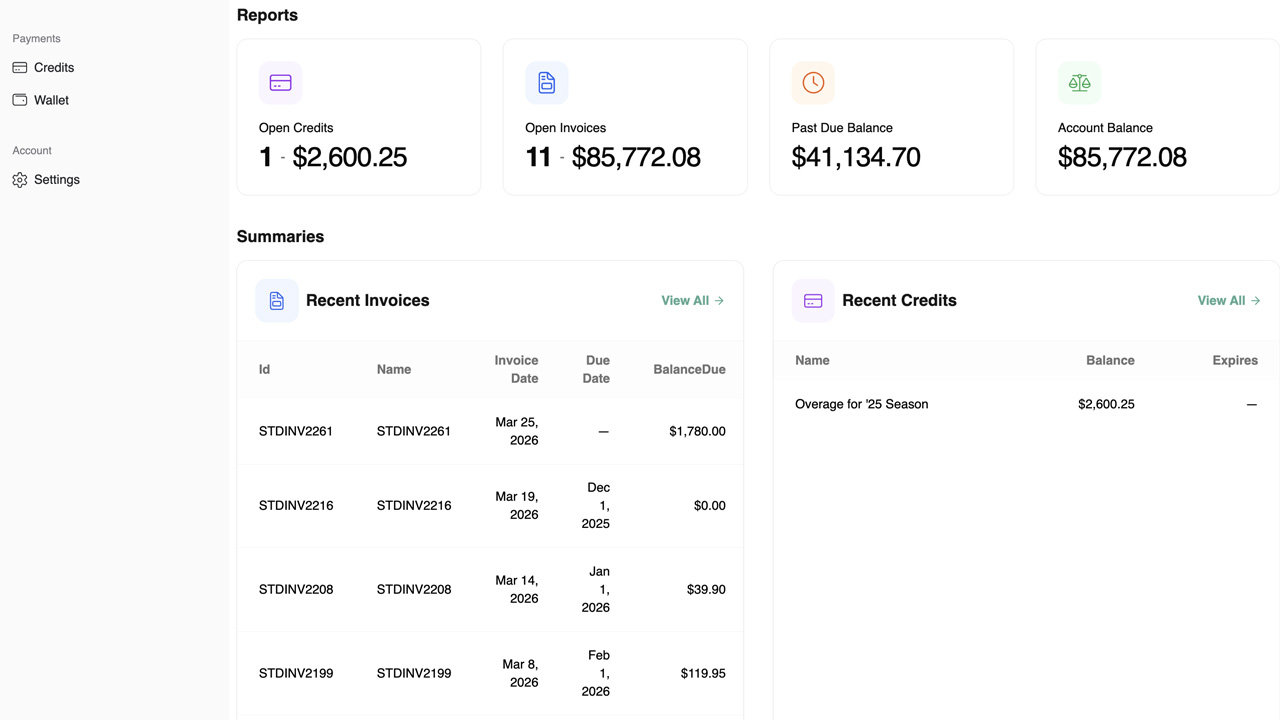
Payment Hub gives your clients a branded, self-service portal where they can view invoices, pay by card or ACH, and save a payment method for future invoices. Every payment posts back automatically to NetSuite, QuickBooks Enterprise, Dynamics 365, Sage 100, or Sage 50 through Clarity Connect — applied to the correct invoice and client.
The portal also handles retainer balances, partial payments, and consolidated payment flows for clients with multiple open invoices. You keep your practice management or billing system. Payment Hub is the client-facing portal and the financial-system integration layer.
Clients see open invoices pulled live from your financial system and pay in two clicks.
Every payment posts back to NetSuite, QuickBooks, Dynamics 365, or Sage automatically — no keying, no errors.
Clients see retainer balances applied against their invoices; firm administrators get a clean ledger instead of a spreadsheet.
Clients with multiple invoices pay them all at once or partially, and the portal splits cash correctly.
Saved payment methods are tokenized at the processor, keeping card data off your firm's systems.
No gateway lock-in. Payment Hub is processor-agnostic and integrates with NetSuite, QuickBooks Enterprise, Dynamics 365 Business Central, Sage 100, and Sage 50 through Clarity Connect. Sage Intacct, widely used in mid-market professional services, is not yet in our battlecard library but is supported through the same integration patterns.
Common Professional Services Scenarios
Here are a few representative situations we see across professional services firms and how Clarity Payment Hub addresses each:
Mid-sized consulting firm on NetSuite
Regional accounting practice on QuickBooks Enterprise
Law firm on Sage 100
Benefits for Professional Services Companies
Self-service payment compresses the collection cycle meaningfully; firms commonly see 10–15 day DSO improvement.
Faster, more consistent collection means more predictable partner distributions and working capital.
Eliminating phone-based card intake and tokenizing saved methods reduces PCI exposure materially.
Automated posting and self-service payment eliminate most manual cash-app and collection-call work.
Clients pay the way they pay every other professional vendor — online, fast, self-service.
For firms holding retainers or trust balances, clients see exactly what they have on account.
Firm administrators, billing coordinators, and controllers reclaim hours of manual work. Partners get more predictable cash flow and distribution cycles. Clients — procurement and AP teams at other businesses — get a fast, self-service path to pay you that they already expect from every other vendor.
ERPs We Integrate With for Professional Services
Professional services firms run on a mix of financial platforms depending on size and practice area. Payment Hub integrates with all the major ones through Clarity Connect. Sage Intacct is widely adopted in mid-market professional services — while not in our battlecard library yet, it is supported through the same integration patterns.
Popular with consulting, engineering, and larger services firms. Payment Hub adds B2B payment automation.
→ QuickBooks EnterpriseThe go-to for small and mid-sized firms. Payment Hub turns QuickBooks into a B2B self-service platform.
→ Dynamics 365 Business CentralMicrosoft's mid-market ERP, common for services firms on Microsoft stacks.
→ Sage 50For smaller practices. Payment Hub brings enterprise-grade self-service to Sage 50.
→ Sage 100The SMB workhorse. Payment Hub adds a branded portal and automated posting.
Frequently Asked Questions
Does Payment Hub integrate with our financial system?
Yes. Payment Hub integrates with NetSuite, QuickBooks Enterprise, Dynamics 365 Business Central, Sage 100, and Sage 50 directly through Clarity Connect. Sage Intacct and other systems are supported through the same integration patterns.
Can clients pay multiple invoices at once?
Yes. Consolidated payment is standard — clients pick any mix of open invoices and pay once. The portal splits and applies cash correctly against each invoice.
How does retainer and trust balance management work?
Retainer/trust balances flow into the portal and are applied automatically against new invoices where appropriate. Clients see their balance clearly; the ledger stays in your financial system.
Will Payment Hub reduce our PCI compliance burden?
Yes. Raw card data never touches your systems — it is tokenized at the processor. Eliminating phone-based card intake further reduces exposure.
How long does deployment take?
Most professional services deployments go live within 48 hours of Clarity receiving ERP sandbox credentials.
Can we keep our existing payment gateway?
Yes. Payment Hub is gateway-agnostic — you keep your processor and negotiate your own rates.
Related Industries
Ready to tighten AR at your professional services firm?