


Payment Hub for Construction: Progress Billing, Retainage, and Faster Collections
A self-service payment portal that handles progress invoices, retainage, and final payments — and writes back to Sage 100, Sage 300, Acumatica Construction, QuickBooks Enterprise Contractor, or your Viewpoint/Foundation system.
Payment Hub for Construction & Contractors: Overview
Clarity Payment Hub is a self-service B2B payment portal built for construction companies, contractors, and specialty trades. It lets owners, GCs, and property managers pay progress invoices, final bills, and retainage online — with every payment posting back automatically to your construction accounting system through Clarity Connect.
Construction AR is fundamentally different from every other industry. You don't bill once and get paid; you bill against progress, hold retainage, and negotiate draws across months or years. Payment Hub is designed for exactly that motion — supporting partial payments, progress draws, and final closeout without forcing a workflow change inside your ERP.
The users are your AR manager, project accountant, controller, and sometimes the project manager checking a draw status. The customers using the portal are owner's reps, property managers, GCs paying subs, and AP clerks on the other side of every project.
The AR Problem in Construction & Contractors
Construction is the slowest-paying industry in the United States. Industry reports consistently show construction DSO averaging 60–90 days, with complex projects stretching well past that. Every day a progress invoice sits unpaid is a day you are financing the customer's project with your own working capital — and construction margins rarely have room for that.
The problem is not that customers refuse to pay. It is that the payment process is broken. Invoices get emailed but buried. Checks take weeks to cut, mail, and clear. Retainage release gets forgotten. And when the customer finally does pay, your AR team spends an hour making sure the payment is applied to the right job, the right phase, and the right invoice in Sage 300 CRE or Acumatica.
Construction DSO averages 60–90 days — roughly double the cross-industry average. Every extra day of DSO is working capital locked up in AR instead of payroll and materials.
Progress invoices, partial payments, retainage holdbacks, and final releases are a headache to apply by hand in Sage 300 CRE, Sage 100 Contractor, or Viewpoint.
Owners and property managers have to cut a check, wire funds, or call in a card — the path of least resistance is 'pay later.'
Retainage sits unbilled or unpaid for months after substantial completion because no one has an easy workflow to release it.
Misapplied payments create job-cost variances that take hours to reconcile across phases, change orders, and retainage.
How Clarity Payment Hub Solves It
Payment Hub gives owners, GCs, and property managers a self-service portal where they can see progress invoices, pay partial amounts, submit ACH or card payments, and track retainage. Every payment posts back to your construction accounting system through Clarity Connect — applied to the right job, the right phase, and the right invoice automatically.
The platform handles the construction-specific quirks: partial payments, progress draws, and retainage release. You keep your Sage 100 Contractor, Sage 300 CRE, Acumatica Construction, or QuickBooks Enterprise environment intact. Payment Hub is the customer-facing portal and the integration glue that makes construction AR move at the speed of the rest of your business.
Owners can pay any portion of a progress invoice. The portal splits and applies the payment correctly against the active schedule of values.
Retainage holdbacks are surfaced clearly, and final release invoices flow through the portal just like any other invoice.
Clarity Connect posts every payment to the right job, phase, and invoice in Sage 300 CRE, Acumatica, or QuickBooks — no manual keying.
Owners can pay by ACH (cheap for you, familiar for them) or card with Level II/III data for the lowest B2B interchange.
The portal wears your company's branding, not Clarity's — owners and GCs see a polished, professional payment experience that matches your brand.
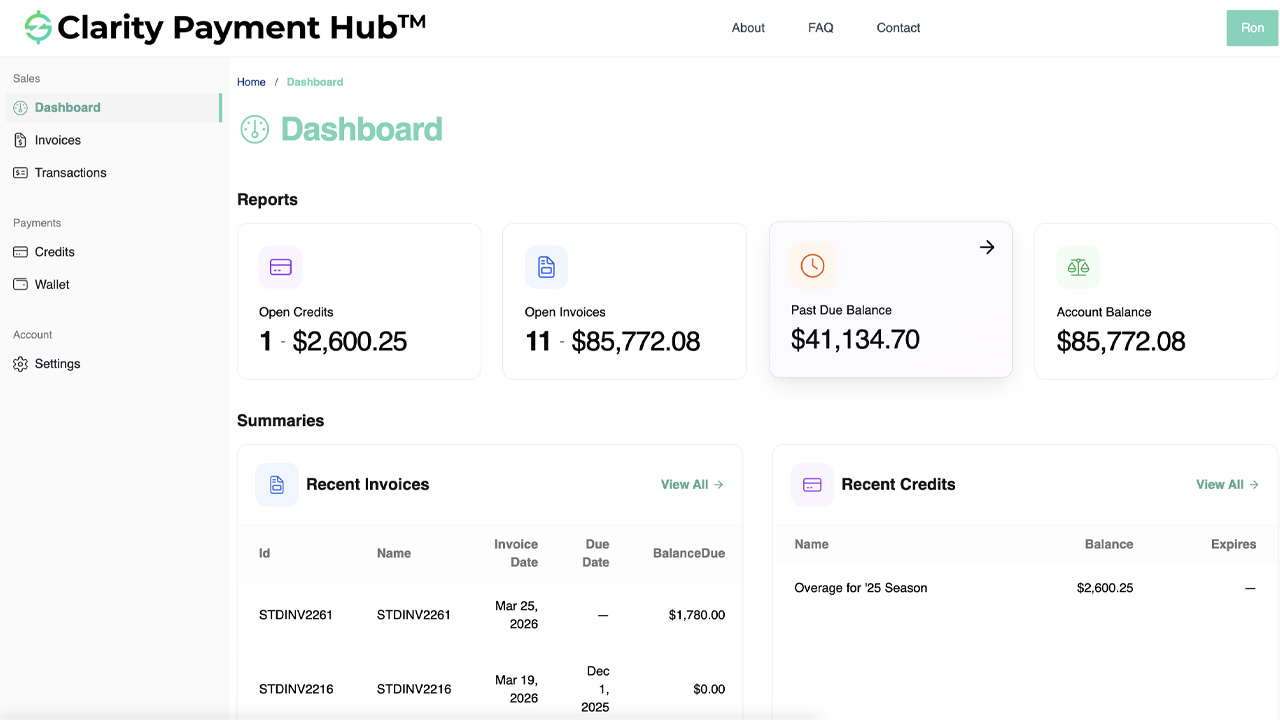
Gateway-agnostic and ERP-agnostic. Payment Hub works with Sage 100 Contractor, Sage 300 CRE, Acumatica Construction, QuickBooks Enterprise Contractor Edition, and alongside systems like Viewpoint Vista and Foundation. You keep your construction accounting system. You keep your gateway. Payment Hub is the portal and integration layer.
Common Construction & Contractors Scenarios
Here are a few representative situations we see across contractors and how Clarity Payment Hub addresses each:
Mid-sized GC on Sage 300 CRE
Specialty subcontractor on QuickBooks Enterprise
Property manager on Acumatica Construction
Benefits for Construction & Contractors Companies
Faster, easier payment reduces construction DSO meaningfully — typical improvements range 7–15 days.
Every day of DSO reduction is working capital you can redirect to payroll, materials, and growth.
Retainage holdbacks are surfaced to customers and your team; releases stop slipping through the cracks.
Payments land on the right job and phase automatically, eliminating reconciliation cycles.
Owners and GCs get a modern, self-service payment experience that matches their expectations from every other vendor.
Level II/III data passing and ACH prioritization keep card and bank-transfer costs low.
AR managers, project accountants, and controllers save hours of manual work. Project managers get real-time visibility into whether their draws have been paid. Owners and CFOs see DSO and working capital improve quantifiably. And your customers — property owners, GCs, and AP clerks — get a modern payment experience that removes friction from the billing relationship.
ERPs We Integrate With for Construction & Contractors
Construction runs on a specialized set of accounting and ERP systems. Payment Hub integrates with the platforms that dominate the industry through Clarity Connect. Viewpoint Vista and Foundation, while widely used in construction, are not yet part of our battlecard library — Payment Hub works alongside them through standard integration patterns; contact us for specifics.
The SMB workhorse for specialty contractors and smaller GCs. Payment Hub plugs in quickly.
→ Sage 300 CREThe mid-market standard for GCs. Payment Hub supports job/phase/retainage-aware cash application.
→ AcumaticaCloud-native ERP with a strong Construction Edition. Payment Hub extends any Acumatica tenant.
→ QuickBooks EnterpriseThe go-to for smaller contractors and specialty trades. Payment Hub turns QuickBooks into a B2B self-service payment platform.
Frequently Asked Questions
Does Payment Hub support progress billing and retainage?
Yes. Partial payments, progress draws, and retainage holdbacks are core workflows. The portal surfaces retainage clearly, and final release invoices post back to your construction accounting system automatically.
Which construction accounting systems does Payment Hub integrate with?
Payment Hub integrates with Sage 100 Contractor, Sage 300 CRE, Acumatica Construction, and QuickBooks Enterprise Contractor Edition through Clarity Connect. It also works alongside Viewpoint Vista and Foundation via the same integration layer.
Can customers pay a partial amount on a progress invoice?
Yes. Owners can enter any amount up to the invoice balance. The portal splits and applies the payment correctly, and the remaining balance stays open.
How does retainage get handled?
Retainage holdbacks flow through the portal like any other line. When you release retainage with a final invoice, it appears in the customer's portal and gets paid through the same flow.
Will this reduce our DSO?
In construction, yes — often dramatically. Contractors typically see 7–15 day DSO reductions within the first quarter post-deployment, driven mostly by owners and GCs paying faster when payment is frictionless.
How secure is card and ACH data in the portal?
All card data is tokenized and stored by the processor; ACH accounts are similarly protected. Payment Hub never stores raw card or bank-account data on your servers.
Related Industries
Ready to shorten construction DSO and eliminate manual cash app?