



What Is the "Pay on Account" Feature?
Part of the reason that customers wait to pay you, is that they're waiting to figure out which invoices are coming and which to pay. The Pay on Account feature in Clarity Payment Hub allows your customers to make a general payment toward their overall account balance with you, rather than specifically tying the payment to a particular invoice. Instead of seeing a list of invoices and clicking "Pay Invoice #12345," customers simply enter an amount they want to deposit against their account. That payment posts to your ERP as an account credit, and your system applies that credit to invoices based on your configured business rules, typically oldest unpaid invoices first, but configurable per your needs.
If a customer sends in a big check, how much time does your team have to waster trying to figure out which invoices that payment covers, and where to parse and deploy those funds? We do it automatically. This seemingly simple feature addresses a surprising number of real-world business scenarios. A manufacturing customer might want to send a $25,000 deposit to reduce their credit risk before the next major order ships. A seasonal business might want to pre-pay during their slow months so they have credits available when invoices come due at peak season. A customer managing accounts across multiple divisions might not know exactly which invoices will be outstanding when the payment arrives and prefers to send a general credit that the vendor can apply intelligently. In all these cases, the rigid "pay a specific invoice" model breaks down, and customers have no clean self-service option.
Built on Clarity's enterprise-grade integration platform and connected to your ERP through Clarity Connect, the Pay on Account feature ensures that account credits are tracked accurately, applied transparently, and reconciled automatically. Your AR team never has to manually allocate a credit or chase a confused customer about where their payment went.
The Problem: Why Rigid Invoice-Only Payment Systems Frustrate Customers
20 years of custom development has taught us that B2B is different. Traditional B2B payment systems are designed with a single mental model: customers have invoices, and they pay invoices. This model works fine for simple, one-off transactions. But it breaks down in real-world scenarios where customers need or want to pay in ways that do not map cleanly to individual invoices. A customer might want to send a deposit against future work. They might want to pre-fund an account. They might be managing a seasonal business with advance payments. Or they might simply want the flexibility to send cash to the vendor and let them allocate it intelligently to wherever it is needed.
When a payment system does not support these scenarios, customers have limited options, all of them bad: call the AR department and ask them to set up a special arrangement, send a wire transfer with confusing payment instructions in the note field, or simply delay the payment until it matches a specific invoice. Each path creates friction and wastes both sides' time.
Customers who want to send a deposit or advance payment have no self-service option in systems that only support invoice-specific payments. They are forced to call AR and arrange something manually, creating overhead on both sides.
When customers send a general payment, both parties often spend time on phone calls or emails negotiating how the credit should be applied. Should it go to the oldest invoice? Applied to specific invoices the customer nominates? Held as a general prepayment? Without clear system support, these conversations are confusing and time-consuming.
Every account payment that comes in requires manual AR work to determine which invoices to apply it to, enter it into the ERP, and then follow up with the customer to confirm the allocation. This is exactly the kind of low-value, repetitive work that should be automated.
Seasonal businesses and those with cyclical cash flows have unique payment timing needs. A customer might want to pre-pay during slow months to build a credit buffer before invoices spike during peak season. Traditional systems cannot accommodate this pattern, forcing customers to wait and pay invoices as they arrive rather than paying strategically.
When account credits are handled manually and without clear system support, confusion often arises. How much credit does the customer have? Has it been applied to invoices yet? Is it being held as a prepayment? Without transparency, disputes are inevitable.
How Clarity Payment Hub Enables Flexible Account Payments with Automation
Clarity Payment Hub solves the account payment problem by providing a simple, automated path for customers to send general account payments without needing to speak to anyone. In the portal, customers see an invoice list alongside an Account section that shows their total account balance, available credits, and an option to "Pay on Account." When they select this option, they simply enter the amount they want to deposit against their account, choose a payment method, and submit. The portal processes the transaction, and Clarity Connect automatically posts it to your ERP as an account credit.
The credit then sits in the ERP and is automatically applied to invoices per your configured business rules. Most companies apply credits to the oldest unpaid invoices first (a standard accounting practice), but you can configure other rules if your business needs them. The key is that the application happens automatically, without requiring AR staff to manually determine where the credit should go. The customer sees their updated account balance in the portal, and both parties have perfect visibility into how much credit is available and how it has been applied.
Customers click "Pay on Account," enter the amount, choose a payment method, and submit. No invoice selection needed. No confusion about which invoice to tie the payment to. Just a straightforward account deposit.
Clarity Connect automatically applies account credits to invoices per your business rules. You configure the logic once, and then every account payment is applied correctly without manual intervention.
Customers see their account balance, available credits, and open invoices in real time through the portal. They know exactly where they stand with the vendor at any moment.
Account payments are ideal for advance payments, security deposits, and prepayments. Customers can send cash ahead of invoices, and credits are held and applied as invoices arrive.
Your AR team does not need to manually determine where each account payment should be applied or enter it into the ERP. Clarity Connect handles all of that automatically, freeing your team for higher-value work.
Fully configurable credit application rules. Clarity Payment Hub's account payment feature works with virtually any ERP and supports customizable credit application logic. Whether you want to apply credits to oldest invoices first, specific cost centers, or follow other business rules, the system can be configured to match your needs. No vendor lock-in, no premium charges for flexibility.
The Missing LinkBetween Paymentsand Your ERP
Clarity Payment Hub closes that gap, connecting your orders, invoices, and payment channels into one flow.
Speak to a Platform ArchitectSee It in Action: Pay on Account Demo
Watch the Demo
Portal Screenshot
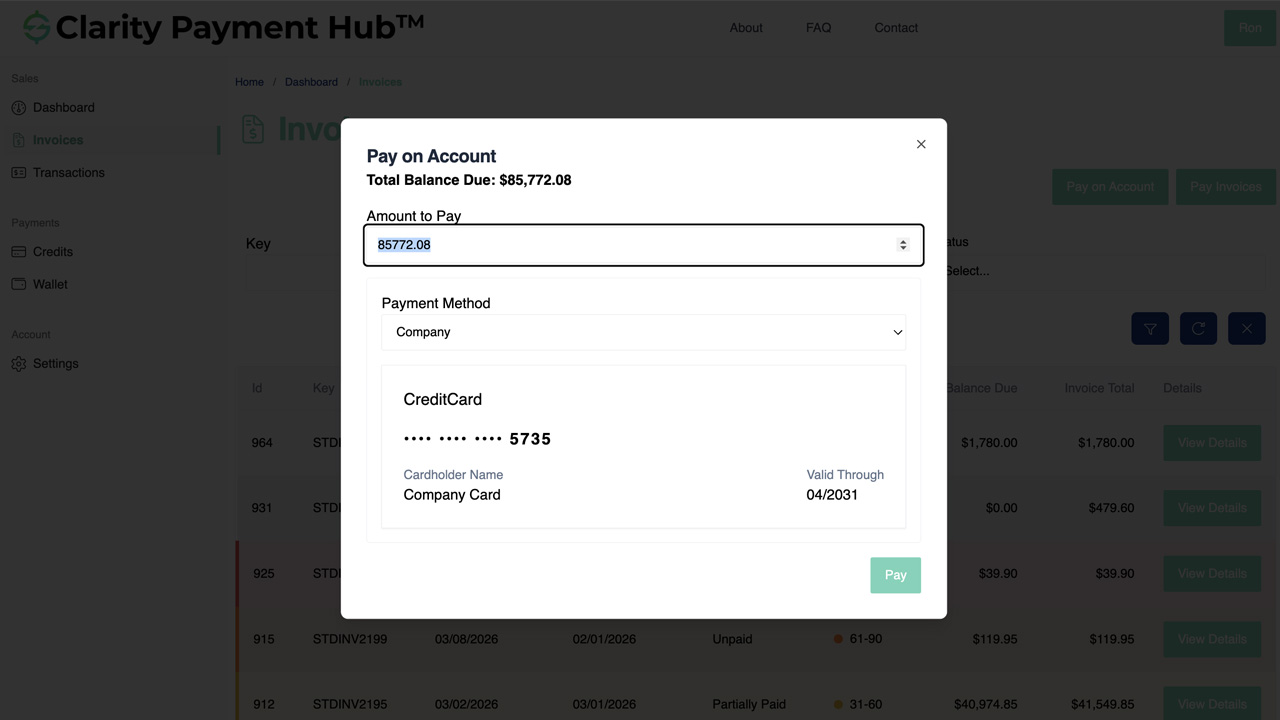
Step-by-Step Walkthrough
Navigate to the Clarity Payment Portal and sign in with your credentials. You will see the dashboard with a summary of your account status.
Click on the Account tab or Dashboard. You will see your total account balance, any credits already applied, current open invoices, and your overall payment status.
Click the "Pay on Account" button or link. Unlike paying a specific invoice, this option lets you make a general deposit against your entire account.
Enter the amount you want to deposit against your account. The portal shows you the payment amount and confirms that this is a general account credit, not tied to a specific invoice.
Choose a saved credit card or ACH method from your wallet, or enter a new payment method. Your payment information is stored securely in a PCI DSS-compliant vault.
Review the payment amount and click Pay. The transaction processes immediately. You receive a confirmation showing the amount deposited and your updated account balance. Through Clarity Connect, the payment posts to your vendor's ERP as an account credit and is automatically applied per their business rules.
Benefits and Business Impact
Account payment functionality creates value for both customers and vendors. For customers, it provides flexibility and removes barriers to sending payments. For vendors, it automates manual work, improves cash position, and strengthens customer relationships. Here is what you gain by offering this capability:
Customers who want to send advance payments or deposits now have a self-service path. Some will send more cash more frequently because they can do it on their own schedule without calling your team.
Every account payment that comes in no longer requires AR staff to manually determine which invoices to apply it to. Clarity Connect handles it automatically per your configured rules, freeing your team for strategic work.
Customers can now pre-fund accounts, send security deposits, or pre-pay for upcoming work through self-service. This reduces your credit risk and improves your cash position, especially valuable for new or high-risk customers.
Because credits are automatically applied per clear rules and customers can see their balance in the portal, there is no ambiguity about where payments went or how much credit they have. Disputes nearly disappear.
Seasonal customers can now pre-fund accounts during slow months and draw down credits during peak invoicing periods. This flexibility strengthens those customer relationships and builds loyalty.
Offering flexible account payment options signals that you understand your customers' real-world business needs. This builds goodwill and differentiates you from competitors with rigid payment systems.
Pay on Account is especially valuable for vendors serving seasonal industries, those with significant customer deposits and pre-payments, and those who want to offer their most valued customers maximum flexibility in how they send cash. It transforms account payments from a painful manual process into an elegant, automated self-service capability.
Frequently Asked Questions
What does it mean to pay on account?
Paying on account means sending a payment toward your overall account balance with a vendor, rather than tying it to a specific invoice. The payment posts as a credit that the vendor's system then applies to your unpaid invoices per their business rules. This is useful for advance payments, deposits, or when you are uncertain which specific invoices need payment.
How does the vendor apply my account credit to invoices?
The vendor's ERP applies your account credit per their configured business rules. In most cases, credits are applied to the oldest unpaid invoices first, which is standard accounting practice. Some vendors may have different rules or allow you to direct how credits are applied. Check with your vendor about their specific credit application policy.
Can I see how much credit I have on my account?
Yes. The Clarity Payment Portal displays your current account balance, including any available credits, applied credits, and open invoices. You can see at a glance how much credit you have and how much you owe in open invoices. This visibility is updated in real time.
Is paying on account different from paying a specific invoice?
Yes. When you pay a specific invoice, the payment is immediately applied to that invoice. When you pay on account, the payment posts as a general credit that the vendor's system applies to invoices per their rules. Pay on account is more flexible and useful when you do not want to commit funds to a specific invoice or when you want to send an advance payment or deposit.
When should I use pay on account versus paying an invoice?
Use pay on account when you want to send a deposit or advance payment before invoices are generated, when your vendor has standing credit policies, when you want to create a credit buffer for future invoices, or when you are uncertain which specific invoices to pay. Use pay invoice when you have a specific invoice in hand and you want that payment applied directly to it.
Can I request that my credits be applied in a specific order?
That depends on your vendor's configuration and policies. Some vendors allow customers to direct how credits are applied, while others apply credits automatically per standard rules. Contact your vendor if you want to understand their credit application policies and whether you can make special requests.
What happens if my account credit is never used?
Account credits typically remain available indefinitely until applied to invoices or until they expire per your vendor's policy (if applicable). In most business relationships, credits do eventually get applied as invoices come due. Check with your vendor if you want to understand their policy on credit expiration and management.
Related Features
Faster AR. Fewer headaches.
See Clarity Payment Hub running inside your ERP, or spin up a free trial environment and click around on your own. Either way, you’ll see exactly how it handles your invoice mix, your gateway, and your Level II/III savings &mdash. Before you commit to anything.
Supported
Go-Live
Savings