



What Is the "Pay Using Account Credit" Feature?
Are you tired of paying additional transaction fees issuing refunds, while losing that income on your balance sheet? The Pay Using Account Credit feature in Clarity Payment Hub solves a surprisingly common problem: what happens when a customer has a credit on their account from a return, overpayment, or promotional credit, and they want to apply it to an open invoice without having to call your AR department? Traditionally, this has been a manual process. A customer would need to call, explain their credit balance, explain which invoices they want it applied to, and then wait for someone on your team to manually enter the credit application into the ERP.
Credits are just another payment method type your customers have access to. Similar to check, ACH, credit or debit cards, credit balances are also a source for payments within the portal. The Pay Using Account Credit feature makes this entirely self-service. Customers log into the portal and immediately see their available credit balance. They can then select one or more invoices they want to apply the credit to and apply it with a single click. The application posts automatically to your ERP through Clarity Connect, and both the customer and your team can see the result in real time. No phone calls, no manual data entry, no reconciliation headaches.
Don't let refunds take 3-5 business days, issue immediately available credits. This simple feature eliminates a surprising amount of unnecessary friction in B2B relationships. Customers with credits on their account often feel frustrated that they cannot use them without a phone call. Your AR team spends time processing credit applications that should be automated. The credit sits unused for weeks or months simply because the barrier to applying it (a phone call) is higher than the motivation (reducing an invoice balance). By removing that friction, you unlock cash application efficiency on both sides.
The Problem: Unused Credits and Manual AR Overhead
Account credits are common in B2B relationships. A customer returns products and receives a credit instead of a refund. A customer overpays an invoice by accident, and the excess is credited to their account. A promotional credit is applied as part of a deal. In any of these scenarios, the customer has a balance sitting on their account that could be applied to invoices. But in traditional systems, accessing that credit requires a phone call to AR, explaining the situation, and waiting for manual processing.
The result is that many account credits never get used effectively. They sit on the books for weeks or months. Customers who do try to get them applied spend time on phone calls. Your AR team spends time on low-value manual work instead of strategic analysis. Reconciliation becomes complex because credits are scattered across the ERP in unpredictable ways. Everyone loses.
Without a self-service path to apply credits, many customers simply do not bother calling to ask. The credit sits idle on their account, and they end up paying invoices with new money instead of using the credit they already have.
Any customer who does try to apply a credit needs to call your AR department. This interruption takes time from both sides and is a friction point in the relationship that should be frictionless.
Every call requesting credit application requires an AR staff member to manually look up the credit balance, determine which invoice to apply it to, make the entry in the ERP, and then follow up to confirm. This low-value work consumes significant AR time.
Customers often do not know how much credit they have available, and your AR team must look it up for them. This creates communication overhead and potential for errors or miscommunication about credit amounts and which invoices can be paid.
When credits are applied manually by AR staff, errors can occur. A credit might be applied to the wrong invoice, only partially applied, or applied with the wrong date. These errors trigger reconciliation investigations and corrections.
How Clarity Payment Hub Automates Account Credit Application
Clarity Payment Hub solves the account credit problem by putting credit visibility and application entirely in customers' hands through the portal. When a customer logs in, they immediately see their available credit balance prominently displayed. The portal also shows all open invoices with their amounts and due dates. Customers can then select one or more invoices they want to apply credit to and apply it with a click. The application posts to your ERP automatically through Clarity Connect, and the customer sees their updated credit balance and reduced invoice balance in real time.
The elegance of this design is that it serves both constituencies. From the customer's perspective, they have complete visibility and control over how their credits are applied. From your ERP perspective, every credit application is recorded with perfect accuracy, complete audit trails, and no manual intervention needed. Your AR team sees the applications post automatically and never has to manually process a credit application again.
Customers see their available credit balance updated in real time in the portal. They know exactly how much credit they have and can make informed decisions about which invoices to apply it to.
Customers select the invoices they want to apply credit to and click to apply. No phone calls, no AR involvement, no manual processing. The application completes in seconds.
If credit balance is less than the invoice amount, the system applies what is available and shows the customer the remaining balance that still needs payment. Full flexibility.
Through Clarity Connect, every credit application posts to your ERP automatically with complete accuracy. Invoice balances are updated, credit balances are reduced, and audit trails are maintained without manual intervention.
Customers receive instant confirmation that the credit has been applied. Both the portal and your ERP show the updated balances in real time, eliminating any doubt about status.
Works with any ERP system. Clarity Payment Hub's credit application feature integrates with virtually any ERP system through Clarity Connect. You are not limited to vendors that have built credit management into their payment modules. Complete flexibility in how credits are sourced, tracked, and applied across your entire customer base.
The Missing LinkBetween Paymentsand Your ERP
Clarity Payment Hub closes that gap, connecting your orders, invoices, and payment channels into one flow.
Speak to a Platform ArchitectSee It in Action: Account Credit Application Demo
Watch the Demo
Portal Screenshot
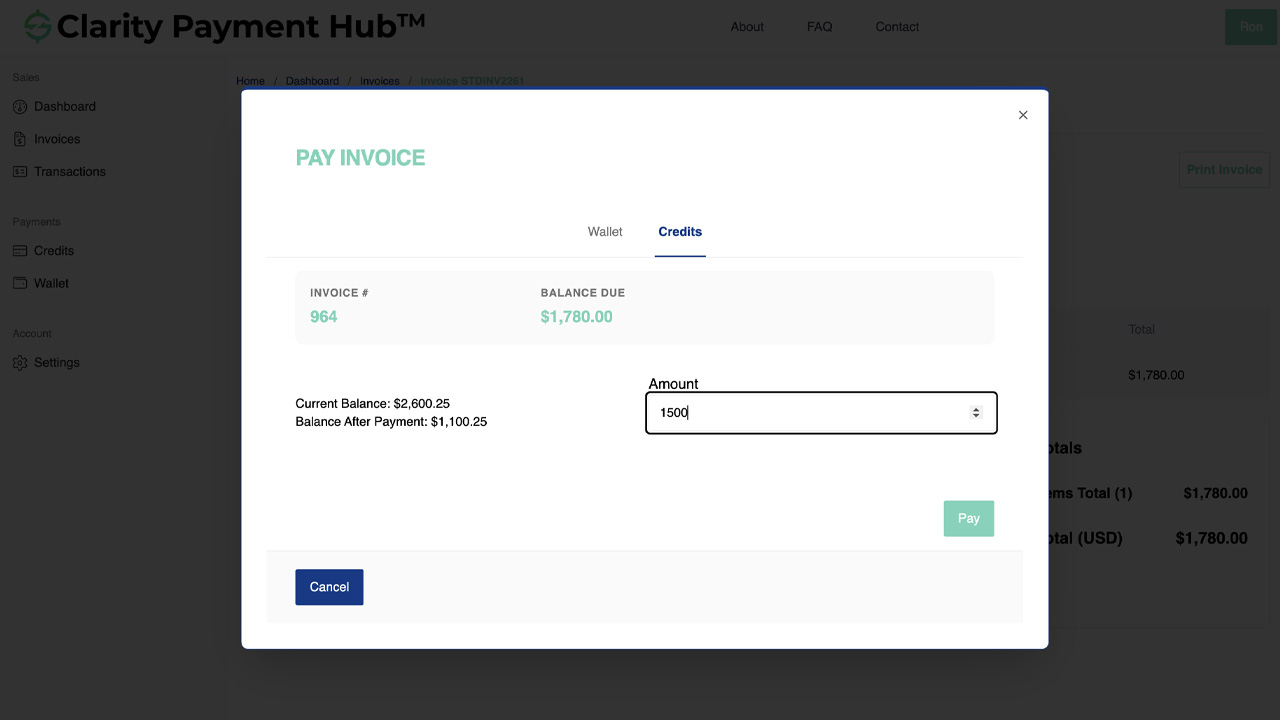
Step-by-Step Walkthrough
Navigate to your Clarity Payment Portal and sign in with your credentials. The dashboard gives you an overview of your account status.
Click on the Account tab or Dashboard. You will see your account balance, any available credits, and current open invoices in one view.
Confirm the amount of credit available. This is clearly displayed at the top of the Account section. You can now make an informed decision about which invoices to apply it to.
Review your open invoices. For each invoice, you will see an "Apply Credit" option if you have available credit. Select the invoices you want to apply credit to.
Click the Apply Credit button for the invoice(s) you selected. The system applies the credit immediately (either to one invoice or distributed across multiple, depending on your selection and available credit amount).
You receive immediate confirmation that the credit has been applied. Your available credit balance and the invoice balance both update in real time in the portal. Through Clarity Connect, your vendor's ERP is also updated immediately with no manual intervention needed.
Benefits and Business Impact
Account credit application automation creates value in multiple dimensions. Customers get visibility and control. AR teams are freed from manual work. Invoices get paid faster. And accounts receivable accuracy improves. Here is what you gain:
When customers can apply credits immediately through the portal, they do. Credits that might sit unused for weeks now get applied immediately. This accelerates cash application and reduces accounts receivable aging.
Your AR team no longer processes credit applications manually. Every credit application is automated and accurate. This frees the team for higher-value work and eliminates errors that lead to reconciliation disputes.
Customers no longer need to call AR to apply credits. This reduces interruptions to your team and improves customer satisfaction by giving them self-service control.
Because credit application is automated through Clarity Connect, every application is recorded with perfect accuracy. Reconciliation becomes trivial because the portal and ERP are always in sync.
Customers appreciate being able to see their credit balance and apply it themselves. This builds confidence in the accuracy of their account and reduces disputes about what they owe.
Faster credit application means faster invoice resolution. Open invoice counts decrease, aging improves, and DSO metrics improve as a result of faster cash application.
Credit application automation is one of those features that seems small but has outsized impact when you look at it holistically. It accelerates cash application, improves data accuracy, eliminates friction in customer relationships, and frees your AR team from low-value manual work. Over time, these benefits compound across your entire customer base.
Frequently Asked Questions
Can I see how much credit I have available?
Yes. The Clarity Payment Portal displays your available credit balance prominently in the Account section. You can see exactly how much credit you have, how it has been used in the past, and which invoices it is currently applied to.
How do I apply credit to an invoice?
In the Clarity Payment Portal, go to your Account section and view open invoices. If you have available credit, each invoice will show an "Apply Credit" option. Click to apply, and the credit is immediately applied to that invoice in your vendor's ERP. No phone call or manual processing required.
Can I apply credit to multiple invoices at once?
Yes. You can select multiple invoices and apply available credit across them. The system will apply your credit to the invoices you designate, or distribute it per your vendor's configured rules (typically oldest invoices first).
What if my credit does not cover the full invoice amount?
Partial credit application is fully supported. If your available credit is less than the invoice amount, the system applies all available credit to reduce the balance. The remaining balance can then be paid with a new payment transaction if you choose.
Where do account credits come from?
Account credits can come from several sources: returns of products or services, overpayments that your vendor refunded as credit instead of cash, promotional credits applied as part of a deal, or account credits you requested for other business reasons. Regardless of source, these credits are displayed in the portal and available for application.
Can I request that credits be applied in a specific way?
The Clarity Payment Portal gives you control over which invoices receive credit. You can direct exactly how your credit is applied by selecting the invoices you want to pay. Your vendor's system processes the application per your direction.
Do I need to call AR to apply an account credit?
No. The Pay Using Account Credit feature is entirely self-service. You can see your available credit and apply it to invoices directly through the portal without contacting your vendor's AR department. This saves time for both sides.
Related Features
Faster AR. Fewer headaches.
See Clarity Payment Hub running inside your ERP, or spin up a free trial environment and click around on your own. Either way, you’ll see exactly how it handles your invoice mix, your gateway, and your Level II/III savings &mdash. Before you commit to anything.
Supported
Go-Live
Savings