



What Is the "View Invoice Aging" Feature?
Sometimes providing all information becomes information overload. To fix this, the View Invoice Aging feature in Clarity Payment Hub provides a clear, visual dashboard that breaks down all unpaid invoices into standard color-coded, aging categories. Customers see their invoices organized into buckets: Current (due today or in the future), 1–30 days past due, 31–60 days past due, 61–90 days past due, and 90+ days past due. Each bucket shows the total amount owed in that aging category, giving both customers and AR teams an at-a-glance summary of what needs to be paid and how urgent the payment is.
Where does the information for the categorization come from? The aging dashboard is powered by Clarity Connect, which automatically syncs the invoice data from your ERP system to the portal in real time and on multiple schedules. As the calendar moves forward, invoices age into new buckets automatically. When a customer makes a payment, the invoice immediately moves out of the aging report. No manual calculations, no delay, no stale data. The aging is always current and accurate.
This feature addresses a surprising gap in most B2B billing relationships. From a customer's perspective, they often don't know how overdue they actually are. They may think an invoice is 30 days overdue when it is actually 60 days old. From an AR perspective, without proactive visibility into customer aging, teams resort to running reports, making calls, or sending form email reminders, all after-the-fact activities rather than proactive collections. The View Invoice Aging feature solves both problems by putting real-time, transparent aging information into the hands of both parties.
How much does this feature cost? This off-the-shelf feature is built into the Clarity Payment Hub Customer Portal, which is customizable with your branding and available 24/7 to your customers. The aging dashboard is one of the first things customers see when they log in, ensuring they are aware of their aging status every time they access their account.
The Challenge: Opacity Into Customer Aging Hurts Collections
In traditional B2B billing, aging data is siloed. Your AR team can see a customer's aging report in the ERP, but the customer cannot. This asymmetry creates friction and inefficiency:
Without a transparent aging report, customers often misjudge how long invoices have been outstanding. They may not realize an invoice is 75 days overdue and damaging their credit standing with your company. This lack of awareness delays payment and makes collections harder.
When a customer calls asking about their aging status, AR staff have to pull reports, calculate days past due, and explain which invoices are most urgent. This is reactive troubleshooting that consumes time and rarely moves a customer closer to payment. If the customer could see the aging themselves, this conversation becomes unnecessary.
Without visibility into customer aging trends, AR teams can't prioritize which customers to call first or identify at-risk accounts. A customer with invoices 120+ days overdue deserves a different collection strategy than one with minor aging. But without real-time aging dashboards, AR teams work reactively rather than strategically.
If a customer doesn't realize an invoice is approaching 30 days late, they don't take action to pay it. By the time AR reaches out, the invoice is already 60+ days overdue. An early warning system could prevent this deterioration in the first place.
When AR and a customer disagree on which invoices are overdue or how long they have been outstanding, disputes arise. These disputes delay payment further. A shared, transparent aging report eliminates the he-said-she-said conversations and focuses both parties on resolution.
How Clarity Payment Hub Solves Invoice Aging Visibility
Clarity Payment Hub's View Invoice Aging feature puts real-time aging information directly into customers' hands through a clear, intuitive dashboard. Rather than building a custom aging report and distribution system, you get a pre-built feature powered by Clarity Connect that automatically calculates and displays aging based on your ERP data, updated continuously as time passes and payments are made.
Here is how the feature addresses each of the pain points above:
The dashboard shows invoices organized into five standard aging categories. Each bucket displays the total amount owed in that timeframe. Customers instantly see at a glance how much is current, 30-day overdue, 60-day overdue, etc.
Ages are calculated automatically based on invoice due dates and the current date through Clarity Connect. You don't have to manually run reports or update aging data. The portal calculates it in real time, every time a customer logs in.
Customers can click on any aging bucket to see the specific invoices in that category. They see invoice numbers, amounts, due dates, and current balance for each. This granularity helps them prioritize which invoices to pay first.
Once a customer sees their aging, they can take action directly from the aging dashboard. Select invoices from any aging bucket and pay them without navigating to a separate invoices list. The friction is minimal, making payment easier.
Because aging data comes directly from your ERP via Clarity Connect, it is always authoritative and accurate. There is no discrepancy between what customers see and what your accounting system records. This builds trust and eliminates disputes.
Shared visibility improves collections outcomes. When both customers and AR teams see the same aging data in real time, collections become more proactive and less contentious. Customers understand urgency when they see invoices in the 90+ bucket. AR teams can focus follow-up on truly at-risk accounts rather than chasing invoices that aren't yet critical. Research shows that transparent aging reporting reduces DSO by 2–5 days on average because customers take action earlier.
The Missing LinkBetween Paymentsand Your ERP
Clarity Payment Hub closes that gap, connecting your orders, invoices, and payment channels into one flow.
Speak to a Platform ArchitectSee It in Action: Understanding Your Invoice Aging
Watch the Demo
Portal Screenshot
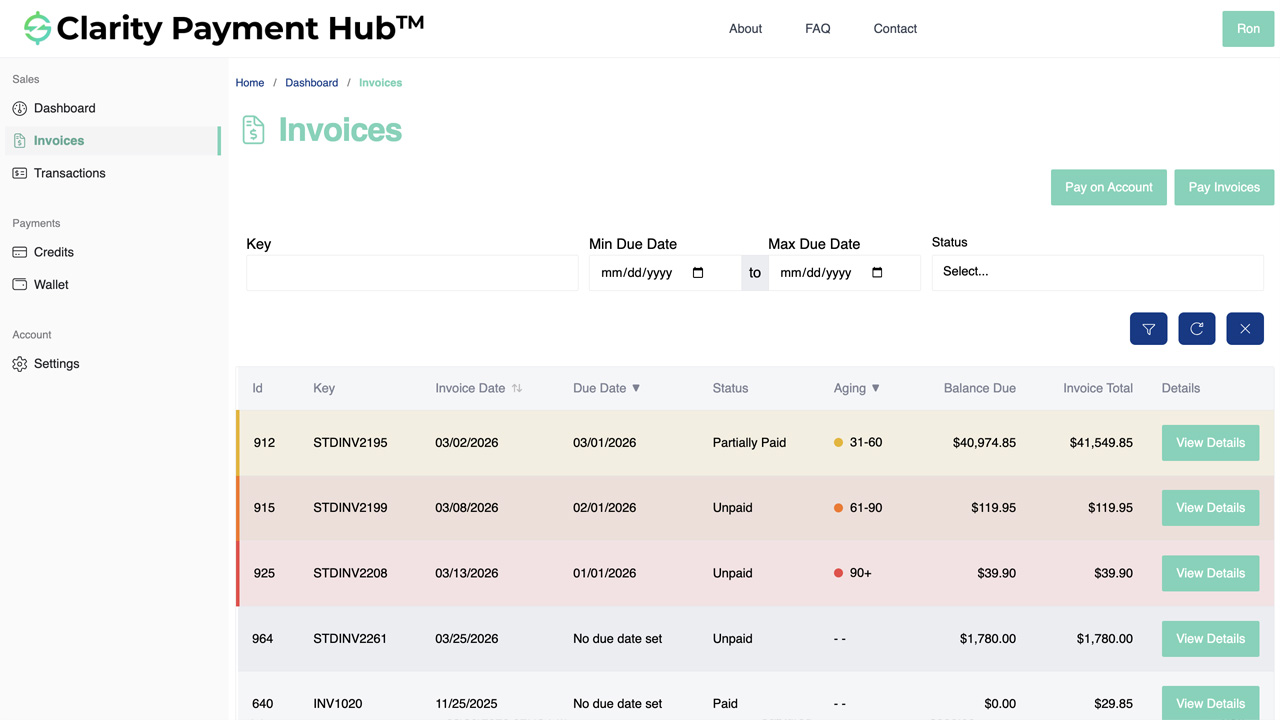
Step-by-Step Walkthrough
Sign in to your Clarity Payment Portal with your customer credentials. The portal home page or dashboard area will prominently display your account summary, including the aging report.
The aging dashboard displays five aging buckets in a visual layout. Each bucket shows the total amount owed in that aging category and the number of invoices in the bucket. You see your complete aging picture at a glance.
If you want to see which specific invoices are in the 90+ day bucket, for example, click on that bucket. The portal expands the view and shows you all invoices in that category, including invoice number, amount, due date, and current balance.
Your aging report helps you decide which invoices to pay first. Typically, you want to clear the 90+ day bucket first, then 60-day, then 30-day, and finally work toward paying current invoices to prevent them from aging.
You can select one or multiple invoices from any aging bucket and click Pay. The portal takes you to the payment screen where you can confirm payment details and submit payment. The aging report updates in real time once payment is applied.
Benefits and Business Impact
Implementing the View Invoice Aging feature delivers tangible benefits to both your customers and your AR operations:
When customers see their aging clearly, they are motivated to pay overdue invoices sooner. Studies on transparent AR reporting show DSO improvements of 2–5 days on average. For a company with $5–10 million in monthly revenue, this can translate to $8,000–$40,000 in improved working capital position.
When your AR team can see customer aging at a glance, they can focus follow-up on accounts with 60+ day aging rather than casting a wide net with form emails. Collections become more targeted and more effective. AR teams spend less time chasing invoices that aren't yet critical.
Because customers see the same aging data as your AR team, both sourced from your ERP, there are no disputes about how old an invoice actually is. This removes a common friction point in collections conversations and builds trust.
Modern customers expect self-service visibility into their accounts. The aging dashboard gives them control and transparency, improving their experience and reducing dependency on calling your AR team for status updates.
Fewer customers call asking "How old are my invoices?" because they can see it themselves in the portal. This reduces support ticket volume and allows AR teams to focus on high-value activities like strategic collections and credit decisions.
Real-time aging visibility enables smarter credit decisions and collections prioritization. You can identify aging trends, segment customers by aging risk, and apply appropriate follow-up strategies. AR becomes data-driven rather than gut-driven.
The cumulative effect is a shift from reactive, transactional AR to proactive, relationship-focused collections. Both your team and your customers benefit from clearer communication, faster payment, and stronger business relationships.
Frequently Asked Questions
What are invoice aging buckets?
Invoice aging buckets are categories that group unpaid invoices by how long they have been outstanding. The standard buckets are: Current (due today or in the future), 1–30 days past due, 31–60 days past due, 61–90 days past due, and 90+ days past due. They help you prioritize payment decisions based on urgency.
How does Clarity calculate invoice aging?
Clarity calculates aging based on the invoice due date and the current date. An invoice is "current" if its due date is today or in the future. It moves to "1–30 days past due" if the due date was 1–30 days ago, and so on. Aging is calculated in real time as your ERP data syncs to the portal through Clarity Connect.
Can I see the invoices in each aging bucket?
Yes. Click on any aging bucket in the dashboard to expand it and see all invoices in that category. You will see invoice numbers, amounts, due dates, and balance due for each invoice. From there, you can click on individual invoices to pay them or export the list.
How often is the aging report updated?
The aging report updates in real time as invoice data syncs from your vendor's ERP through Clarity Connect. When an invoice is created, paid, or adjusted in the ERP, the aging report reflects that change immediately. You are always looking at current data.
Can I download the aging report?
Yes. The aging report can be exported as a CSV or PDF file for use in your accounting software, email, or reporting. This is useful for sharing with your finance team, accounting firm, or auditors. The export includes all aging bucket totals and a detailed list of invoices in each bucket.
What if I have partial payments on an invoice?
The aging report shows the current balance remaining on each invoice, not the original invoice amount. If you have made a partial payment on an invoice, the aging report reflects the remaining balance and ages that balance based on the invoice's due date. This gives you an accurate picture of what you still owe.
How does aging help me manage my account?
The aging report gives you clarity into which invoices need attention first. By seeing 90+, 60, and 30-day buckets, you can prioritize payment of overdue amounts to improve your relationship and credit standing. You can also see if you are trending toward more aging by comparing reports over time, helping you forecast your payment obligations.
Related Features
Faster AR. Fewer headaches.
See Clarity Payment Hub running inside your ERP, or spin up a free trial environment and click around on your own. Either way, you’ll see exactly how it handles your invoice mix, your gateway, and your Level II/III savings &mdash. Before you commit to anything.
Supported
Go-Live
Savings